INS_CNFE3TX2CXMS(U,E)_REV– Rev. 7.11.18 PAGE 29
QUICK START GUIDE CNFE3TX2CXMS(U,E)
TECH SUPPORT: 1.888.678.9427
Firewall Setting
IP Filter
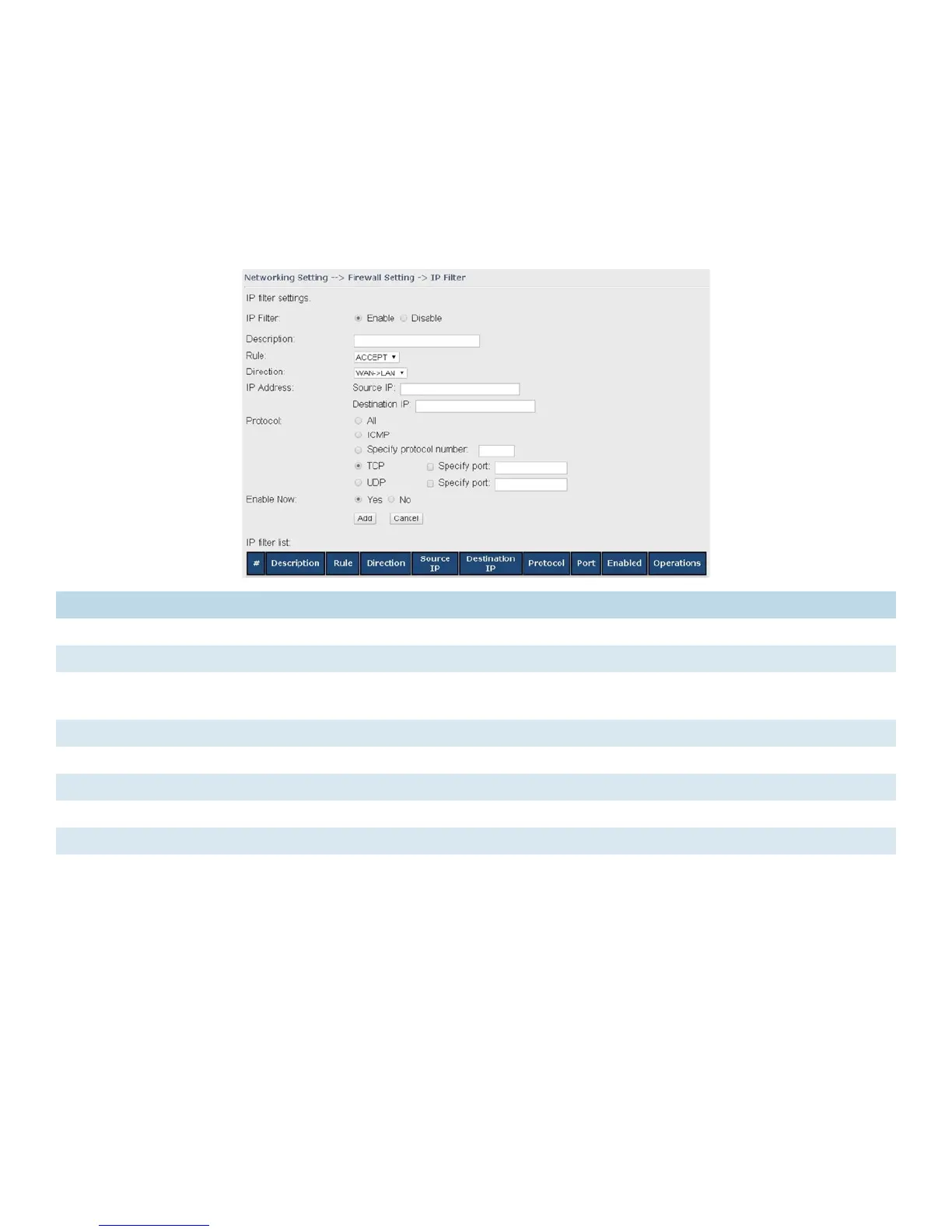
IP filters enable you to control the forwarding of incoming and outgoing data between your LAN
and the Internet and within your LAN. This control is implemented via IP filter rules which are
defined to block attempts by certain computers on your LAN to access certain types of data or
Internet locations. You can also block incoming access to computers on your LAN.
Label Description
IP Filter Enables or disables the IP Filter
Description Enter description for the entry.
Rule Configures the rules to be applied to the IP filter. Available options include DROP, ACCEPT,
and REJECT.
Direction Specifies the direction of data flow to be filtered
IP Address Enter the IP address of the source and destination computer
Protocol Configures the protocol to be filtered
Enable Now Click Yes to enable the entry after adding it
IP filter list Shows the information of all IP filters. Click Edit to edit the entry or Del to delete the entry.


 To Next Page