INS_CNFE3TX2CXMS(U,E)_REV– Rev. 7.11.18 PAGE 35
QUICK START GUIDE CNFE3TX2CXMS(U,E)
TECH SUPPORT: 1.888.678.9427
5.2.3 System Tools
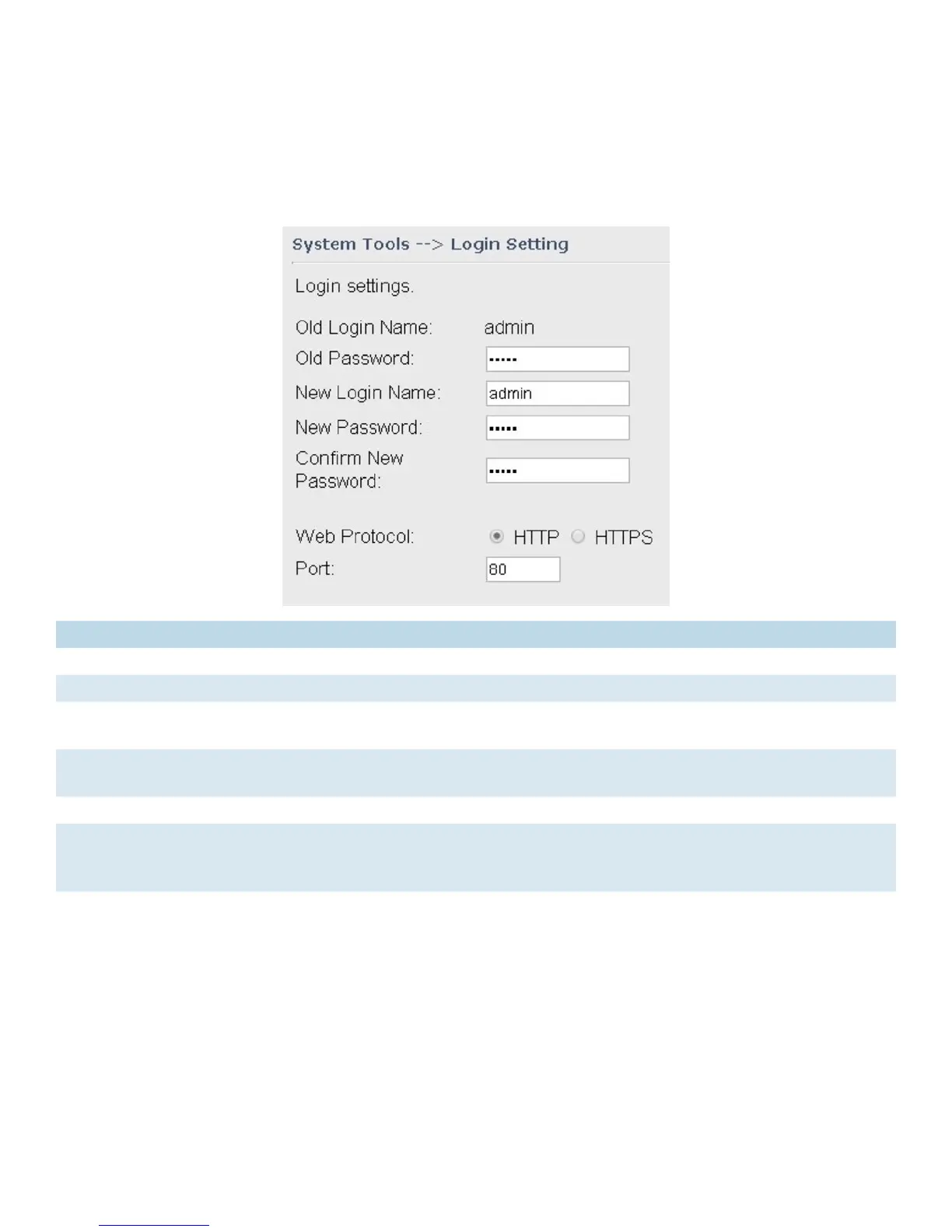
Login Setting
You can change login name and password in page. The default login name and password are
both admin.
Label Description
Old Name Type in current login name
Old Password Type in current password
New Name Enter a new login name. Acceptable characters contain ‘0-9’, ‘a-z’, ‘A-Z’ and the
length must be 1 to 15 characters. An empty name is not acceptable.
New Password Enter a new login password. Acceptable characters contain ‘0-9’, ‘a-z’, ‘A-Z’ and
the length must be 0 to 15 characters.
Confirm New Password Retype the new password to confirm it.
Web Protocol Choose a web management page protocol from HTTP and HTTPS. HTTPS
(HTTP over SSL) encrypts data sent and received over the Web. Choose HTTPS
if you want a secure connection.
Port Choose a web management page port number. For HTTP, default port is 80.
For HTTPS, default port is 443.


 To Next Page