EasyManua.ls Logo

Comnet CNGEMC4+2/M - User Manual

Comnet CNGEMC4+2/M
34 pages
Print Icon
To Next Page IconTo Next Page
Loading...
INSTALLATION AND OPERATION MANUAL
CNGEMC4+2[POE][HO]/M
10/100/1000 MBPS INTELLIGENT
MEDIA CONVERTER WITH OPTIONAL POE+
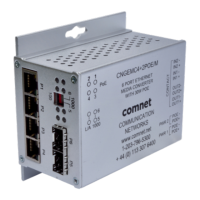
The ComNet CNGEMC4+2[POE][HO]/M is a four port intelligent Media Converter.
It provides four 10/100/1000Base-T(X) copper ports and two 100/1000Base-FX SFP
ports. The CNGEMC4+2[POE][HO]/M provides exclusive functionality for easy field
deployment including DIP media converter based operation of RSFP (redundant
SFP) for creating redundant fiber connections and MUX feature for port isolation
preventing network video flooding of multicast traffic. Copper ports 1 through 4 can
optionally supply up to thirty (30) watts of power per port based on the IEEE 802.3at
standard. An optional High Output (HO) version is also available that can supply up to
sixty (60) watts of PoE from copper ports 1 through 4. This product is fully compatible
with the ComNet exclusive CopperLine® SFP modules for operation over extended
distance UTP or Coax cable. The ComNet exclusive Port Guardian feature provides
additional cybersecurity protection by enabling physical port lockout in the event that
an existing cable is disconnected and prevents a potential network incursion using
common spoofing techniques.
This manual serves the following
ComNet Model Numbers:
CNGEMC4+2/M
CNGEMC4+2POE/M
CNGEMC4+2POEHO/M
Question and Answer IconNeed help?

Do you have a question about the Comnet CNGEMC4+2/M and is the answer not in the manual?

Summary

Regulatory Compliance Statement

Warranty

Disclaimer

Safety Indications

Overview

Introduction

General introduction to the CNGEMC4+2 intelligent Media Converter.

Software Features

Lists the key software functionalities of the media converter.

Hardware Features

Details the physical and technical hardware specifications of the device.

Hardware Overview

Side Panels

Describes the ports located on the sides of the CNGEMC4+2[HO]/M unit.

Indicating LEDs

Cables

Ethernet Cables

Details cable types and specifications for Ethernet connections.

10;100;1000 BASE-T(X) Pin Assignments

Provides pin assignments for RJ-45 Ethernet ports.

SFP Transceivers

Console Cable

DIP Switches

Graphical User Interface

Web Based Configuration

Overview of the web interface for device management.

Preparing for GUI Access

Details default IP, subnet mask, gateway, username, and password.

GUI Login

Steps to access the web-based GUI of the media converter.

Main Interface

System Information

Port Configuration

Port Statistics

Authentication

Upgrade Firmware

Factory Defaults Reset

System Reset

Network Interface Configuration

PoE-PSE Status

Contact Configuration

Static MAC Lock

Port Guardian

Port Guardian - CLI Reset

Jumbo Frame Port Configuration

Command Line Interface Management

How to access the Command Line Interface (CLI)

Steps for connecting to and using the device's Command Line Interface.

Firmware Upgrade Procedure

Technical Specifications

Mechanical Installation Instructions

ComNet Customer Service

Summary

Regulatory Compliance Statement

Warranty

Disclaimer

Safety Indications

Overview

Introduction

General introduction to the CNGEMC4+2 intelligent Media Converter.

Software Features

Lists the key software functionalities of the media converter.

Hardware Features

Details the physical and technical hardware specifications of the device.

Hardware Overview

Side Panels

Describes the ports located on the sides of the CNGEMC4+2[HO]/M unit.

Indicating LEDs

Cables

Ethernet Cables

Details cable types and specifications for Ethernet connections.

10;100;1000 BASE-T(X) Pin Assignments

Provides pin assignments for RJ-45 Ethernet ports.

SFP Transceivers

Console Cable

DIP Switches

Graphical User Interface

Web Based Configuration

Overview of the web interface for device management.

Preparing for GUI Access

Details default IP, subnet mask, gateway, username, and password.

GUI Login

Steps to access the web-based GUI of the media converter.

Main Interface

System Information

Port Configuration

Port Statistics

Authentication

Upgrade Firmware

Factory Defaults Reset

System Reset

Network Interface Configuration

PoE-PSE Status

Contact Configuration

Static MAC Lock

Port Guardian

Port Guardian - CLI Reset

Jumbo Frame Port Configuration

Command Line Interface Management

How to access the Command Line Interface (CLI)

Steps for connecting to and using the device's Command Line Interface.

Firmware Upgrade Procedure

Technical Specifications

Mechanical Installation Instructions

ComNet Customer Service

Comnet CNGEMC4+2/M Specifications

General IconGeneral
TypeGigabit Ethernet Media Converter
HousingMetal
Humidity5% to 95% non-condensing
CertificationsCE, FCC, RoHS
Ports4x 10/100/1000Base-T, 2x 100/1000Base-X SFP

Related product manuals