EasyManua.ls Logo

Comnet CNFE2MC2C/M - User Manual

Comnet CNFE2MC2C/M
29 pages
Print Icon
To Next Page IconTo Next Page
Loading...
INSTALLATION AND OPERATION MANUAL
CNFE2MC2C[/M]
10/100MBPS ETHERNET ELECTRICAL TO OPTICAL
MEDIA CONVERTER WITH CONTACT CLOSURE RELAY
v1.0 Jan 2012
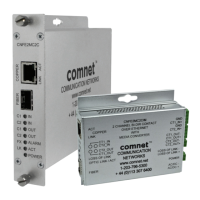
The ComNet™ CNFE2MC2C[/M] Ethernet 10/100Mbps Ethernet media converter is
designed to transmit and receive 10/100 Mbps data and bi-directional contact relay
over multimode or single mode optical fiber using sold-separately Small Form-Factor
Pluggable (SFP) modules to select distance and connector type. The electrical interface
will Auto-Negotiate to a 10 Mbps, or 100 Mbps Ethernet rate without any adjustments.
The optical interface operates at a 100 Mbps Ethernet rate. It can be one-to-one
mapped over Ethernet or controlled via a PC. Included is a driver that allows the
CNFE2MC2C[/M] to read or write contact information from a PC-based application.
A software utility allows customers to search for this device when installed on the
network. The CNFE2MC2C[/M] supports Windows® Discovery.
Open source com0com TCP/IP protocol is supported for any customer PC applications
to communicate with the units over the Ethernet. The software utility allows customers
to create virtual com ports for each module installed on the same subnet.
These media converters are environmentally hardened to operate in extreme
temperatures. LED indicators are provided to determine equipment operating status.
The CNFE2MC2C[/M] has a normally-open Fiber optic link alarm relay output.
The CNFE2MC2C[/M] small package size allows the unit to be installed in those
locations where space is at a premium, either wall or rack-mounted, or may be DIN-rail
mounted by the addition of ComNet model DINBKT1 adaptor plate.

Question and Answer IconNeed help?

Do you have a question about the Comnet CNFE2MC2C/M and is the answer not in the manual?

Summary

Hardware Description

Assign IP Address to a Module

Module Configuration

Contact Input;Output Settings

Install ComNet Software Utilities

Install the com2 com

Installs the open-source virtual serial port driver for Windows, enabling virtual COM port pairs.

Install the com2 tcp

Installs the utility for redirecting data traffic from virtual COM ports to a telnet server or client.

Install the freeware TeraTerm

Installs the terminal emulator for connecting to modules via telnet or serial connections.

Install ComNet Module Configuration software

Installs the software application for configuring serial-to-Ethernet modules and connections.

Using the Module through a Virtual COM port (VCP)

Edit port names

Allows renaming of virtual COM ports to avoid conflicts with serial applications.

Manual VCP Configuration

Verify VCP Operation

Using TeraTerm Telnet Connection

Connects directly to the module using TeraTerm's Telnet support for verification.

Using Windows UPnP to Discover Your Contact over Ethernet modules

ComNet Customer Service

Summary

Hardware Description

Assign IP Address to a Module

Module Configuration

Contact Input;Output Settings

Install ComNet Software Utilities

Install the com2 com

Installs the open-source virtual serial port driver for Windows, enabling virtual COM port pairs.

Install the com2 tcp

Installs the utility for redirecting data traffic from virtual COM ports to a telnet server or client.

Install the freeware TeraTerm

Installs the terminal emulator for connecting to modules via telnet or serial connections.

Install ComNet Module Configuration software

Installs the software application for configuring serial-to-Ethernet modules and connections.

Using the Module through a Virtual COM port (VCP)

Edit port names

Allows renaming of virtual COM ports to avoid conflicts with serial applications.

Manual VCP Configuration

Verify VCP Operation

Using TeraTerm Telnet Connection

Connects directly to the module using TeraTerm's Telnet support for verification.

Using Windows UPnP to Discover Your Contact over Ethernet modules

ComNet Customer Service

Comnet CNFE2MC2C/M Specifications

General IconGeneral
BrandComnet
ModelCNFE2MC2C/M
CategoryMedia Converter
LanguageEnglish

Related product manuals