ORIGINAL INSTRUCTIONS | Ref. quality process 002/03 | v. 07/01/2016 | K06307
16
10. CONFIGURATION
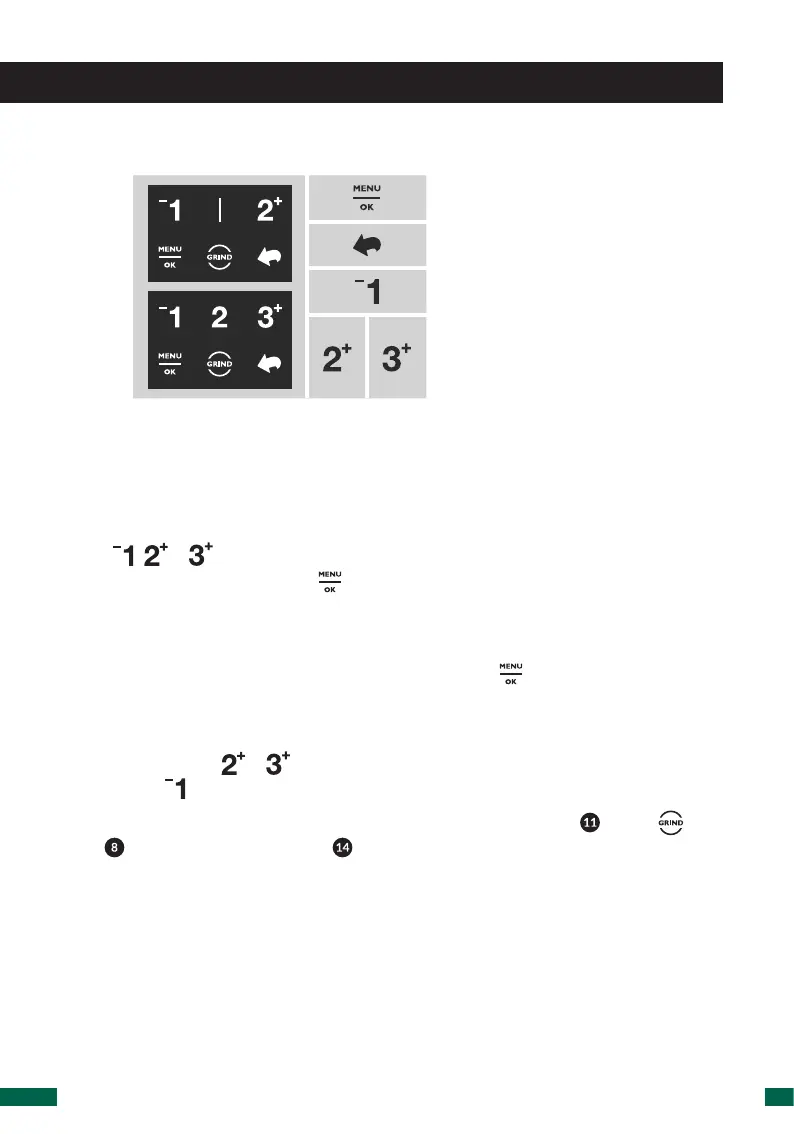
10.1.Displayiconguide
Access to menu.
Value or selection aproval.
Return.
Up shift in menu.
Decrease value.
Down shift in menu.
Increase value.
10.2.Grindtimecongurations
ThegrindtimescanbeconguredfortheAutomatic,PreselectandInstantmodes.
When modifying in one of three modes are updated for all modes simultaneously.
To modify the time of one dose, press the time of the respective dose numerical
icon ( , or ) on the touch screen twice (double tap), followed immediately (2
seconds or less) by pressing the button.
You can also change the time of a dose accessing MENU / SET UP SETTINGS / SET UP
TIME / TIME DOSE 1, 2, 3*.
Automatically the icon of the desired dose icon and the icon will change to active
colorandthefourtimenumberswillthenbegintoash.
There are two ways to modify the time:
• Press the icons or on the LCD screen and the time will increase, and press
the icon to decrease the time.
• Also, the time can be changed by using the lower dose button ( ) or the icon
( ) found on the LCD screen ( ). If any of these options are pressed, the grinder
will begin to run and the time, starting at zero, will increase until the chosen
button is released.
*Availableonlyforthe3dosesoftwareoption.



 To Next Page