Start ComproDTV 4.5 and watch TV
After installation, just press the remote or double click the ComproDTV 4.5 icon
on the desktop, you will be able to watch TV. Same as operating a normal TV
set. Watch TV programs on your PC, in full-screen mode or in a window.
Channel up and down. Close ComproDTV 4.5 and even shutdown the
computer with the full function remote control keypad.
Options
Press the Options button to open the Options dialog box. You can
change detail settings of ComproDTV 4.5 here.
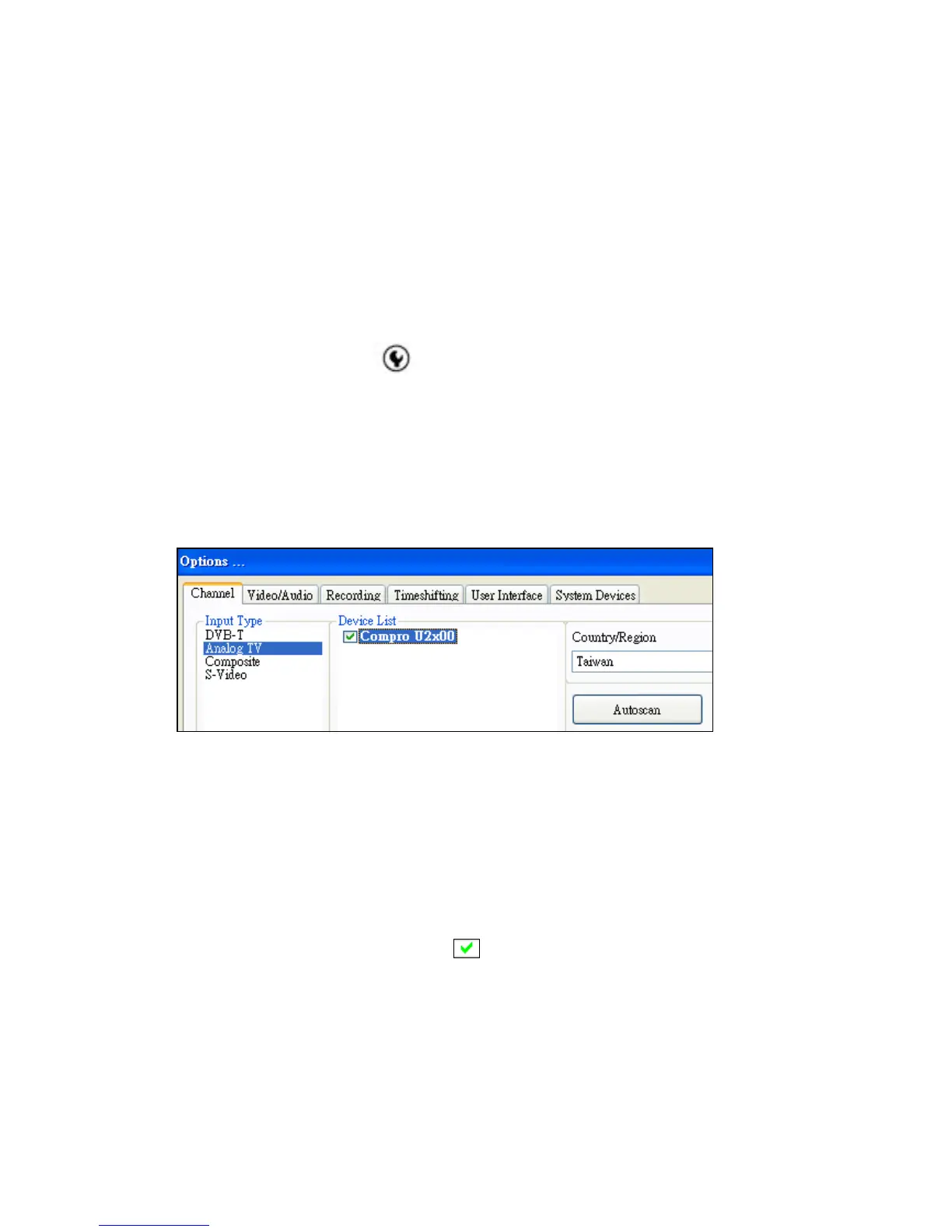
TV Settings
This option gives you the way to manually select TV system and set the
method of scanning TV programs.
Choose ” Input Type” Check the ”Device List” Country /Region Autoscan
Autoscan
The first time you start ComproDTV 4.5, Autoscan will automatically scan for
available TV channels for TV signals. You can rescan the channels at any time
by pressing the Autoscan button. Also, you can enable the advanced
autoscan for more precision scan result.
When Autoscan is finished, detected channels are automatically enabled and
marked with the green check mark
. Channels, where a valid signal could
not be detected, are disabled and marked with a blank. However, you can
interrupt the scanning process by pressing the Stop button.
After you are finished scanning for available channels, you may select OK to
return to the display window, or customize the channel orders according to
your preferences.



 To Next Page