
 Need help?
Do you have a question about the CompuSTAR CM1000A and is the answer not in the manual?
Important safety precautions for servicing or loaning the vehicle.
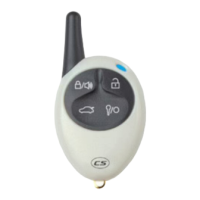
Overview of the R500A as a one-way AM four-button remote.
Step-by-step guide to program the remote to the system.
Instructions on how to arm and disarm the vehicle's alarm system.
How to open the vehicle's trunk using the remote.
Procedure for locking and unlocking vehicle doors with the remote.
How to activate panic mode for attention or emergencies.
Enables/disables system features for servicing or valet parking.
Locks doors automatically after vehicle starts or after a delay.
System arms and locks doors automatically 30 seconds after last door closes.
Prevents vehicle from starting by disabling starter or ignition.
Activates ignition kill if vehicle is taken by force.
Allows silent arming/disarming without siren chirps.
Parking lights flash if a door is left open when arming.
Guidance on safe and effective installation practices.
Schematic showing connections for all system components.
Details for connector 1, including power, parking light, and siren outputs.
Details for connector 2, including lock/unlock outputs and relays.
Details for connector 3, including ignition, door, trunk, and brake inputs.
Details for connector 4, for optional sensors and LED.
Details for connector 5, for shock sensor inputs.
Guidance on proper antenna placement to avoid range issues.
Three methods for configuring CON 2 lock/unlock outputs.
Specifics for CON 3 inputs like ignition, door triggers, and brake.
Using wires for additional sensors and diode isolation.
Table of programmable features and their settings.
Adjusts pulse duration for vehicle lock/unlock commands.
Configures kill relay for starter kill or anti-jacking mode.
Enables parking lights to flash if a door is left open.
System relocks and arms if no door is opened after disarming.
Provides a double pulse for unlocking some vehicle doors.
Procedure to program individual system options.
Procedure to reset all system options to factory defaults.









 To Next Page

 General