EasyManua.ls Logo

COMPX StealthLock SL-100 - User Manual

COMPX StealthLock SL-100
10 pages
Print Icon
To Next Page IconTo Next Page
Loading...
Instruction Manual
StealthLock
®
, Keyless Invisible Security
2
Thank you for purchasing StealthLock
®
. StealthLock
®
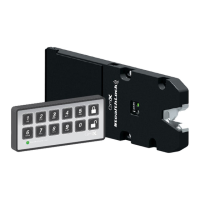
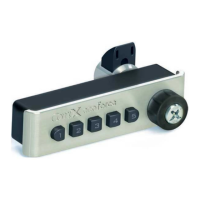
is an innovative solution for
keyless invisible security. Using radio frequency technology, StealthLock
®
allows you to
secure almost any wood cabinet door or drawer with little or no changes to the cabinet
design.
StealthLock
®
is battery operated and works with a user established 4
to 8 digit code.
Operation is simple: input your code and press lock or unlock. The Latch can operate any
Receiver Latch within a 15 foot range which allows it to be placed anywhere, leaving no
trace of visible hardware. In addition, the Latch can operate multiple Receiver Latches to
secure an entire room or bank of cabinets.
StealthLock
®
is designed to install and program easily and offers:
Programmable user and supervisor codes
Programmable modes of operation
Programmable reset features
StealthLock
®
is recommended for use on cabinets made from:
Wood
Wood products
Phenolic resin
Glass
StealthLock
®
is NOT intended for:
Metal furnishings or cabinets
Exterior furnishings or cabinets
Applications where temperatures fall below 50° F or above 120° F
StealthLock
®
may be used in households to help protect minors from u
nsafe materials.
It is strongly recommended that all batteries used by the StealthLock
®
be replaced on an
annual basis. Please mark this date on your calendars to insure replacement. In the event
you have allowed the batteries to die, you will need to forcefully enter the cabinet. The
StealthLock
®
strike plate is designed to shear away at 80lbs of force. A new strike plate
will then be needed to operate the lock.
713.839.8586 · www.cabinethardware.com
DISTRIBUTED BY:
Question and Answer IconNeed help?

Do you have a question about the COMPX StealthLock SL-100 and is the answer not in the manual?

COMPX StealthLock SL-100 Specifications

General IconGeneral
Power SourceBattery
MaterialZinc Alloy
Battery Life12 months
Unlock MethodsKeypad
Operating Temperature-20°C to 60°C

Summary

StealthLock Instruction Manual

Product Introduction and Overview

Introduction to StealthLock® as an innovative keyless invisible security solution for cabinets.

Recommended Use and Limitations

Specifies suitable materials (wood, glass) and operational limitations like temperature for the lock.

StealthLock Components and Battery Installation

SL-100 StealthLock Contents

Illustrates and lists all parts included in the SL-100 StealthLock® kit.

Receiver Latch Battery Installation

Detailed steps for installing four AAA batteries into the Receiver Latch housing.

Transmitter Pad Battery Installation

Transmitter Pad Battery Replacement

Instructions for replacing the CR2032 battery in the Transmitter Pad, including LED warnings.

Installation Instructions

Receiver Latch Installation Steps

Step-by-step guide for mounting the Receiver Latch, including strike plate placement.

Transmitter Pad Mounting

Guidance on mounting the Transmitter Pad on non-metallic surfaces using adhesive tape.

Programming Introduction

Key Component Identification

Diagrams and descriptions of key components like the Learn Button and LED indicators on the Receiver Latch.

User Code Programming

Changing the User Code

Steps to change the current user code, which must be 4 to 8 digits.

Supervisor Code Programming

Changing the Supervisor Code

Steps to change the supervisor code, which must be 4 to 8 digits.

Operation Modes Programming

Single Use; Non Single Mode Setup

Instructions for setting Single Use or Non Single Use modes for user codes.

Self Lock; Passage Mode Setup

Details on programming Self Lock and Passage modes with delay options.

Advanced Programming Features

Learn Disable; Learn Enable Configuration

How to enable or disable user code programming by the supervisor.

Reset Factory Default Settings

Procedure to return the lock to its original factory configuration.

User Code Management and Power Options

Clear User Pin Code

Resets the user code to the factory default of 0000 without affecting other settings.

Auxiliary Power Connection

Information on connecting optional 120 VAC power to the Receiver Latch.

Mounting Accessories and Compliance

Transmitter Pad Mounting Accessories

Details on optional mounting plates for the Transmitter Pad.

Regulatory Information

FCC compliance statement and instructions for handling interference.

Related product manuals