Using Comrex ACCESS over BGAN Page 2
5 Benefits to BGAN users
Comrex ACCESS provides:
• Completely wireless transmission from virtually anywhere on Earth.
• A small, compact, handheld unit (less than 6 lbs./3 kg).
• 15 kHz mono and stereo transmission using 32 kbps Streaming.
• Ability to be pre-configured for “Plug & Play” operation.
6 Setting up
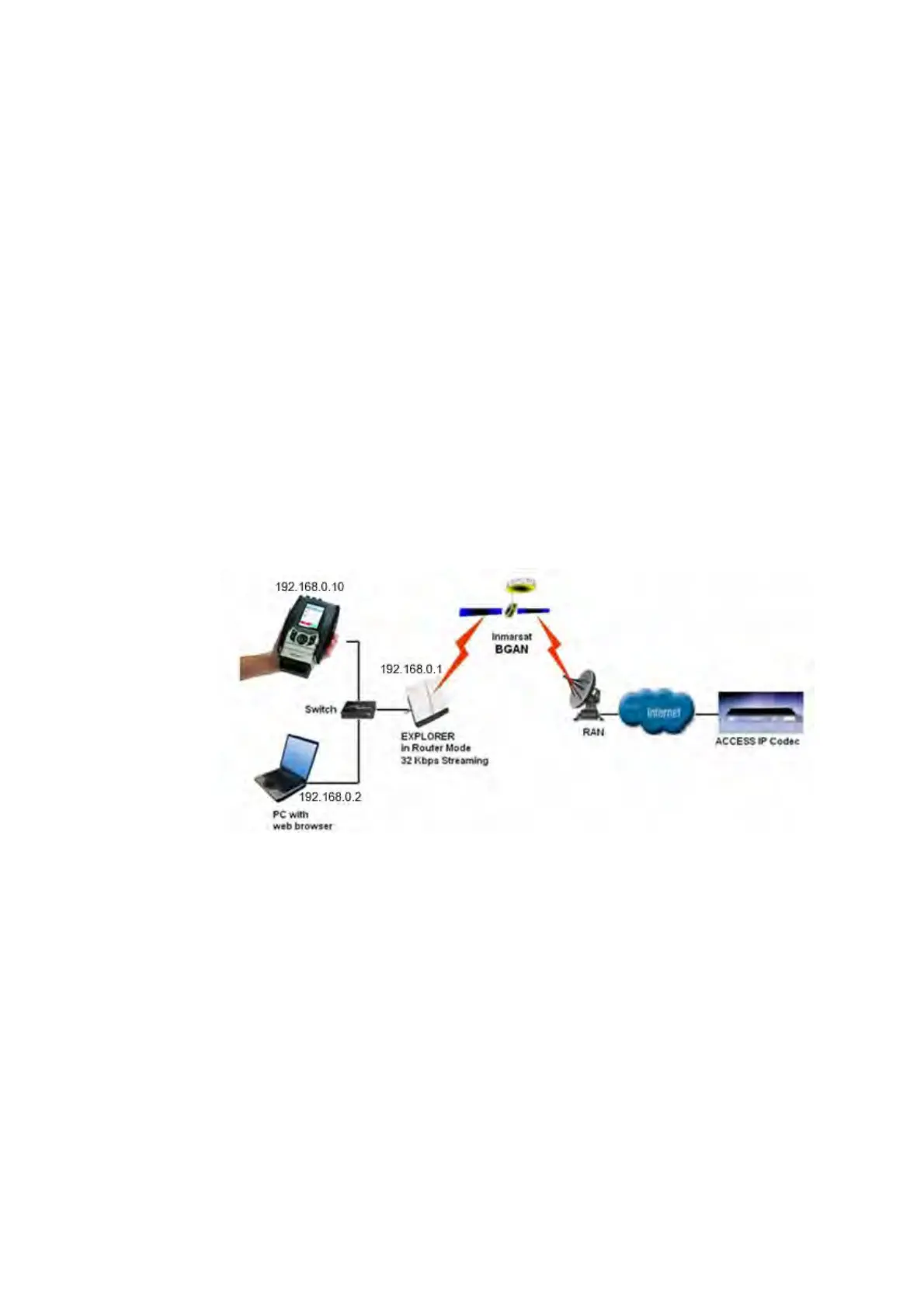
This section describes how to set up BGAN for use with Comrex ACCESS and gives an example of
a typical configuration when using ACCESS with a BGAN terminal. Broadcast transmission was
tested over a standard 32 kbps Streaming connection using an EXPLORER™ 500. The audio
broadcast was transmitted to a terrestrial Internet address. The test showed that BGAN terminals
and the Inmarsat BGAN network work well as a transport media for the Comrex ACCESS IP
Codec. The test has also been carried out with the EXPLORER 110 and the Hughes 9201; it is
assumed to work as well with the EXPLORER™300, EXPLORER™527 and EXPLORER™700.
The ACCESS Portable, computer and BGAN terminal should be connected to a switch or directly
with Ethernet cables, as shown in the diagram above. The computer’s IP settings should be
configured for DHCP. The ACCESS IP settings are described below.
6.1 Step by step setup – EXPLORER 300/500/527 and 700.
The 32 kbps Streaming service should be initiated from the BGAN terminal, and can be configured
from either the EXPLORER’s built-in web server (via a laptop’s web browser), or using the LCD
interface on the terminal.
Note: Although the solution will work on the Standard IP connection type, there is no quality
guarantee, so Inmarsat recommends that you utilise the 32Kbps Streaming connection.


 To Next Page