Using Comrex ACCESS over BGAN Page 4
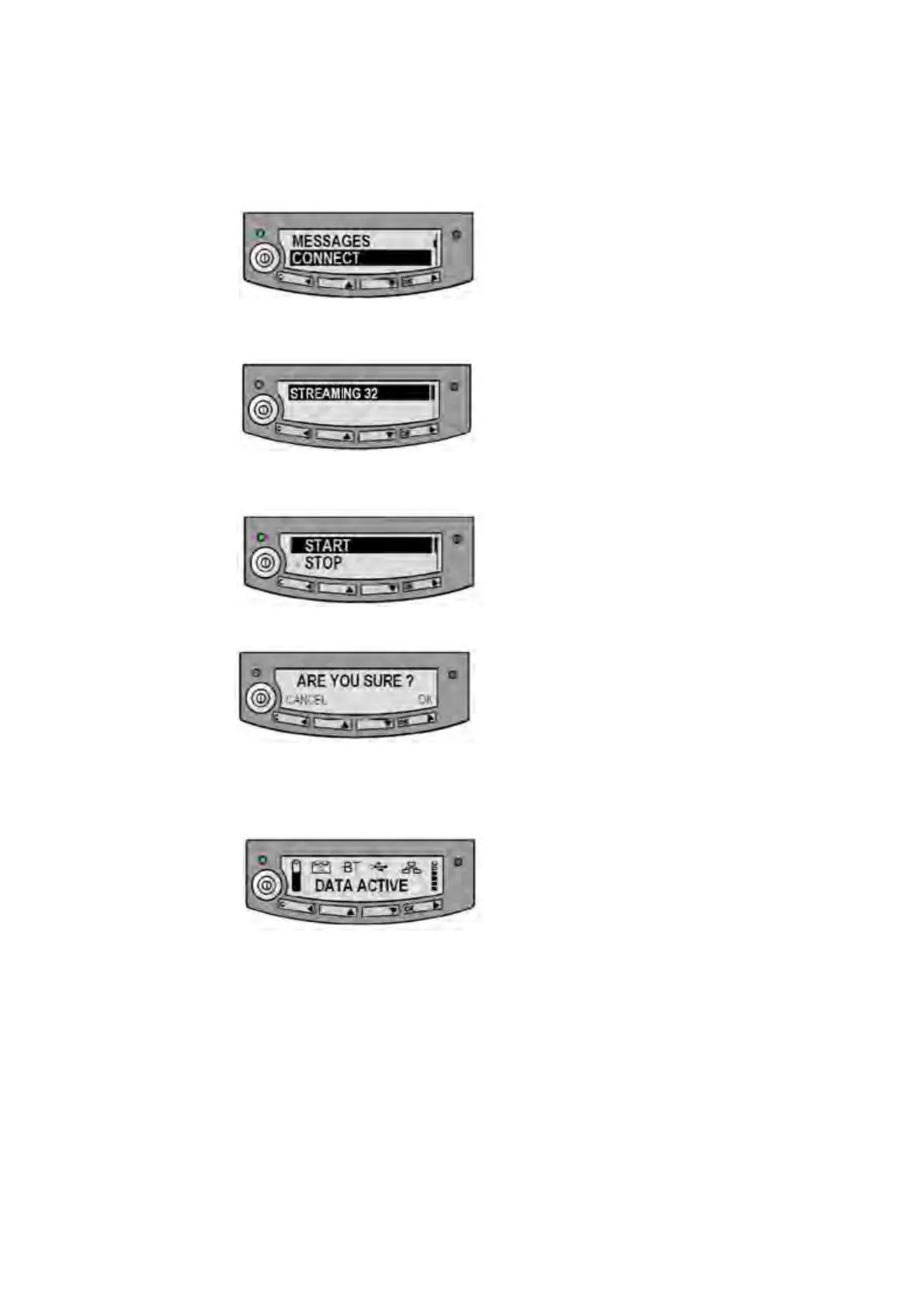
b. Press the arrow down button until the CONNECT menu displays.
c. Press OK. The following screen displays:
d. Select STREAMING 32, and press OK. The following screen displays:
e. Select START and press OK. The following screen displays:
f. Press OK to confirm the Streaming connection, and wait a minute or two to allow the
EXPLORER to register the Packet Switched connection with the BGAN system. After
registration the LCD main screen will show DATA ACTIVE, as shown below:
Now go to “ACCESS Portable configuration” on page 6.
6.2 Step by step setup – EXPLORER 110 (formerly Nera WorldPro 1010)
This section describes how to set up BGAN for use with Comrex ACCESS, and gives an example
of a typical configuration when using ACCESS with the EXPLORER 110 terminal.
This is a one-time configuration to set the terminal up so that it connects to the network
automatically. After the first time you only need to follow the instructions for “Connecting to BGAN”,
below.
The 32 kbps Streaming service should be initiated from the BGAN terminal, and needs to be
configured from the EXPLORER 110’s built-in web server (via a computer’s web browser).


 To Next Page