IP HIGH SPEED DOME SERIES QUICK START GUIDE
1
WHAT’S IN THE BOX?
Packaging Contents
Speed Dome Camera x1 9-Pin Terminal Block x 1 Quick Start Guide x1
Bracket x1 Anchor Bolt x 4 Screwdriver x1
Hex Key x 1 Mounting Template x 1 User Manual USB x1
Gloves x1
2
INSTALLATION
Install the Speed Dome Camera in 3 Steps
1. Use the mounting template sheet to drill holes in the mounting surface, then ax
the included bracket to the surface
2. Connect the safety lanyard between the camera and bracket, then connect all
required cables to the camera
3. Twist the camera into the bracket and tighten the xing screws.
3
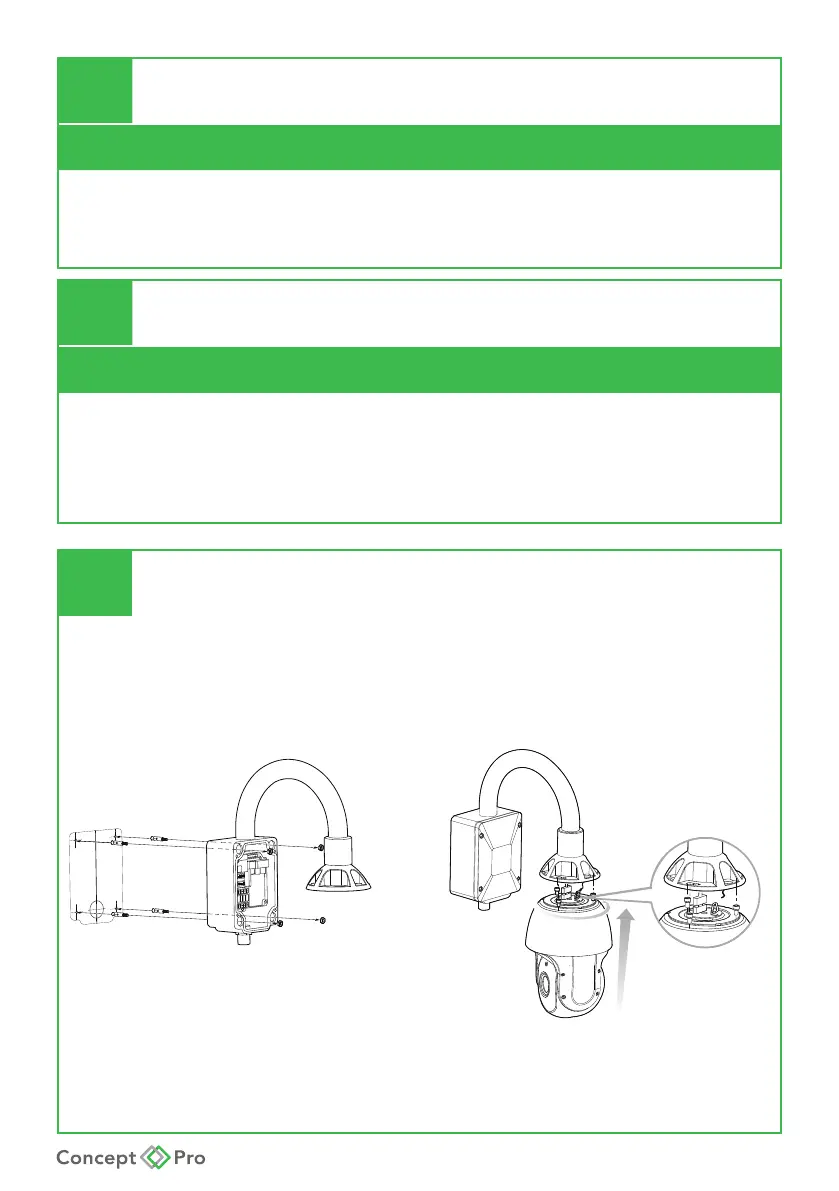
WALL MOUNT INSTALLATION
1. Drill holes and ax wall bracket to surface and pass cable through to junction box
2. Congure DIP switches for ID, baud rate, video output then twist on dome and
secure to wall bracket
3. Attach all cables to junction box and tighten all xing screws










 To Next Page