Network Video Recorder(NVR)
4.2 Rear panel
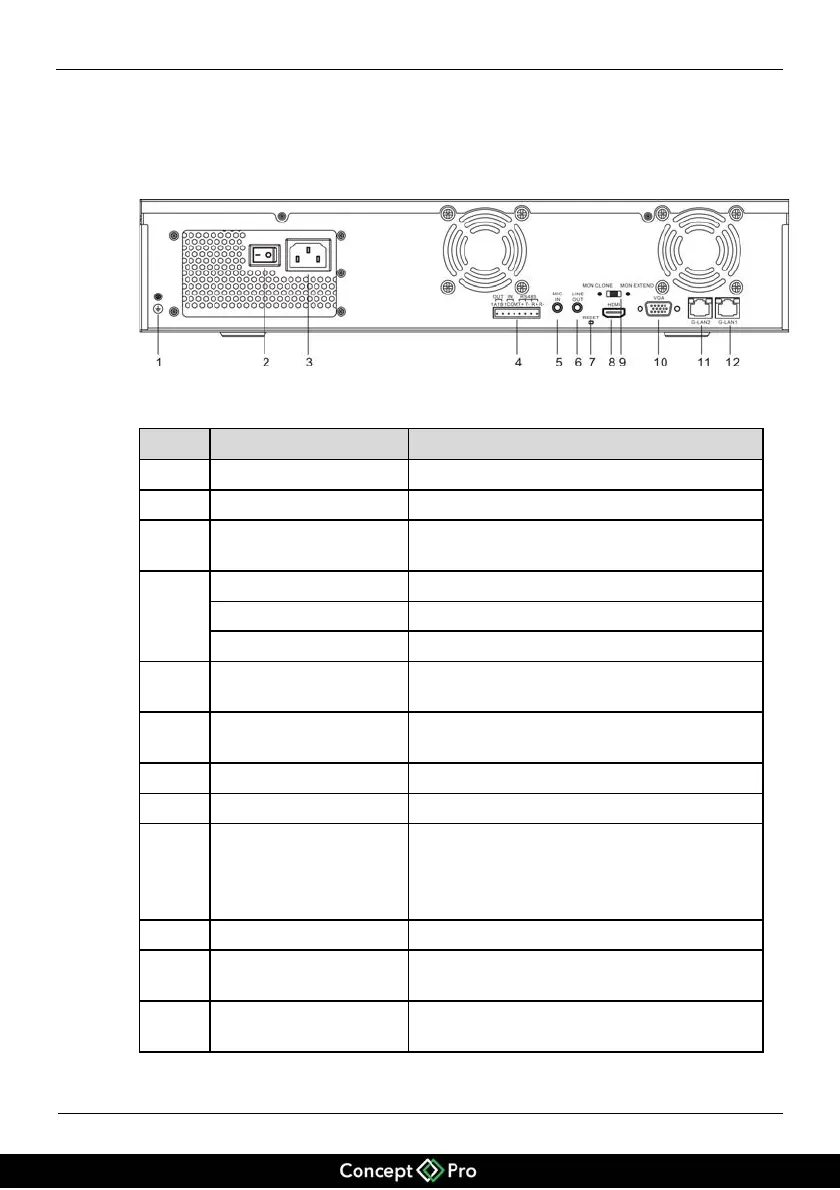
Figure 4-2 shows the rear panel of the NVR and Table 4-2 describes the numbered
features.
Figure 4-2 Rear panel
Table 4-2 Description of the real panel
Grounding terminal for the device
Input switch of the power supply
110V/220V AC power input interface of the
device
1 full-duplex RS485 communication inputs
Linear audio input for connecting a
microphone
Linear audio input for connecting earphones
and audio(or PA) system
Press the key for 5s to restore factory settings.
MON CLONE is used for dual-screen and
single-source display and output.
MON EXTEND is used for dual-screen and
non-single-source display and output.
RJ45 10/100/1000Mbps adaptive Ethernet
input
RJ45 10/100/1000Mbps adaptive Ethernet
input


 To Next Page