VXH5AHD QUICK START GUIDE
7
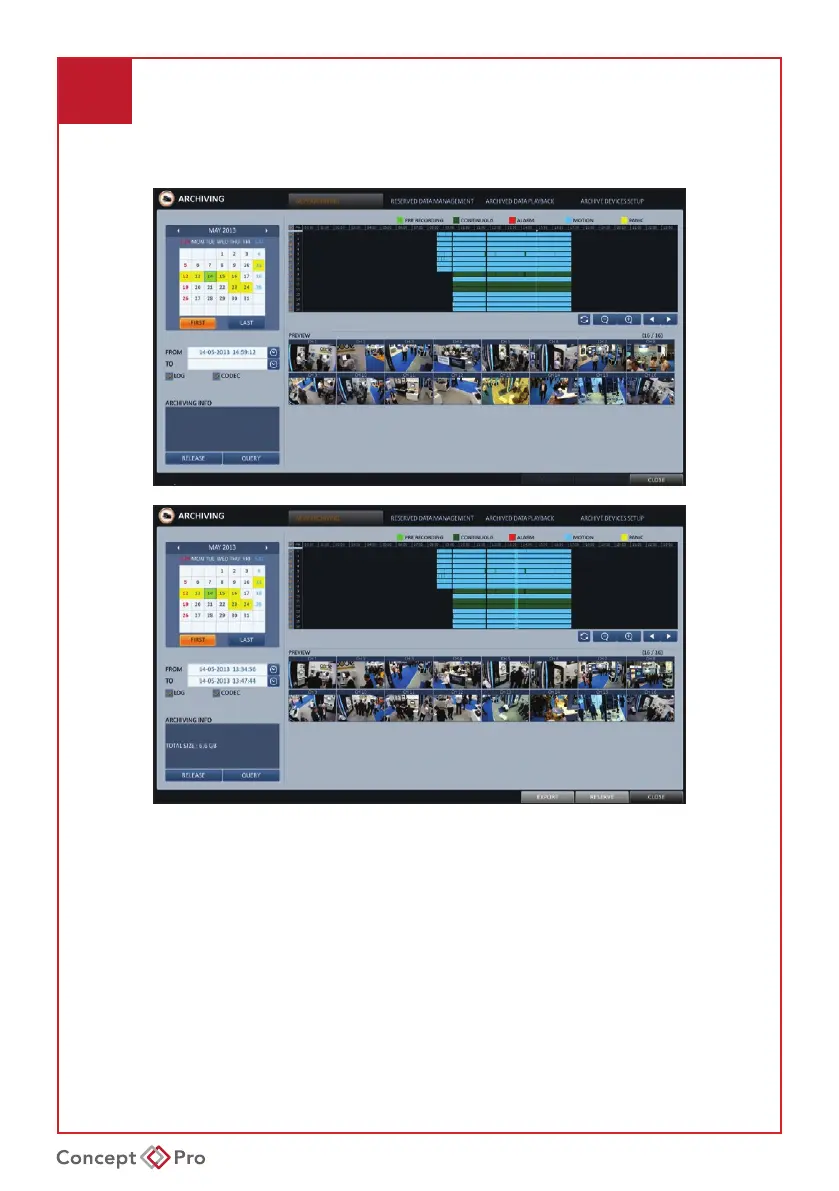
ARCHIVING RECORDED VIDEOS
1. Click <MENU> and select <ARCHIVING>. This can be selected from either the Live
or Playback screens. From <ARCHIVING>, select <NEW ARCHIVING>.
2. Select a date for the archive from the calendar to the left. Any dates containing
recordeddatawillbecolouredboxes.FIRST:Automaticallyselecttherstdatewith
recorded video. LAST: Automatically select the last date with recorded video.
Check the <START> & <END> times. Drag the timeline to specify the start and end times.
3. Check the appropriate boxes for desired <CHANNEL>, <LOG>, <CODEC>, and
<PLAYER> to be included in the archive.
4. Click <QUERY>. The results will be listed in the <ARCHIVING INFO> window.
• The maximum backup capacity for one time is 20GB. If the archiving request exceeds
20GB,theendtimewillbeautomaticallyadjustedsotheleisunder20GB.



 To Next Page