EasyManua.ls Logo

CONCORD RM-08 - User Manual

CONCORD RM-08
8 pages
Print Icon
To Next Page IconTo Next Page
Loading...
RM-08
®
Read entire instruction sheet carefully before beginning installation.
To avoid the possibility of electrical shock, be sure the power is TURNED OFF as its source (fuse
or circuit breaker). All electrical components must be installed in accordance with national and
local electrical codes. To reduce the risk of fire and electrical shock, this remote control should
be used only
with CONCORD ceiling fans.
CA
UTION:
BEFORE BEGINNING INSTALLATION STEPS:
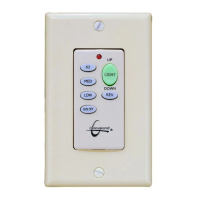
Locate the Hand-held Remote Control Transmitter, the Receiver Unit, and the Wall Control. These three items have a
block of dip switches inside them. See illustrations “i” and “ii” to locate the block of dip switches. Make sure the
switches in all three units are aligned exactly the same way. This system will not function properly unless all switches
are set the same. Insert 1-12 volt battery into the Wall Control Unit (see illustration ii). Insert 1-9 volt battery into the
compartment of the Hand-held Remote Control Transmitter (see illustrations “iii”, “iv” & “v”).
Figure i
Hand-Held Transmitter
Battery Compartment
Hand-Held Transmitter
Battery
Term inal
9 volt
Battery
Battery
Compartment
Lock Clip
Hand-Held
Transmitter
Figure ii
Figure iii (Open)
Figure iv (Insert Battery)
Figure v (Close)
- 1 -
12 volt Battery
Cover
Wall
Control
(Revised 05.02.2007)
Question and Answer IconNeed help?

Do you have a question about the CONCORD RM-08 and is the answer not in the manual?

Summary

Installation Preparation

Initial Setup and Dip Switch Alignment

Locate transmitter, receiver, and wall control. Align dip switches in all three units identically for system function.

Receiver Unit Installation

Removing Fan Switch Housing Components

Detach the existing switch housing and its internal components from the fan.

Selecting and Connecting Capacitors

Choose the correct capacitor based on fan model and connect it to the receiver module.

Making Receiver Unit Electrical Connections

Connect wires from the fan's Molex plug, light kit, and capacitor to the receiver module.

Connecting Receiver to Fan Housing

Connect the receiver's Molex plug to the fan's connector and secure the housing.

Fan Mounting and Wiring

Installing Mounting Bracket and Junction Box Connections

Mount the bracket to the ceiling junction box and connect fan/receiver wires to house wiring.

Hanging Fan Body and Ceiling Canopy Installation

Hang the fan motor assembly onto the mounting bracket and install the ceiling canopy.

Wall Control Installation and Operation

Replacing Existing Wall Switch

Turn off power, remove old switch, and install the new wall control unit in its place.

Wall Control and Remote Operation

Learn to operate fan speed, direction, and light dimming using wall control and remote.

Summary

Installation Preparation

Initial Setup and Dip Switch Alignment

Locate transmitter, receiver, and wall control. Align dip switches in all three units identically for system function.

Receiver Unit Installation

Removing Fan Switch Housing Components

Detach the existing switch housing and its internal components from the fan.

Selecting and Connecting Capacitors

Choose the correct capacitor based on fan model and connect it to the receiver module.

Making Receiver Unit Electrical Connections

Connect wires from the fan's Molex plug, light kit, and capacitor to the receiver module.

Connecting Receiver to Fan Housing

Connect the receiver's Molex plug to the fan's connector and secure the housing.

Fan Mounting and Wiring

Installing Mounting Bracket and Junction Box Connections

Mount the bracket to the ceiling junction box and connect fan/receiver wires to house wiring.

Hanging Fan Body and Ceiling Canopy Installation

Hang the fan motor assembly onto the mounting bracket and install the ceiling canopy.

Wall Control Installation and Operation

Replacing Existing Wall Switch

Turn off power, remove old switch, and install the new wall control unit in its place.

Wall Control and Remote Operation

Learn to operate fan speed, direction, and light dimming using wall control and remote.

CONCORD RM-08 Specifications

General IconGeneral
Frequency Range433.92 MHz
ModulationASK
Operating Voltage12V DC
Input Voltage12V DC
Frequency433.92 MHz