- 2 -
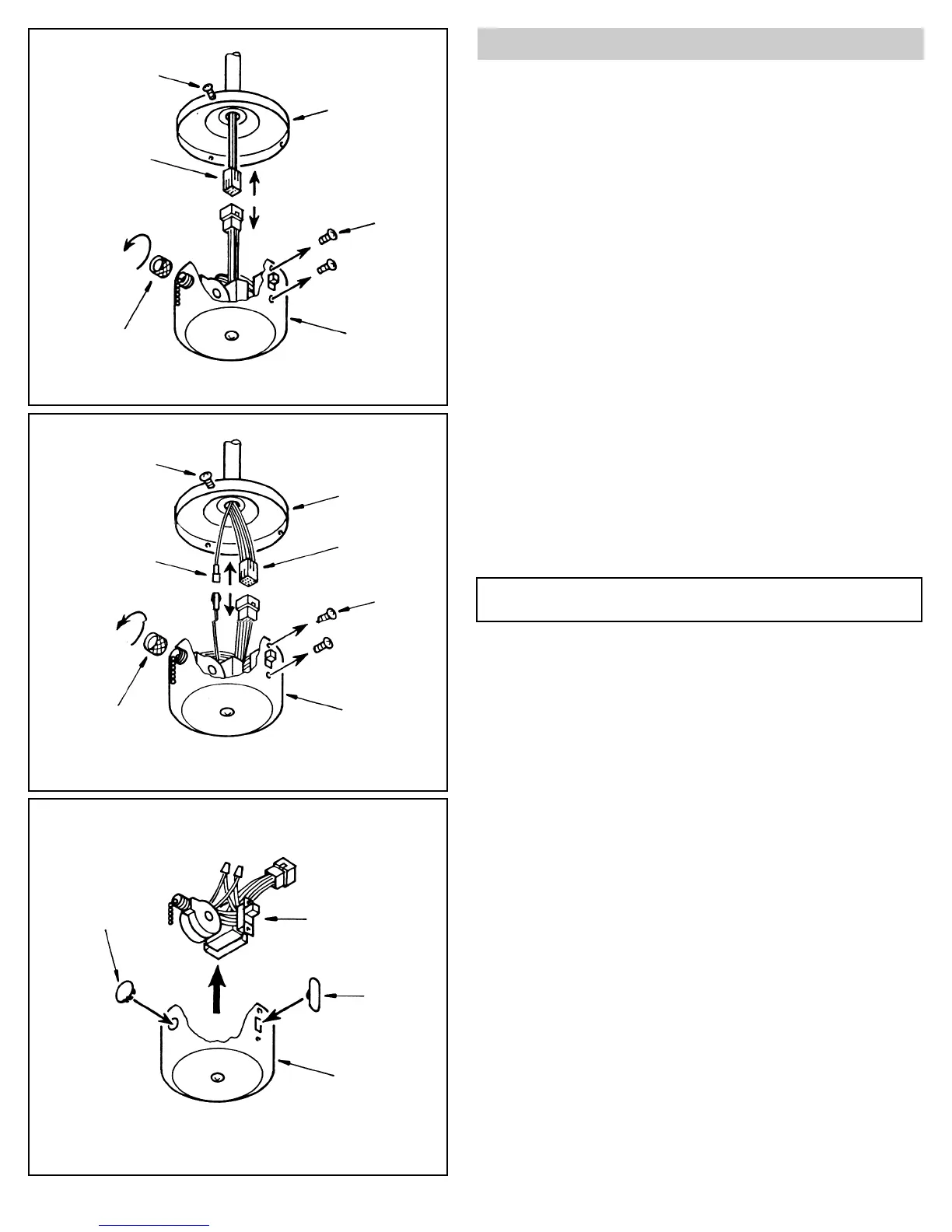
- Unscrew the metal sleeve where the pull chain comes out of the switch
housing (see figure A).
-Remove the speed switch from the hole.
-Next, remove the 2 small screws holding the forward/reverse switch in
place (see figure A).
-Now remove the forward/reverse switch from the hole.
-You are now able to remove the entire contents of the switch housing
unit (see figure C).
-Place the plastic caps supplied into the holes left by the speed switch
and forward/reverse switch (see figure C).
Figure A
Figure B
Figure C
Screw (3)
Mounting Plate
Molex
Switch
Housing
Remove Wire Bundle
Reverse
Switch
Screw (2)
Sleeve
Screw (3)
Mounting Plate
Molex
Reverse
Switch
Screw (2)
Switch
Housing
Sleeve
Pigtail Connector
Plug
Switch Housing
Plug
Option to remove wiring from switch housing
NOTE: If your fan has uplights or motor center band lighting, your
switch housing will look like figure B.


 To Next Page