C o n e r g y IP G s t r in g in v e r t e r s e r ie s Instruc tio n m anual 19
4 C o n e r g y IPG s t r in g v is io n in v e r t e r s e r ie s
ENGLISH
4 C o n e r g y IPG s t r in g v is io n in v e r t e r s e r ie s
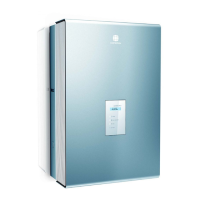
Every string inverter of the Conergy IPG string vision inverter
series is equipped with a display. The display is a touch
screen, i.e. you operate the menu by touching the display.
The touch areas Cancel , Di agr am, Set t i ngs and
Di agnost i cs are available for navigation through the display
menu. By touching the appropriate touch areas you will reach
the required menu item. If you change settings you must first
confirm the change. By touching the Cancel area, you will
always be returned to the status and output screen.
In order to be able to operate the display at any time of the
day or night, Conergy recommends the connection of an
external 230 V power supply. If you have chosen combination
with the Conergy IPG easyconnect generator junction box,
you will not need an external power supply, as this is already
integrated in the generator junction box.
The string inverters of the Conergy IPG series work
automatically and require no maintenance. However, should
malfunctions arise, these will be shown immediately on the
display.
When commissioning the inverter, the display automatically
switches on. The first thing to appear is the question in which
language the display text should be shown. The display then
shows the yield of the photovoltaic system. You can call up
updated data for today, the values from the previous day and
photovoltaic system data for the last 7 days via the display.



 To Next Page