6
CTUPO02_IG_en-GB_v1
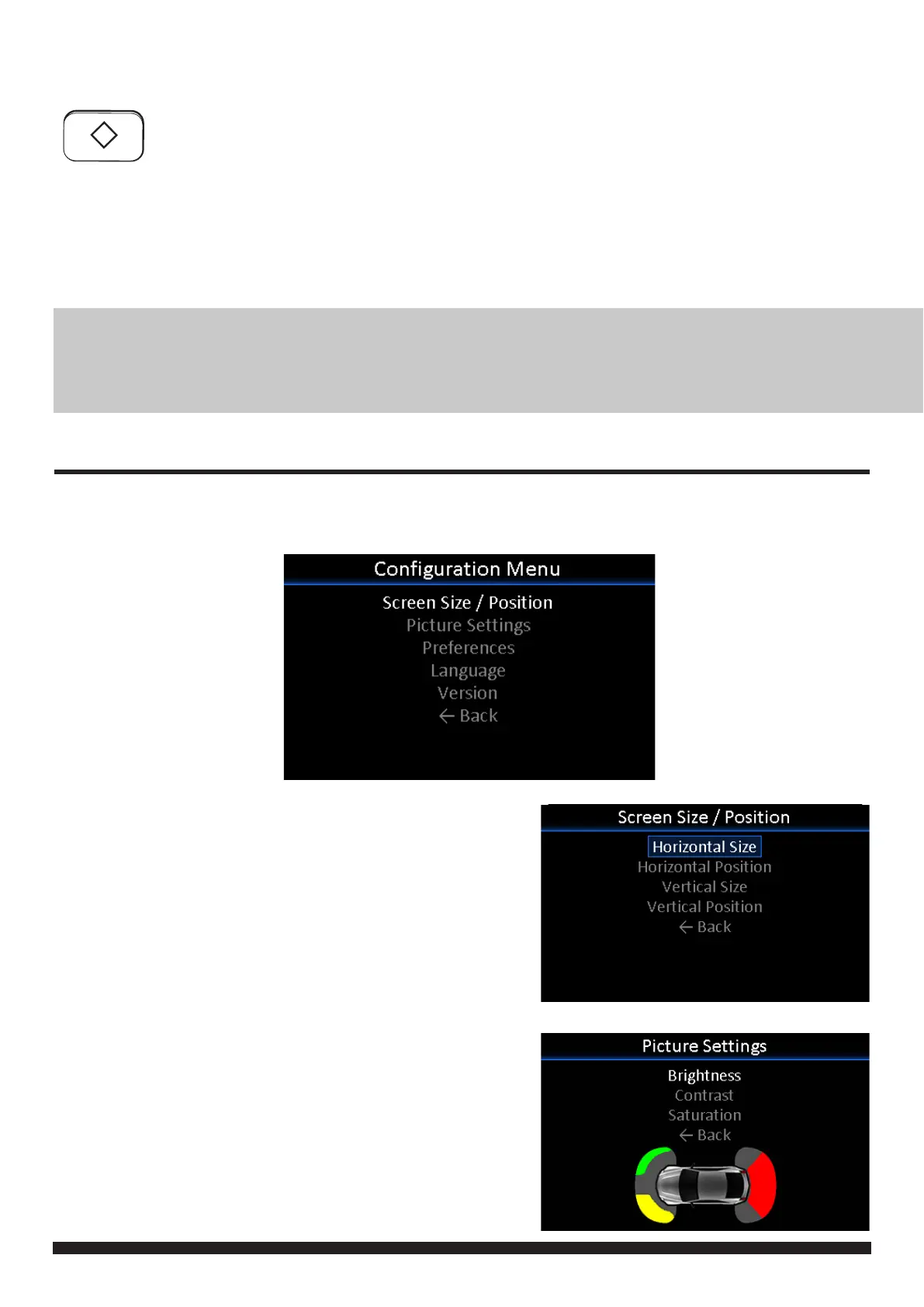
INFODAPTER MENU
Press and hold Button 1 to enter the Infodapter menu and navigate through the various options and settings
below:
SCREEN SIZE/POSITION
-> Horizontal Size
-> Horizontal Position
-> Vertical Size
-> Vertical Position
PICTURE SETTINGS
-> Brightness
-> Contrast
-> Saturation
*PROGRAMMABLE BUTTON
The diamond button on the steering wheel can be programmed to perform a specic radio
function whilst in the Infodapter menus on both a long and short press.
Function options include Source, Track +, Track +, DSC + and DSC -
To assign a function to the button, enter the Infodapter menu and go into the ‘Preferences’
sub-menu. From here, select the desired button function against the ‘Diamond Short Press’
and ‘Diamond Long Press’ options.
NOTE: If you wish to use the diamond button as described above, ensure that the button is set to any radio
function in the vehicle’s OEM instrument cluster menu. If you do not wish to use the button for this pur-
pose, ensure that both short and long press options are set to ‘None’ in the Infodapter Preferences sub-
menu


 To Next Page