11
Important Information about Water
Resistant Operation
For proper water resistant operation, make sure the plastic jack
cover of the unit is completely ush with the unit by pressing
along the entire edge of the cover until it is completely and
securely in place.
The unit is splash proof rated. However, DO NOT
immerse the unit in water. It may cause product failure.
• Make sure the jack cover and surrounding surfaces are
completely dry before opening the jack cover to prevent
moisture from damaging the internal electronics.
• Keep the jack cover free of dirt, sand, or other objects that can
interfere with proper sealing. If for any reason the jack cover is
not making a tight waterproof seal water may enter the unit.
• DO NOT clean unit with oily soaps or use chemicals or solvents.
Clean with damp cloth.
First Charge / Recharge the Battery
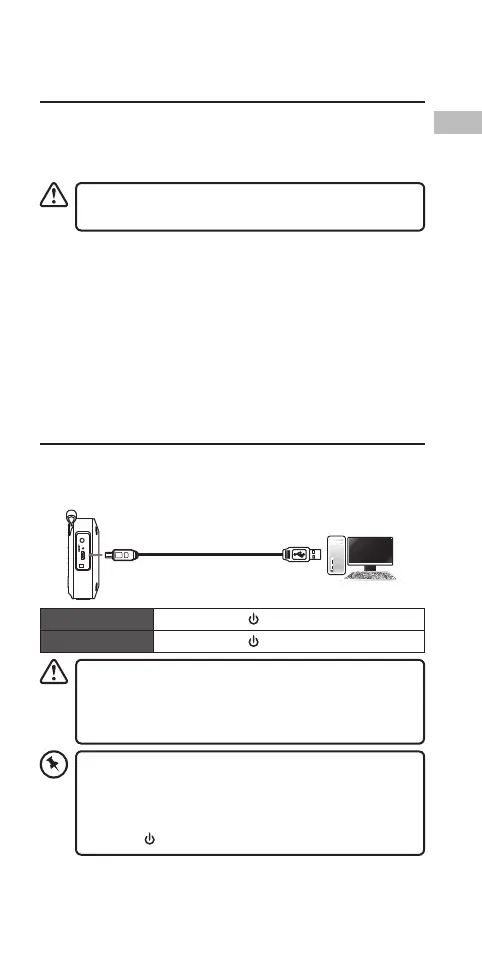
The unit has a built-in rechargeable battery. The battery is charged
automatically whenever the unit is connected to a computer or a
USB charging device.
USB to Micro USB Cable
Recharging
The light of the
ON/OFF Button flashes.
Fully Recharged
The light of the
ON/OFF Button turns off.
• Ensure the unit is switched o while charging.
• Do not overcharge the battery as it may shorten its
life. Disconnect the USB cable and then switch o the
unit after the unit is fully charged.
• It takes 3 hours (approx.) to fully charge the battery.
• A fully charged unit has up to 6 hours of playback time
(depending on the volume level).
• When the battery power is low, you will hear 3 beeps
and the
button will ash.
SCPEGBL_CG_SI15E_IB_5L_170104_will.indb 11 4/1/2017 6:35 PM


 To Next Page