13
• If the unit is not paired in a few minutes, it will exit
pairing mode.
• The operating range of the Bluetooth® for this unit is
10 metres, without obstruction. Walls, structures and
other objects may aect the Bluetooth® range.
• For better signal reception, remove any obstacles
between the unit and the Bluetooth® device.
• This unit supports A2DP (Advanced Audio Distribution
Prole) and AVRCP (Audio Video remote Control
Prole) functions. This can only be paired with one
Bluetooth® device at one time.
• Compatibility with all devices and media types is not
guaranteed.
• Some mobile phones with the Bluetooth® function
may connect and disconnect as you make and end
calls. This is not an indication of a problem with your
unit.
• Disconnect the AUX IN cable to enable Bluetooth®
mode.
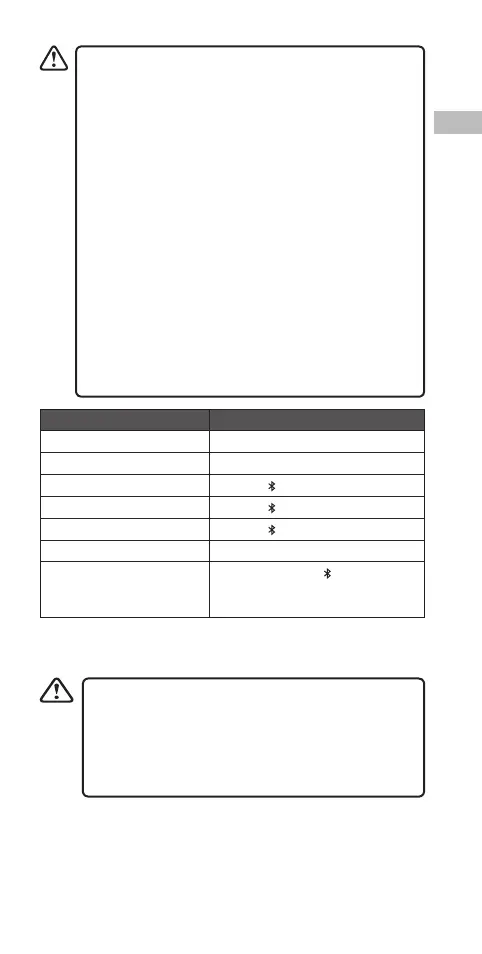
To Operation
Increase Volume Press/Press and hold the + Button.
Decrease Volume Press/Press and hold the – Button.
Pause/Play playback Press the Button.
Answer an incoming call Press the Button.
End Call Press the Button.
Reject an incoming call Press +/– Button.
Clear all the connection
with the paired Bluetooth®
devices
Press and hold the Button.
Call functions only applicable if mobile phone is paired and
connected with the speaker and both are switched on.
• To successfully answer a call, ensure your mobile
device supports Bluetooth® HFP.
• Ensure your Bluetooth® device is congured to take
full advantage of the unit’s functions. Please refer
to your Bluetooth® device’s manual for detailed
instructions.
SCPEGBL_CG_SI15E_IB_5L_170104_will.indb 13 4/1/2017 6:35 PM


 To Next Page