Edition 04/2017 - CG400
SACOME, Document CONFIDENTIEL,
Ne peut être reproduit ni communiqué sans notre accord préalable.
- 29 -
WARNING MESSAGE FOR REPLACEMENT OF GRINDING DISCS
When the grinder has reached the number of anticipated shots equaling the life span of grinding discs
previously set (refer to paragraph 6. PROGRAMMING TECHNICAL MENU), the following warning
message will appear on the display during Stand-by mode:
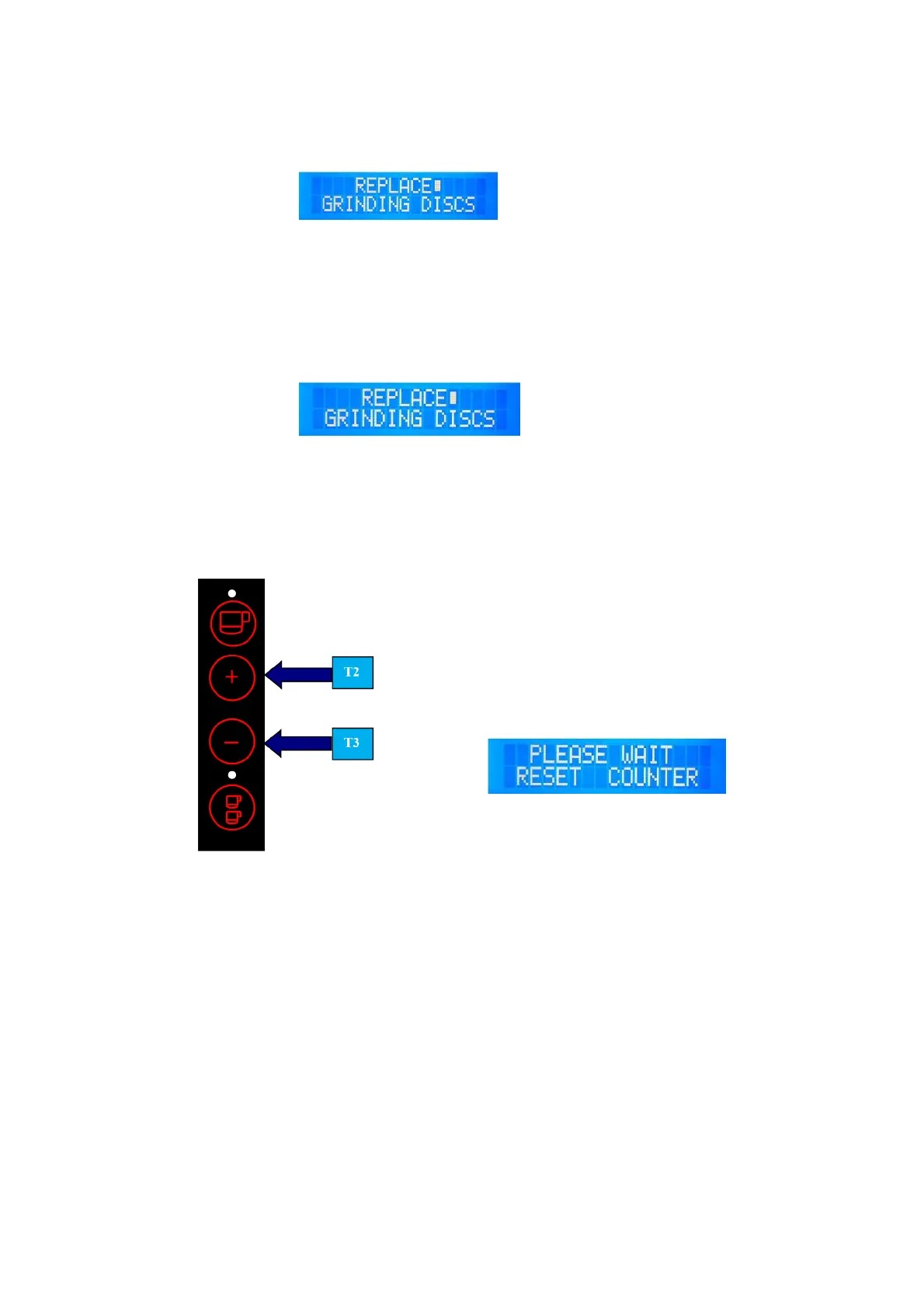
Ex.: Display shows:
NOTE: If the counter for the lifespan of grinding discs is set to value "000000”, function will not be
enabled. Thus, no warning message will appear on display
RESET WARNING MESSAGE “REPLACE GRINDING DISCS”
If warning message appears:
Ex.: Display shows:
Make sure grinding discs are replaced by an authorized service dealer as soon as possible to maintain
the best possible grinding quality and good cup of coffee.
After replacing the worn grinding discs, reset the warning message. Switch-off grinder, push T2 and T3
and while keeping them pushed, switch on grinder again…
…And wait until following
appears on display...
Release T2 and T3. Warning message is reset and grinder returns to operation mode again.
(See figure 1/2).


 To Next Page