Edition 04/2017 - CG400
SACOME, Document CONFIDENTIEL,
Ne peut être reproduit ni communiqué sans notre accord préalable.
- 24 -
12. PROGRAMMING MODE
SET THE GRINDING TIME FOR 1 & 2 CUPS
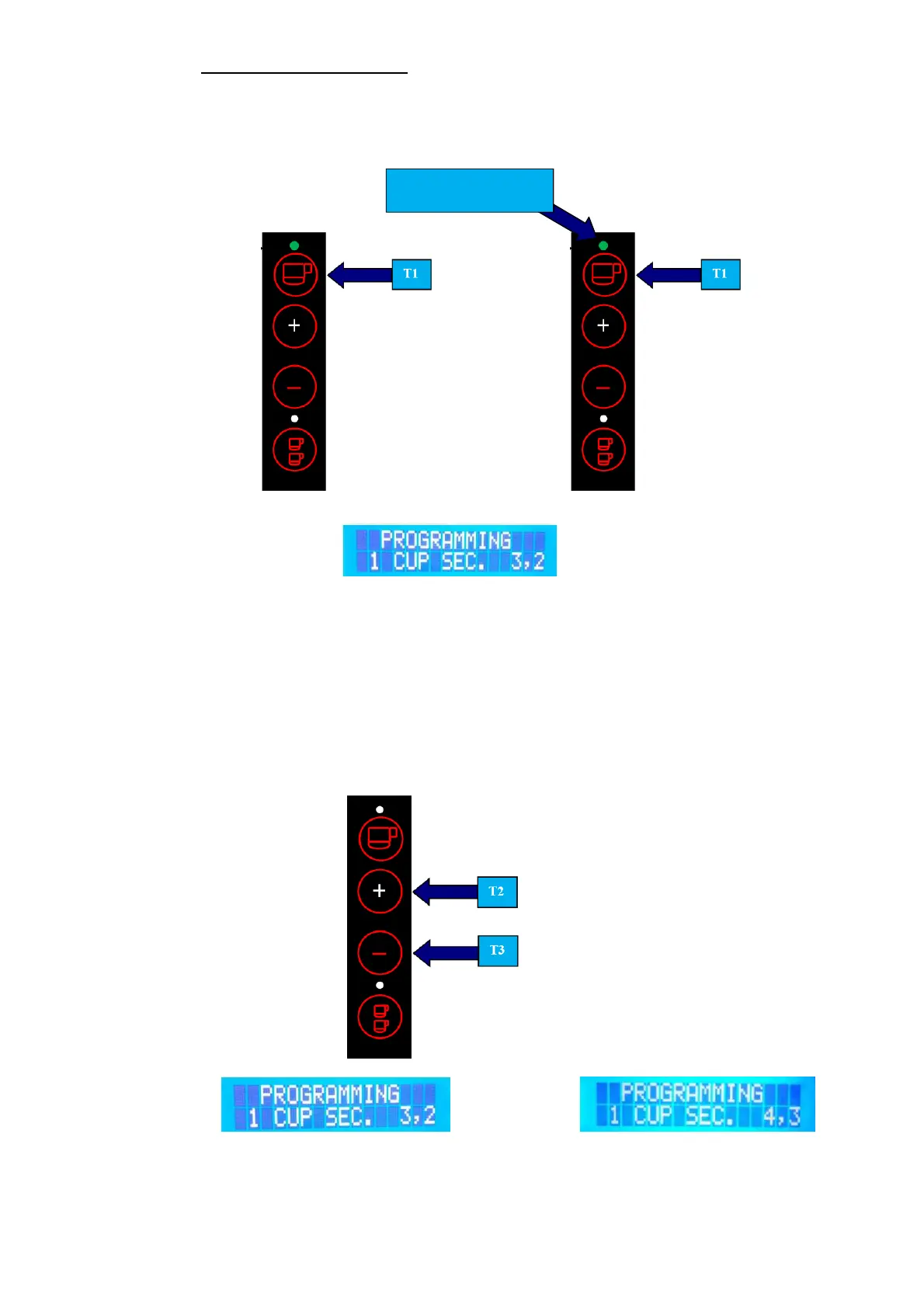
Grinder is in Stand-by mode. Push and hold T1 or T4 for approx. 5 sec until led of key is flashing. (see
Figure 4)
Example: 1 Cup
Ex.: Display shows:
ADJUST GRINDING TIME
To increase or decrease the grinding time by a second, push either key T2 or T3.
After you set the time by seconds, push key T1 (Ex. 1 cup) again and you can now set the time by 1/10 of
a second.
To increase or decrease the time by 1/10 of a second, push either key T2 or T3 (See figure 5).
To save new setting & exit programming mode, push T1 (ex. 1 cup) or T2 (ex. 2 cups) again.
NOTE: The range available to adjust the time for both, 1 and 2 cups is from 1 - 99.9 sec.
Ex.: Display: Example 4,3
Grinder will now return in Stand-by mode (see figure 1/2).
L1 TURNED ON AND
LIGHT FLASHING


 To Next Page