Edition 04/2017 - CG400
SACOME, Document CONFIDENTIEL,
Ne peut être reproduit ni communiqué sans notre accord préalable.
- 23 -
GRINDING 1 OR 2 CUPS (TIME LAG ACTIVE) = BY DEFAULT.
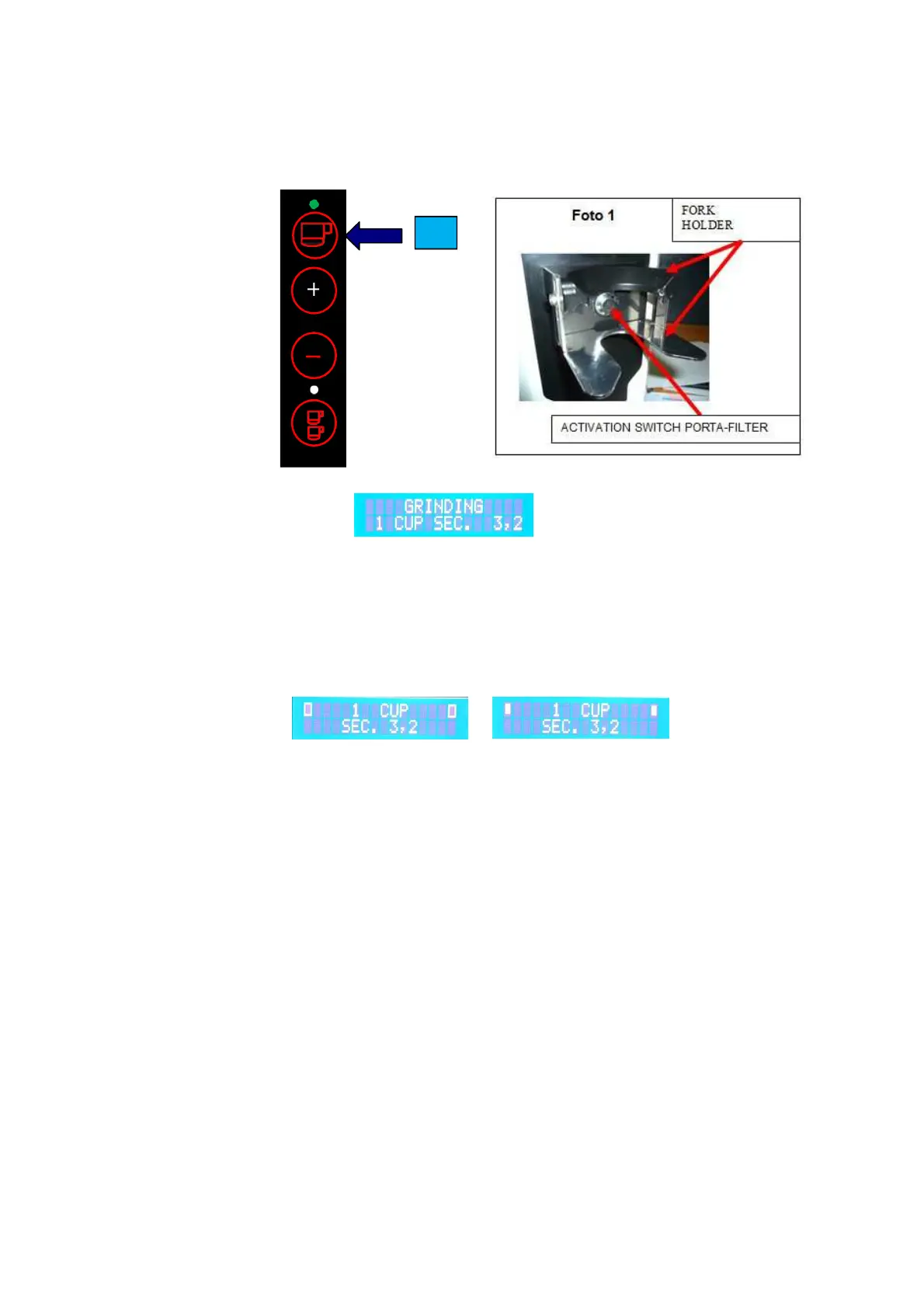
Select either T1 or T4 for 1 or 2 cups respectively. To start the grinding cycle, insert the porta-filter into the
porta- filter holder (see picture 1) and push the same against the activation switch to start the cycle. If the
porta-filter holder is properly adjusted it will hold the porta-filter in place (hands-free operation) and
complete the shot automatically.
Example: 1 Cup
Example: Display shows:
Once the grinding cycle is completed, the machine will return to Stand-by mode (see Figure 1 and 2).
If in the “Time Lag Mode”, the grinding cycle can briefly be interrupted by pulling the porta-filter back from
the holder. The grinding cycle can be resumed and completed by re-inserting the porta-filter as long as the
rectangular symbol on the top LH & RH side of the display is flashing. If porta-filter is not re-inserted in
time, the grinder goes back to Stand-by mode.
This time in the “Time Lag Mode” can be de- or increased in the set-up menu. Default setting is 5 sec.
T1


 To Next Page