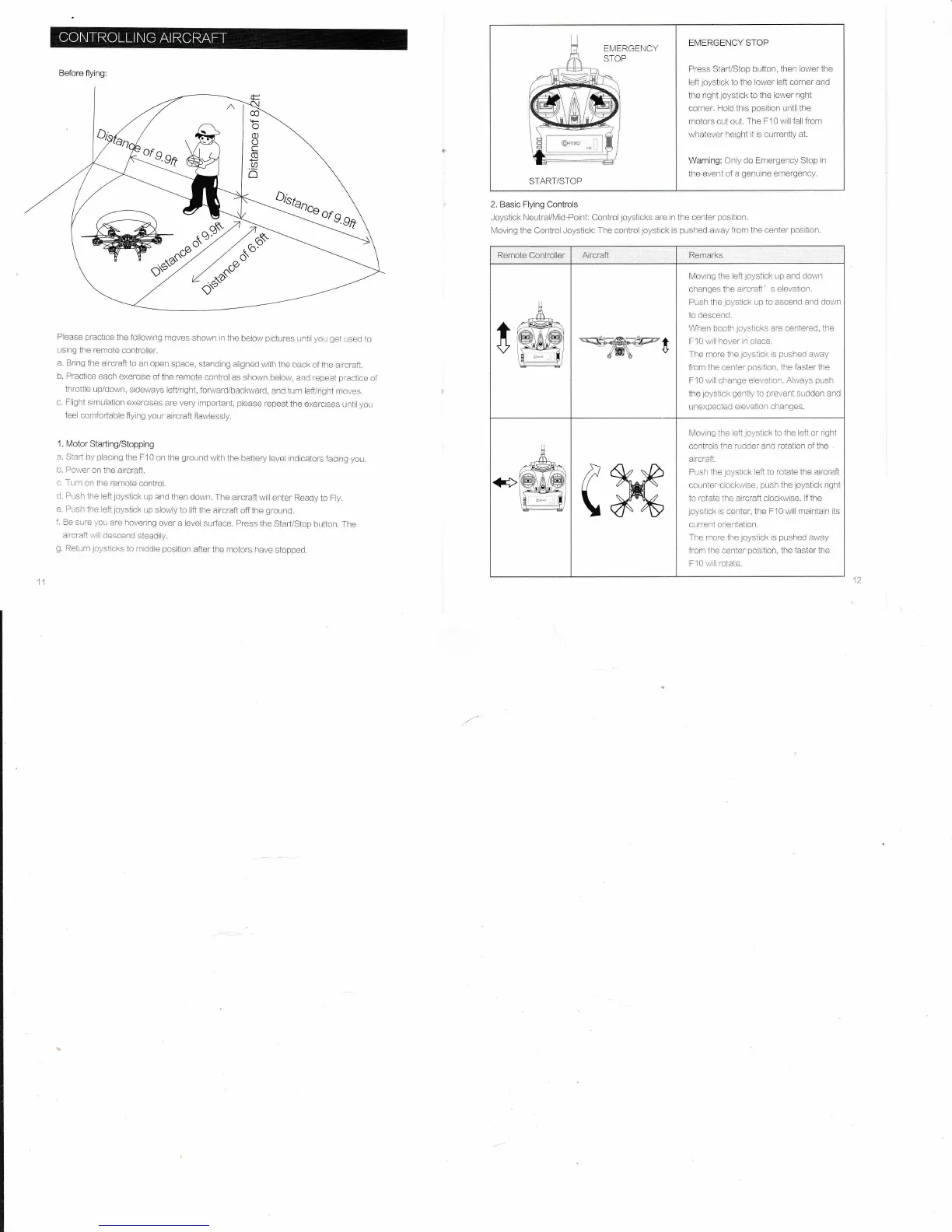
Before
flying:
Please
practice
the
follov,,ing
moves shown
in the
below
pictures
Lrntrl
you get
Ltsed
to
using
the rentote
controller.
a. Bring
the aircraft
to an open
space, standing
alignecl
with
the back
of the atrcraft.
b.
Practice
each
exercise
ofthe remote
control
as sholn
beloil,
and repeat
practtce
of
throttle
Lrpldown,
sideways
lefl/right,
forvuard/backvyard,
and turn
lefl/right
moves.
c, Flight
simulation
exercises
are very impoftant,
please
repeat
the exercises
until
you
feel
comfofiable
flying
ysLlr-
ar.,rft
flawlessly,
1. Motor Starting/Stopping
a. Start
by
placing
the F10
on the
ground
v/ith the
battery
level rndicators
facing
you.
b. Porrver
on
the aircraft.
c. Turn
on the remote
contmi.
d. Push ihe
left
joysiick
uD
and then
down. The
atrcraft
will enter
Ready to
FIy.
e.
Push the
]eft
joystick
up
slowly to lift
the aircraft
off the
ground.
f.
Be sure
you
are
hovering
over
a level
surface.
press
the Starl/Stop
button.
The
aircraft will
descend
steadtly.
g.
Return
loysticks
to middle
position
after
the motors lrave
stopped.
2. Basic Flying Controls
Joystick Neutral/Midfoint: Controljoysticks are
in the center
position.
Moving the Control Joystiok: The controljoystick
is
pushed
arvay from the center
position.
EMERGENCY
STOP
EMERGENCY STOP
Press StarVStop button, then
lowerthe
left
joystick
to the lower left corner
and
the right
joystlck
to
the lower
nght
corner, Hold this
position
until the
rnotors cut out.
The F10
r,vill
fall from
whatever
height it is currently
at.
\,Varning: Only
do Emergency Stop in
the
event of a
genuine
emergency.
START/STOP
Remote Cantroller
Aircraft
Remarks
0
liloving the left
joystick
Lrp and dolvn
changes the
aircraft' s elevation.
Push the
joystick
up
to ascend and down
to descend.
When
booth
ioysticks
are centered, the
F10
\//lll
hover
in
place.
The more the
joystick
is
pushed
away
from the center
posrtron,
ihe faster the
F10 wril change
elevation. Always
push
the
loystick
gently
to
prevent
sudden and
.,rexpected
e evatron
chanqes.
I\lovrng ihe eft
joystick
to
the left or rght
controls
the rudder and rotation of the
atrcraft.
Pr-rsh the
toystick
left to rotate the aircraft
coL;nter-clockwise,
pLrsh
the
joysilck
rlght
to rotate the aircraft clockwrse. lf the
loystick
is
center, the F10
will maintain its
current
orientatron.
The more the
joystick
is
pushed
avray
from the center
position,
the
iaster
the
F10 \/ill
roiate.



 To Next Page