Selects the feature User Set to load, save or
configure.
Loads the User Set specified by
UserSetSelector to the device and makes it
active.
Save the User Set specified by
UserSetSelector to the non-volatile memory
of the device.
Selects the feature User Set to load and make
active by default when the device is reset.
Reports the last user set executed by the
device from a user set load command, or as a
result of a device reset.
UserSetLoadStatus
InProgress
Failure
Success
Reports the last user set executed by the
device from a user set load command, or as a
result of a device reset.
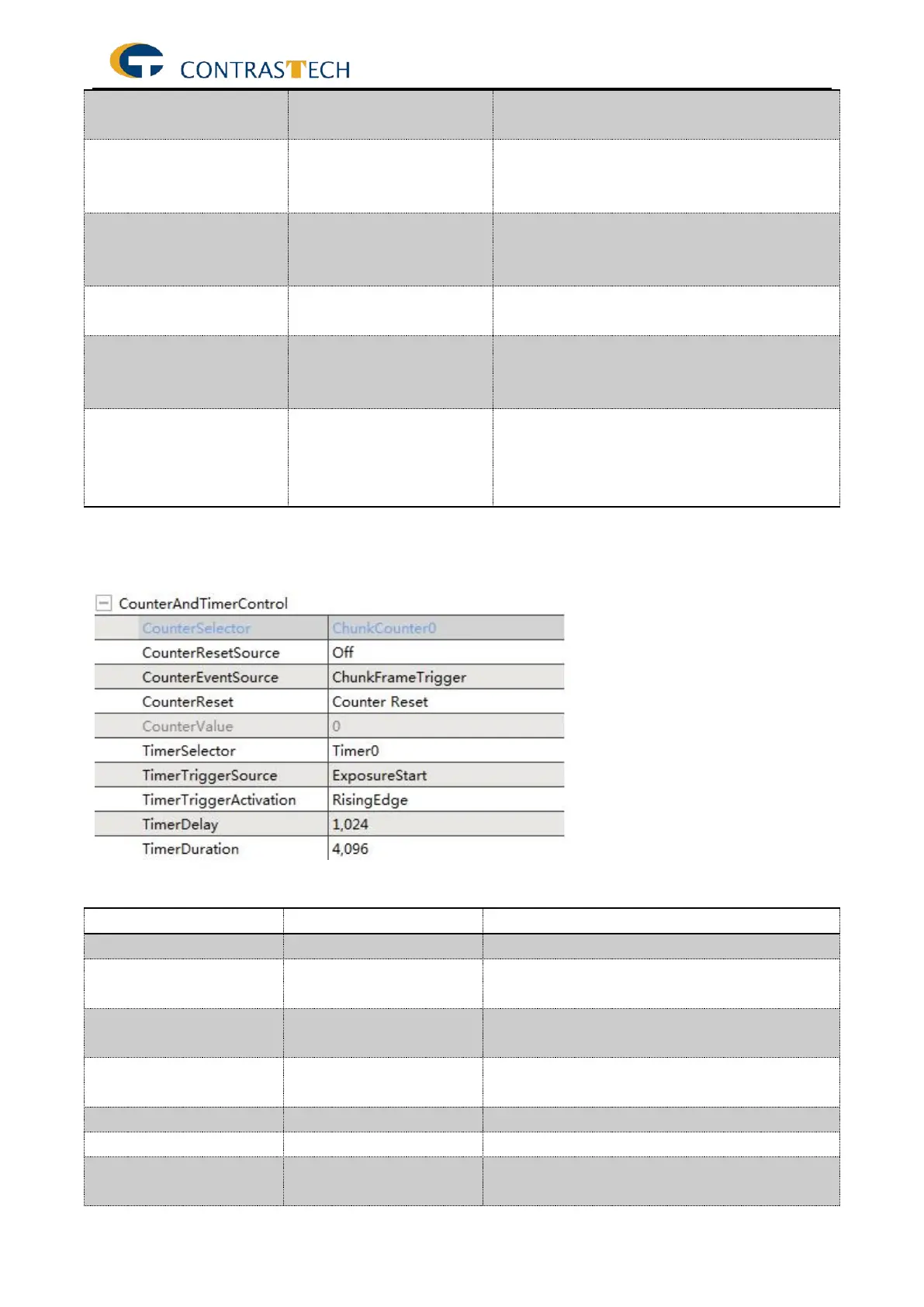
4.3.10 CounterAndTimerControl
The following table describes each Counter and Timer control features.
Selects which Counter to configure.
Selects the signals that will be the source to
reset the Counter.
Select the events that will be the source to
increment the Counter.
Does a software reset of the selected Counter
and starts it.
Read the current value of the selected counter.
Selects which Timer to configure.
Selects the source of the trigger to start the
Timer.


 To Next Page