CTT8 instruction manual IM302-U v2.3 pag. 1 / 8
INSTRUCTION MANUAL
IM302-U v2.3
CTT8 TEMPERATURE MONITOR DEVICE
GENERALITY
The device of control temperatures CTT8 is used in the control of electric
machine, transformer, motor, etc. where it’s possible to control the
temperature level signalling the critical temperature condition or to disable the
machine under control. For example for the control the temperature of
supplying transformer, where it’s possible to control the temperatures of three
coils of phase and the nucleus, using the tripped output (TRIP) to cut off the
load and eventually the functions of ventilation control.
Another important function is the presence of one port of serial
communication RS485, that allows the connection to system of acquisition
(PC, PLC, scada, etc.) of the measure data, control and programming of the
device. The MODBUS-RTU is the protocol used, it’s documented in a specific
manual.
A software for Windows environment is available for a management of the
devices with complete function of control, storing data, recording alarm, etc.
It’s available a analogue output settable 0-20 or 4-20 mA with end-scale
200°C to join to one of channel or to the higher of the 4 temperature channels.
INTRODUCTION
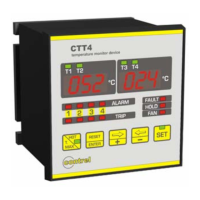
The device type CTT8 allows the control and the visualization of temperature read with probe type RTD PT100 ().
For each channel of measure are available two levels of alarm (alarm-tripped) that active the commutation of the relative
output relay for signalling at distance or to disable the machine under control. On front of the instrument on a double
display at 3 digit, it’s possible the visualization of the temperatures, the visualization of the status of the alarm of the
measure channels and 5 button for the programming. The instrument is completed by the functions of ventilation control,
storing maximum values and storing of the tripped.
ACCESSORIES AND OPTION
accessories: transparent cover of frontal protection
options
: serial output RS485
analogical output 0-20mA / 4-20mA user selectable
INSTALLATION
Foreward.
Read carefully the present manual before to install and use the device.
The device described in this manual must be installed and used by personal opportunely learned.
Security.
Before to proceed at the installation it’s necessary verify if the device is intact and it haven’t damages caused by transport. The power
supply must be compatible with the tool range. The instrument installation must be done in total absence of voltage and observing the
security norm in force. All operation of maintenance and reparation executed by not authorized person are forbidden. If during of
functioning the device loose the security, it’s necessary to put it out of service and to be sure that this device will not use unintentionally.
The use can be considered insecure when the instrument: - don’t function regularly / - have damage clearly visible / - have
damage caused of transport / - is stored in bad condition
CONNECTION OF THE THERMOMETER SENSORS
For the connection of the thermometer sensor RTD Pt100 it’s necessary to follow the indication of the wiring diagram of
this manual: pay attention not to invert the position between the conductors with red insulator and the conductor with
white insulator. The probes type PT100 with 3 wires use a third wire to compensate the resistance of the conductors (max
20 ohm). If the sensor has 2 wires (normally white and red) it’s necessary to short-circuit the terminals with the red wires
(1-2, 4-5, 7-8, 10-11, 13-14, 16-17, 19-20, 22-23).
To reduce the external noises it’s necessary to use the following indication for the wires of measure of the Pt100:
to use probes with shielded wire connected at earth and wires twisted
to separate the wires of the probes from wires of power
to use wires with section higher than 0,5 mm
2
to use wires with conductor with tin or silver-plated
OUTPUT RELAYS
For the connection of the output contacts of relays it’s necessary to follow the indication in the diagram.
The ALARM and TRIP relays commute when the threshold set are to get over. The FAULT relay is normally energized
and it commute in presence of an anomaly on the Pt100 or on device. During the normally functioning of the device the
contact 38-39 will be open while the 39-40 will be closed. The FAN relay is used to control the fun of cooler, in function of
the threshold set of switch on and switch off.

 Need help?
 General

 To Next Page