Need help?
Do you have a question about the Control 4 C4-TW7C0-WH and is the answer not in the manual?
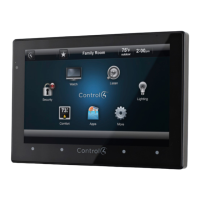
Overview of the Control4 7" In-Wall Touch Screen with Camera.
Details available power (AC/PoE) and network (WiFi/Ethernet) connection options.
Lists the specific Control4 Touch Screen models and their associated SKUs.
Lists the items included in the product packaging for unpacking.
Provides technical details like dimensions, weight, screen resolution, and wireless capabilities.
Lists optional accessories like PoE injectors and back box kits for installation.
Outlines necessary components and system prerequisites for installation.
Details requirements for Ethernet (PoE/AC) and WiFi (AC) connections.
Describes front panel components and rear panel connections.
Provides detailed measurements and explains Touch Screen removal procedure.
Guides on selecting an optimal and convenient location for installation.
Explains the meaning of the LED status lights on the Touch Screen.
Crucial safety warnings regarding power off and back box opening.
Overview of how the device connects to power and the network.
Details installation for Ethernet (PoE/AC) and WiFi (AC) connections.
Details installation for WiFi with AC power, notes, and limitations.
General steps for preparing the power box for installation.
Step-by-step guide for connecting AC power to the device.
Continues the steps for AC power connection and wire termination.
Steps for connecting the PoE injector and network for power.
Steps to connect the device to a WiFi network.
Continues the steps for WiFi network configuration.
Instructions for adding and configuring the device in Composer Pro software.
Section for addressing common issues like boot-up problems.
Steps to reset the device to its original factory settings.
Continues the process of restoring the device to factory defaults.
Covers electrical safety, heat, dry locations, and magnet warnings.
Warns about magnets and their effects on medical devices and magnetic media.
Covers warranty, electrical codes, heat, dry locations, and residential use.
Information about Libertas firmware and GNU license.
Links to regulatory information and warranty details.
Provides document part number and revision date.
 General
| Model | C4-TW7C0-WH |
|---|---|
| Display Size | 7 inches |
| Resolution | 1280 x 800 |
| Touchscreen Type | Capacitive |
| Connectivity | Wi-Fi, Ethernet |
| Power Supply | PoE (Power over Ethernet) |
| Mounting Type | Wall Mount |
| Processor | Quad-core |
| Operating System | Control4 OS |
| Color | White |


 To Next Page