EasyManua.ls Logo

Control 4 T3 Series - User Manual

Control 4 T3 Series
19 pages
Print Icon
To Next Page IconTo Next Page
Loading...
11
Supported models
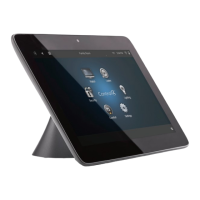
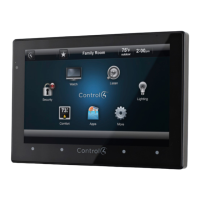
C4-TT7-1-xx 7" Tabletop Touch Screen (black, white, or red)
C4-TT10-xx 10 Tabletop Touch Screen (black or white)
Introduction
The Control4® T3 Series Tabletop Touch Screens o er complete
system control in an elegant, compact, and portable design. The
touch screens are equipped with a full capacitive screen, audio
and video Intercom (with the built-in camera) using SIP, and
more.
This touch screen can be located anywhere, and the convenient
recharging station enables it to be used as either a tabletop or
portable interface. Choose from four installation options:
Option 1: PoE data and power. Ethernet network connection
and power are provided through a PoE injector. No
additional wiring is needed.
Option 2: Ethernet data and AC power. Ethernet network
connection is provided through an Ethernet cable, and
power is provided through the ACpower adapter.
Option 3: WiFi data and AC power. WiFi is used as the
network connection, and power is provided through the
ACpower adapter.
Option 4: WiFi data and PoE power. WiFi is used as the
network connection, and power is provided through a PoE
injector.
Note: 802.11b is not recommended for Video Intercom.
We recommend using Wireless-N. See “Specifi cations”
and “Power and Network Installation Options” for more
information.
Box contents
Tabletop Touch Screen
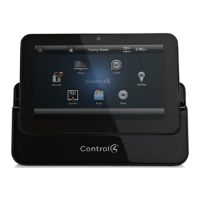
Recharging station
Warranty card
Ferrites (10" model only)
Accessories available for purchase
Control4 PoE Injector, sold separately (AC-POE1-B).
Warnings
Warning! This product must be grounded in accordance
with the National Electrical Code (NEC) requirements.
Avertissement ! Ce produit doit être fondu selon les
conditions électriques nationales de code (NEC).
Caution! Do not place the touch screen near sources of
heat or expose to direct sunlight for an extended time.
Avertissement ! Ne placez pas l’unité près des sources
de chaleur ou exposition pour diriger la lumière du soleil
pendant une période prolongée.
Caution! This product generates heat. The room must
have adequate ventilation or the ability to dissipate heat
e ectively.
Avertissement ! Ce produit produit de la chaleur. La salle
doit avoir à ventilation proportionnée ou la capacité
d’absorber la chaleur e cacement.
Caution! Use this product only in dry locations.
Avertissement ! Employez ce produit seulement dans
des endroits secs.
Caution! This product is for residential use only.
Avertissement ! Ce produit est pour à l’usage résidentiel
ou commercial seulement.
Caution! Do not use pens or sharp objects to navigate
or make selections on the touch screen. To select an
item or scroll through a list, use your fi ngertip.
Avertissement ! N’employez pas les stylos ou les objets
pointus pour diriger ou pour faire des choix sur l’écran.
Pour choisir un article ou un rouleau par une liste,
employez votre bout du doigt.
Caution! Improper use or installation can cause
DAMAGE OF PROPERTY.
Avertissement ! L’utilisation ou l’installation inexacte
peut causer DAMAGE DE PROPRIÉTÉ.
Caution! Do not use shielded Ethernet cable. Doing so
will void the warranty.
Attention ! Ne pas utiliser de câble Ethernet blindé .
Cela annulera la garantie.
Important! Using this product in a manner other than
outlined in this document voids your warranty. Further,
Control4 is NOT liable for any damage incurred with the
misuse of this product. See “Warranty.”
T3 Series Tabletop Touch Screens
Installation Guide
Question and Answer IconNeed help?

Do you have a question about the Control 4 T3 Series and is the answer not in the manual?

Control 4 T3 Series Specifications

General IconGeneral
BrandControl 4
ModelT3 Series
CategoryTouchscreen
LanguageEnglish

Summary

Introduction

Box Contents

Lists the items included in the product packaging.

Available Accessories

Lists optional accessories that can be purchased separately.

Important Safety Warnings

Grounding and Electrical Safety

Product must be grounded according to National Electrical Code (NEC) requirements.

Environmental and Usage Precautions

Avoid heat, sunlight, ensure ventilation; use in dry locations, residential only.

Installation and Warranty Compliance

Improper use/installation can cause damage; do not use shielded Ethernet cable.

Product Specifications

Model, Screen, and Network Details

Details model numbers, screen resolution, camera, and network types (Ethernet/WiFi).

Power, Temperature, and Connections

Covers power supply, operating/storage temps, and charging station connections.

Dimensions and Weight

Provides physical dimensions and weight for the touch screen and charging station.

System Requirements

Controller and Software Needs

Requires a controller with Control4 OS 2.7.2+ (2.8.0+ for 10" model).

Network and Power Connectivity

Details requirements for Ethernet, WiFi, PoE, and AC power connectivity.

Installation Options Overview

Ethernet with PoE Power

Connects via Ethernet and powered by PoE injector for tabletop use.

Ethernet with AC Power

Connects via Ethernet and powered by AC adapter for tabletop use.

WiFi with AC Power

Connects via WiFi and powered by AC adapter for portable use.

WiFi with PoE Power

Connects via WiFi and powered by PoE injector for portable use.

Network Configuration

PoE Connection and Ferrite Installation

Guides on connecting via PoE and attaching the ferrite for specific models.

Wireless Network Setup

Instructions for connecting to WiFi networks, including manual SSID entry.

Static IP Address Configuration

Steps to set static IP addresses for wireless or Ethernet connections.

Composer Pro Configuration

Adding and Identifying the Device

Steps to add the T3 touch screen driver and identify it in Composer Pro.

Configuring Device Properties

Details on setting network, backlight, camera, intercom, and custom button properties.

Mounting Options

Portable Mounting

Describes placing the screen on the charging station for tabletop or portable use.

Tabletop Permanent Mounting

Details permanently attaching the charging station to the screen for security.

Troubleshooting Procedures

Power Cycling and Factory Reset

Instructions for powering off/on the device and performing a factory data reset.

Additional Resources and Support

Support Resources

Lists available resources like knowledgebase, forums, and technical support.

Regulatory and Warranty Information

Guides to regulatory compliance, patents, and warranty details.

Safety and Precautions - Part 1

Basic Safety Instructions

Read instructions, keep them, heed warnings, follow all instructions.

Apparatus Usage Restrictions

Avoid use near water, clean with dry cloth, do not block ventilation, avoid heat sources.

Plug Safety and Outlet Considerations

Ensures proper grounding and consults electrician if plug does not fit outlet.

Safety and Precautions - Part 2

Cord Protection and Accessory Use

Protect power cords and use only manufacturer-specified accessories.

Lightning Storm and Surge Protection

Unplug during storms; warranty does not cover surge damage; consider surge arrestor.

Servicing and Circuit Breaker Use

Refer servicing to qualified personnel; use circuit breaker for disconnection.

Safety and Precautions - Part 3

Overcurrent Protection and Battery Safety

Building installation overcurrent protection; caution with battery replacement.

Electrical Interference and Warning Symbols

Avoid inserting objects; potential interference; explains warning symbols.

USA & Canada Compliance

FCC Part 15 Interference Statement

Details FCC limits for Class B devices and interference correction methods.

FCC;Industry Canada Intentional Emissions

FCC Part 15;RSS-247 Intentional Emissions

Covers intentional emissions compliance and antenna requirements per FCC/IC.

RF Radiation Exposure Compliance

RF Exposure Limits and Usage

States compliance with FCC/IC limits and requirements for separation distance.

European Compliance (English)

CE Declaration of Conformity

Declares conformity with EMC, Safety, and Radio directives.

European Compliance (French)

Déclaration de conformité CE

Déclare la conformité avec les directives EMC, Sécurité et Radio.

European Compliance (German)

CE-Konformitätserklärung

Erklärt die Konformität mit EMV-, Sicherheits- und Funkrichtlinien.

European Compliance (Italian)

Dichiarazione di conformità CE

Dichiara la conformità con le direttive EMC, Sicurezza e Radio.

European Compliance (Spanish)

Declaración de conformidad CE

Declara la conformidad con las directivas EMC, Seguridad y Radio.

European Compliance (Portuguese)

Declaração de Conformidade CE

Declara a conformidade com as diretivas EMC, Segurança e Rádio.

Environmental and Document Information

Recycling and WEEE Compliance

Control4's commitment to environmental standards and WEEE directive compliance.

About This Document

Copyright information, registered trademarks, and document part number.

Related product manuals