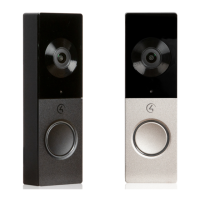
This document serves as a setup guide for the Control4 Chime Video Doorbell (PoE model), providing essential information for its installation, configuration, and maintenance within a Control4 smart home system. The Chime Video Doorbell is designed to integrate seamlessly with your existing Control4 environment, offering advanced features for home security and communication.
Function Description
The Control4 Chime Video Doorbell (PoE) is a smart doorbell system that provides video and audio communication with visitors at your door. It leverages Power over Ethernet (PoE) technology for both power and network connectivity, simplifying installation by eliminating the need for separate power wiring. The device is designed to work with a Control4 system running OS 3.2 or higher, allowing for comprehensive control and integration with other smart home devices.
Key functions include:
- Video and Audio Communication: The doorbell features a camera and microphone, enabling two-way audio and one-way video communication with visitors through your Control4 system. This allows you to see and speak to guests from any connected Control4 interface, such as touchscreens, mobile apps, or even your television.
- Doorbell Chime Integration: The Chime Video Doorbell supports integration with an external doorbell chime. When a visitor presses the doorbell button, it can trigger your traditional doorbell chime, providing an audible alert within your home. This feature requires a doorbell chime, a doorbell transformer, and appropriate wiring (18-22 gauge 2-conductor wire).
- Network Connectivity: The PoE model connects to your network via an Ethernet cable, which also supplies power. It is configured for DHCP by default, automatically obtaining an IP address from your network. This ensures reliable and stable communication with your Control4 controller.
- System Integration: Once connected to your network, the VDB can be added to your Control4 project using Composer Pro. This allows you to configure its settings, integrate it into automation scenes, and manage its behavior within your smart home ecosystem.
- Intercom Functionality: The VDB acts as an intercom proxy, enabling you to make and receive intercom calls within your Control4 system. You can configure call groups, allowing the doorbell to ring specific devices or groups of devices when activated. Custom buttons can also be configured for intercom calls, providing quick access to specific actions or contacts.
Usage Features
The Chime Video Doorbell offers several features designed to enhance user experience and security:
- Easy Setup and Configuration: The setup process involves physically installing the doorbell and its bracket, connecting it to a PoE power source, and then adding it to your Control4 project using Composer Pro. The guide provides clear steps for connecting the VDB to your network and integrating it with your Control4 system.
- Admin Password Management: For security, the system prompts you to create a new admin password for the VDB upon initial installation. This is done through the Maintenance tab in Composer Pro, ensuring that only authorized users can access and modify the doorbell's settings.
- External Chime Enablement: If you wish to use an external doorbell chime, you can enable this feature through the DEVICE tab in Composer Pro. This allows the VDB to trigger your traditional chime when the button is pressed.
- Call Settings Customization: You can customize call settings, including the call ring duration and the call group the VDB will ring. This flexibility allows you to direct doorbell notifications to specific rooms or devices within your Control4 system. A "Test Call" feature is available to verify your intercom call settings.
- Intercom Proxy Configuration: The Intercom proxy sub-driver within Composer Pro allows for advanced configuration of intercom properties. You can set up custom buttons that appear during an intercom call, providing quick actions or communication options.
- LED Status Indicators: The doorbell features an LED indicator that provides visual feedback on its status. A solid white LED indicates that the VDB is online and connected to the network. Other LED patterns indicate different states, such as connecting, not connected, factory reset, or network reset, aiding in troubleshooting.
Maintenance Features
The Chime Video Doorbell includes maintenance features to help resolve issues and restore settings:
- Factory Reset: If you need to restore the VDB to its factory default settings, there are two methods available. You can perform a factory reset through the driver Actions tab in Composer Pro, with an option to keep or reset network settings. Alternatively, you can physically press the doorbell button 13 times within 5 seconds, followed by a power cycle, to initiate a factory reset. This is useful for resolving persistent software issues or preparing the device for a new installation.
- Network Settings Reset: If you encounter network connectivity problems, you can reset only the network settings of the VDB. This can be done by pressing the doorbell button 9 times within 5 seconds, followed by a power cycle. This action will clear the network configuration, allowing the device to re-acquire an IP address and reconnect to your network.
- Troubleshooting Guide: The manual provides a dedicated troubleshooting section with clear instructions for performing both factory and network resets. It also includes a table detailing the meaning of different LED status indicators, which is invaluable for diagnosing problems quickly.
- Technical Support: Control4 offers comprehensive technical support for its products. Contact information for support in various regions (USA, UK, Germany, Australia, China) is provided, ensuring that users can get assistance when needed. For regions covered by a distribution partner, users are advised to contact their distributor.
- Online Resources: For additional information and setup topics, users are directed to the Control4 Tech Community. Regulatory and safety information, as well as warranty details, are also available on the Control4 website, providing a complete resource for product ownership. The product comes with a 2-Year Limited Warranty, and details can be found online or requested via customer service.


 To Next Page
 General