Need help?
Do you have a question about the Control 4 CHIME and is the answer not in the manual?
Contact Control4 Technical Support for assistance with issues or questions.
Document confidentiality terms and usage restrictions for authorized Control4 Dealers.
Control4 disclaims warranties and reserves the right to make changes to the publication.
GNU General Public License terms for copying, distribution, and modification.
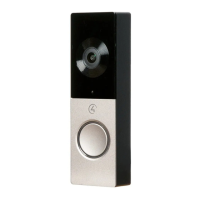
The Control4 Chime Video Doorbell (Wi-Fi) is a smart home device designed to enhance security and convenience at your doorstep. It integrates seamlessly with a Control4 system running OS 3.2 or higher, providing a connected and intelligent experience. This video doorbell allows you to see and communicate with visitors, even when you're not home, offering peace of mind and control over your entryway.
The Control4 Chime Video Doorbell (Wi-Fi), model C4-VDB-W, serves as a smart doorbell with integrated video and two-way audio capabilities. When a visitor presses the doorbell button, it triggers a notification through your Control4 system, allowing you to view a live video feed from the doorbell's camera and engage in a conversation with the visitor using your connected devices. This functionality extends to remote access, meaning you can interact with your doorbell from anywhere with an internet connection.
The device is powered by a 16-24V AC, at least 10VA (10W), doorbell transformer, which is not included with the product. It relies on a Wi-Fi connection for its smart features, requiring sufficient Wi-Fi coverage at the doorbell location for optimal performance. A signal strength of -65 dbm or better is recommended for the best results.
One of the key features of this video doorbell is its ability to integrate with an existing mechanical doorbell chime. If you wish to utilize this external chime feature, a mechanical doorbell chime, a doorbell transformer, and standard doorbell wiring (18-22 gauge 2-conductor) are necessary. It's important to note that digital doorbell chimes are not supported by this system for the external chime feature. For installations where a mechanical chime is not desired or available, the system offers a bypass option, allowing the VDB to be wired directly to the doorbell transformer.
The video doorbell is designed to be a part of a larger Control4 ecosystem, enabling it to interact with other smart home devices and scenes configured within your system. This integration allows for advanced automation possibilities, such as triggering lights when the doorbell is pressed or recording video events based on motion detection.
The installation process for the Control4 Chime Video Doorbell involves several steps, starting with the mounting of a bracket and connecting the existing doorbell wires. Before any installation begins, it is crucial to disconnect power to the doorbell transformer or the circuit at the circuit breaker to ensure safety.
The mounting bracket is installed first, using provided wood screws or anchors depending on the construction material of your wall. A template included in the box helps mark the correct holes for mounting and for the cable passthrough cutout. It's important to ensure that the existing doorbell wires align with this cutout. The VDB should never be mounted more than 6 ft (2 m) off the ground for optimal functionality and safety.
Once the bracket is in place, the two doorbell wires are connected to the terminals on the metal bracket. Wire polarity does not matter for this connection. Any excess cable length should be pushed back into the wall cavity, and the cable trimmed if necessary.
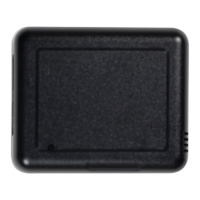
For systems utilizing a mechanical doorbell chime, a chime adapter is installed. This adapter wires in parallel to the existing doorbell button wiring at the doorbell chime location. For example, if the VDB is at the front door, the adapter's wires connect to the FRONT and TRANS terminals alongside the existing wires. The chime adapter has an adhesive backing to secure it to the doorbell chime. Care must be taken to ensure that the adapter and its wires do not obstruct the motion of the mechanical chime.
If a mechanical chime is not desired or if you have a digital doorbell chime (which is not supported), the chime adapter installation can be skipped. In this scenario, the wiring at the mechanical chime can be bypassed, or the VDB can be wired directly to the doorbell transformer.
After the wiring is complete, the VDB itself is installed onto the metal bracket. This involves hooking the top of the bracket with the back of the VDB, swinging the bottom in, and firmly pressing it against the bracket. A set screw is then inserted and tightened using the provided Allen-style wrench to secure the doorbell in place. Before installation, it's important to remove any plastic film from the front and back of the VDB, being careful not to disturb the thermal paste on the back.
Finally, power is reconnected to the circuit or doorbell transformer. The VDB will power on, and its LED ring will slowly fade in and out to white, indicating that it is awaiting Wi-Fi configuration. The next step involves connecting the video doorbell to your Control4 system, which is detailed in the VDB Setup and Installation Guide available online. This guide covers the process of integrating the device into your smart home network and configuring its various features.
Maintenance of the Control4 Chime Video Doorbell primarily involves ensuring its proper installation and network connectivity. Regular checks of the Wi-Fi signal strength at the doorbell location can help maintain optimal performance. If the signal strength drops below the recommended -65 dbm, it may affect the doorbell's responsiveness and video quality.
The device is designed for durability, but like any outdoor electronic device, it may benefit from occasional cleaning to ensure the camera lens remains clear and the button functions correctly. Gentle cleaning with a soft, damp cloth should suffice, avoiding harsh chemicals or abrasive materials that could damage the finish or components.
For any issues encountered during or after installation, or for general questions, Control4 Technical Support is available. Contact information for various regions (USA, UK, Germany, Australia, China) is provided in the manual. For regions covered by a distribution partner, users are advised to contact their distributor for support.
Regulatory and safety information, as well as warranty details, are available on the Control4 website. It is important to review this information to ensure compliance and understand the terms of the product's warranty. The warranty information outlines the coverage and conditions for service or replacement.
The installation and maintenance of the VDB should only be performed by qualified technicians to ensure safety and proper functionality. This is a critical caution highlighted in the documentation. Furthermore, the VDB should only be connected to a properly secured network to protect against unauthorized access and maintain system integrity.
The use of a UL listed and Limited Power Source (LPS) certified power supply is also a crucial maintenance and safety consideration. The power supply should bear the UL listed and LPS marks and meet all safety and compliance requirements for the country of use, and it should be properly grounded. Adhering to these guidelines ensures the longevity and safe operation of the video doorbell within your smart home system.
 General
| Model | CHIME |
|---|---|
| Connectivity | Ethernet |
| Audio | Multiple chime tones |
| Power Supply | PoE or 12-24V AC |
| Operating Temperature | 0°C to 40°C (32°F to 104°F) |
| Humidity | 10% to 90% non-condensing |
| Compatibility | Control4 Systems |

 To Next Page