9
UNITS
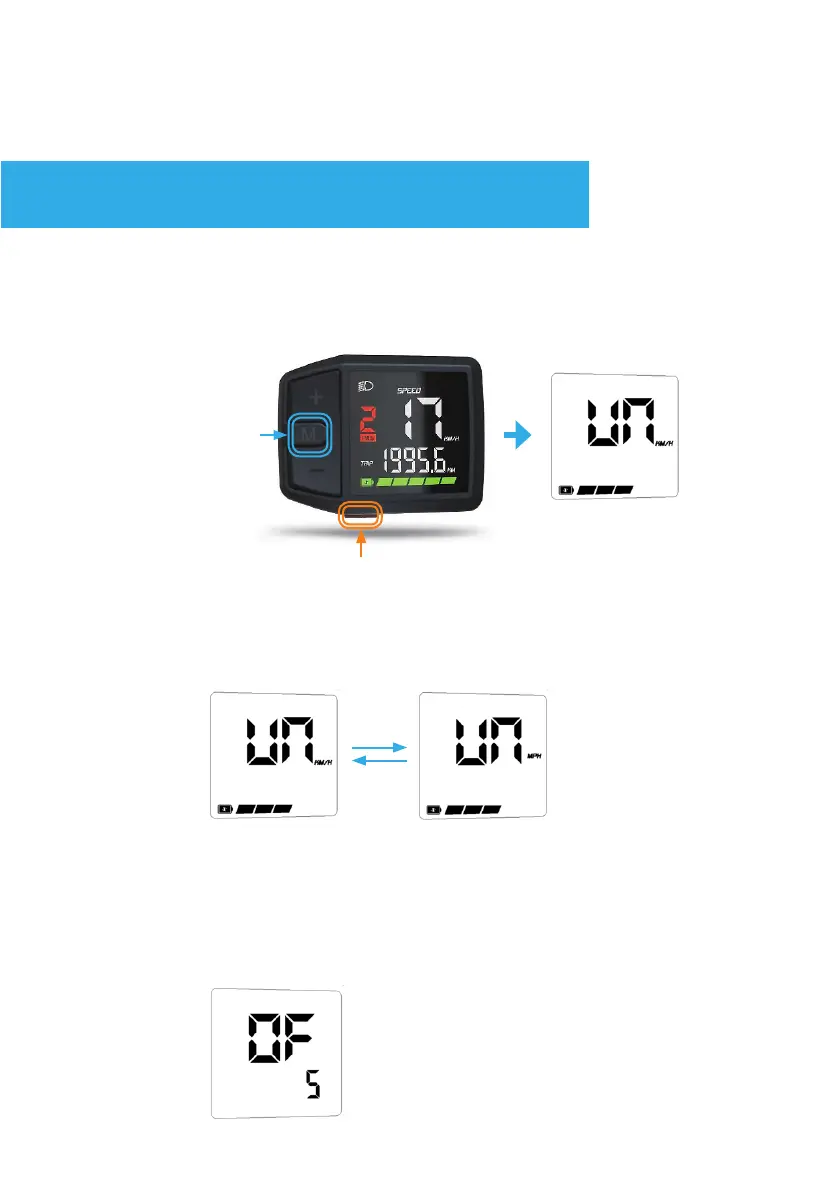
In the ‘OF’ mode, use the + or - buttons to adjust the Auto-Off time
(the time it takes to auto shut down when no input is provided).
default is 5 Minutes, choose between 1, 2, 3, 5, 8 or 10 minutes.
Press Mode to conrm the modication and go to the next setting.
In the ‘UN’ (unit) mode, use the + or - buttons to toggle between
KM/H and MPH
Press Mode to conrm the modication and go to the next setting.
Enter and adjust within the settings menu.
SETTINGS
AUTO-OFF
1.
2. Press and hold
Immeditiately
(before 10 seconds)
Turn the system on, within 10 Seconds press and hold Mode. The
screen will switch to the ‘setting’ mode, starting at UN(units). Press
Mode again to conrm the modication and go to the next setting.


 To Next Page