6 Steljes Audio . ConXeasy SWA401 User Guide
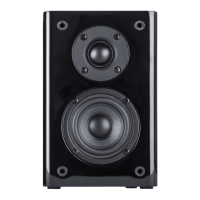
REMOTE CONTROL
1. Power
2. Mute
3. Volume Up
4. Previous track (USB port)
5. Play Pause
6. Next track
7. Volume down
8. Source
9. Mode
1
3
4
5
6
7
8
9
2
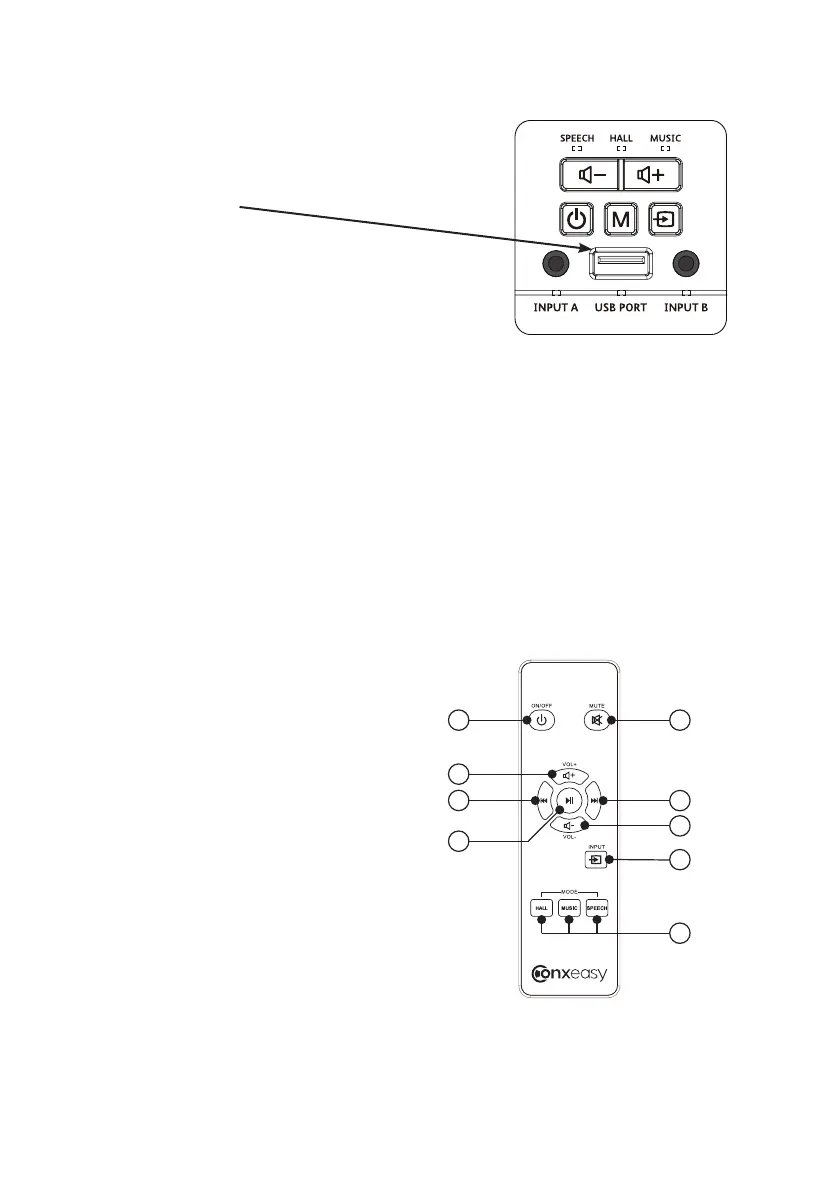
USB PORT
When using either of the standard 3.5mm
stereo analogue inputs, the USB port will
automatically switch to the charging function.
To use it as an audio playback input, please
ensure it is selected using the input button on
the remote or the wall panel.
The USB port has two functions. It may be
used as a usb charging point for your mobile
‘phone, tablet, etc. Just plug in the cable
provided with your portable device and it will
charge in the usual manner.
In addition to this, the usb port may be used
as an audio input for a flash memory device
and will play back MP3/WMA/WAV files, with
full transport control from the remote control
provided. Please note that audio playback
from iOS devices is not supported.



 To Next Page