23
15. Battery Guidance
Important Note:
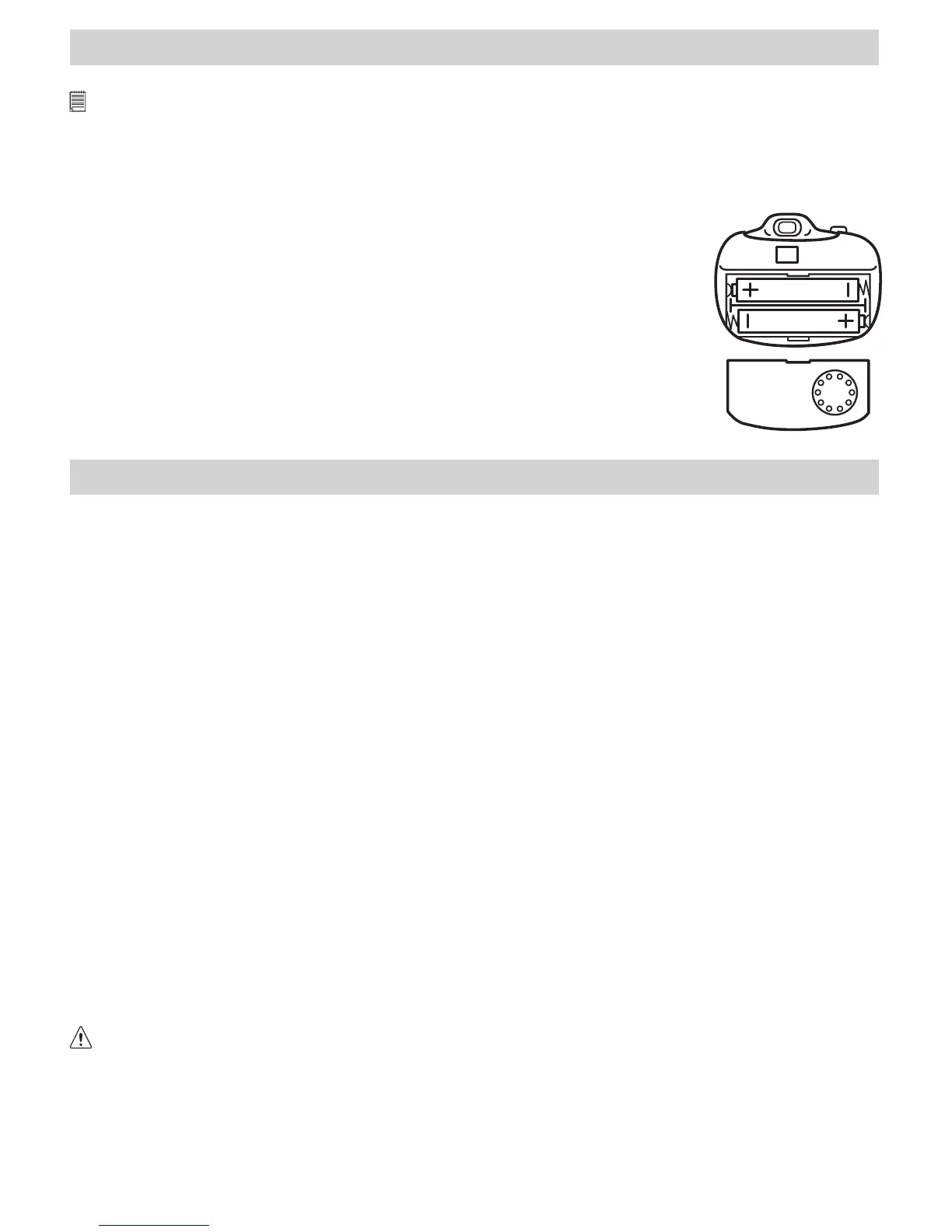
We strongly recommend that you do not use rechargeable batteries as this will affect the performance of your Micro C@m.
WARNINGS!
• Batteries should be replaced by an adult.
• Non-rechargeable batteries are not to be recharged.
• Rechargeable batteries are to be removed from the camera before being charged (if removable).
• Rechargeable batteries are only to be charged under adult supervision (if removable).
• Different types of batteries or new and used batteries are not to be mixed.
• Only batteries of the same or equivalent type as recommended are to be used.
• Batteries are to be inserted with the correct polarity.
• Exhausted batteries are to be removed from the camera.
• The supply terminals are not to be short-circuited.
• Do not mix alkaline, standard(carbon-zinc), or rechargeable(nickel-cadmium) batteries.
• Do not dispose of the batteries in re.
• Batteries are to be removed from the camera when not in use.
• Do not use rechargeable batteries.
These instructions should be retained for future reference.
16. Technical Specications
• Memory: 2Mbytes SDRAM
• Image Performance for Video on Web-cam:
• Approximately 10fps (frame per second) for High Resolution - 352 x 288 pixel (CIF)
• Approximately 25fps for Low Resolution - 176 x 144 pixels (QCIF)
• Still Image Resolution:
• High Resolution - 352 x 288 pixel (CIF) software enhanced to 640 x 480 pixel
• Low Resolution - 176 x 144 pixel (QCIF) software enhanced to 352 x 288 pixel
• Storable Images:
• High Resolution - 20 images
• Low Resolution - 80 images
• Video Clip: unlimited when connected to the computer via video capture software
• Self-timer: Electronic self-timer with 9 seconds delay
• File Format:
For Windows® Users:
• Still Image - compression in BMP format
• Video Image - AVI format
For Macintosh® Users:
• Still Image - PICT format
• Video Image - QuickTime format
• Interface: USB
• External Connector: USB
• Auto Power Off: 30 seconds after inactivity
• Power Supply: USB Port, 2 x AAA Batteries (included)
• Operating System: • For Windows® Users: Microsoft® Windows® 98SE, Me, 2000 or XP
• For Macintosh® Users: Mac® OS Version 8.6 - 9.2
This Micro C@m should only be operated within the following environmental conditions:
• 41-104º Fahrenheit; 5-40º Celsius
• 20% - 85% relative humidity, non-condensing
Camera Cautions
• Never immerse any part of the Micro C@m or its components into any uid or liquid.
• Disconnect the Micro C@m from your PC or Mac before cleaning it.
• Remove dust or stains with a soft cloth dampened with water or neutral detergent.
• Do not place hot items on the surface of the Micro C@m.
• Do not attempt to open or disassemble the Micro C@m. This will affect any warranty claim.


 To Next Page