
 Need help?
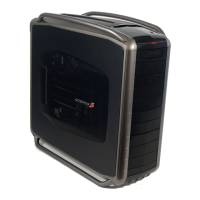
Do you have a question about the Cooler Master Cosmos S and is the answer not in the manual?
Details technical specifications like dimensions, weight, material, and cooling system.
Visual representation of the case's front, top, and side views with component labels.
Enumerates all included components with their respective quantities and item numbers.
Lists all bundled accessories and their intended uses for assembly.
Step-by-step instructions for removing the side panel and mounting the power supply unit.
Guide on aligning motherboard stand-offs and securing the motherboard to the chassis.
Procedure for removing expansion slot covers and installing expansion cards.
Instructions for installing various storage devices into the drive bays.
Steps to mount hard drives into the specialized 4-in-3 device module.
Guidance on mounting and replacing top and side case fans.
Instructions for locating and cleaning the PSU and bottom fan air filters.
Tips and illustrations for organizing internal power and data cables.
Final steps to close the case and finish the assembly process.
Details pinouts for motherboard and case IEEE 1394 connectors for proper connection.
Explains pin assignments for front panel USB connectors on motherboard and case.
Illustrates pin configurations for front panel SATA connectors on motherboard and case.
Provides pinout details for AC'97 audio connectors on motherboard and case.
Describes pin assignments for Intel HD Audio (Azalia) connectors on motherboard and case.
 General
| Type | Full Tower |
|---|---|
| External 5.25" Drive Bays | 4 |
| Internal 3.5" Drive Bays | 6 |
| Expansion Slots | 7 |
| Material | Aluminum, Steel |
| Motherboard Support | ATX, Micro-ATX |
| Front I/O Ports | Audio In/Out |
| Power Supply Supported | Standard ATX |


 To Next Page