14
I/O Function panel installation guide
Please refer to the illustrations in the motherboard user manual that describe USB 3.0, USB 2.0 and
audio connector support. The motherboard connectors must match the included front panel cables in this case.
Attempting to install anything other than matching connectors may result in damage and loss of function.
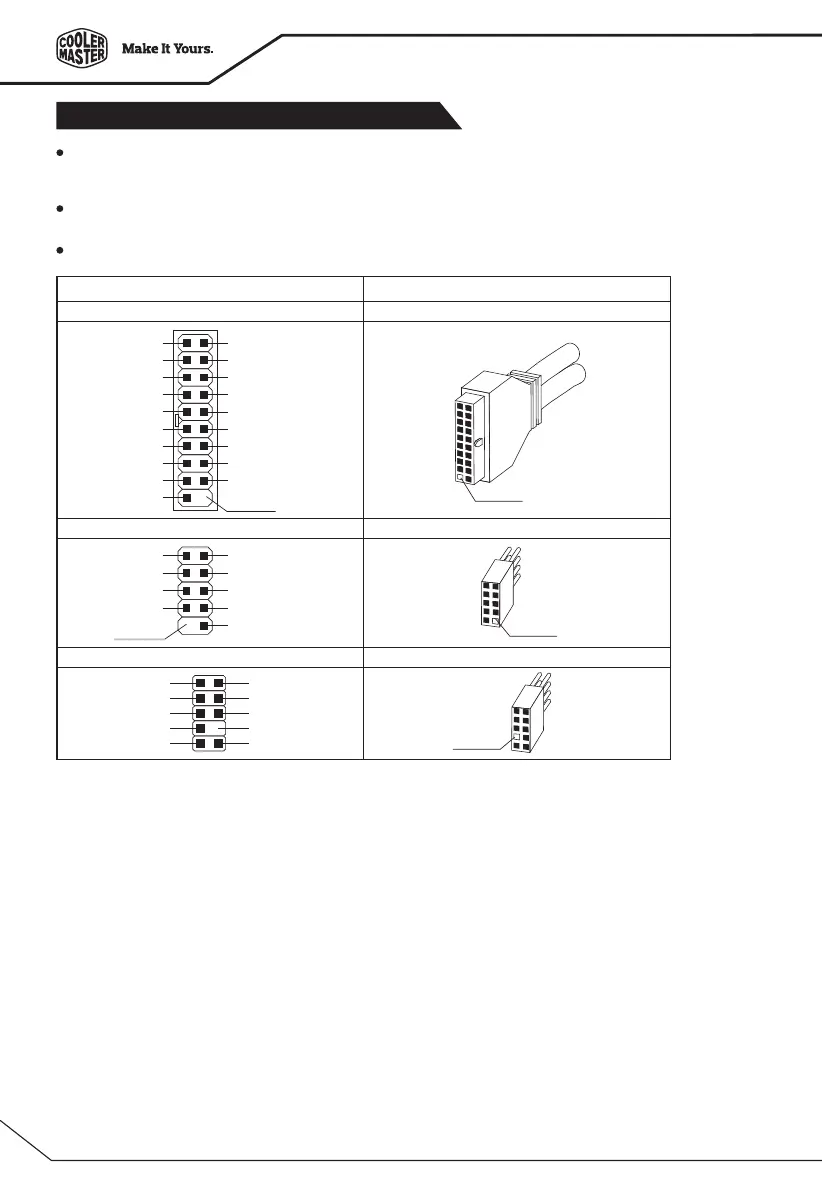
The following illustration is a diagram showing the I/O connectors.
On some motherboards, the connectors forUSB 3.0, USB 2.0, Audio are not the same as the drawing below.
Please check with your motherboard manual before installing.
Azalia (Intel High Definition Audio) HD Connector
USB 2.0 connector USB 2.0 connector
AUD GND
PRESENCE#
SENSE1_RETURN
NO PIN
SENSE2_RETURN
PORT1L
PORT1R
PORT2R
SENSE_SEND
PORT2L
No Pin
No Pin
USB+5V
LP-
LP+
GND
USB+5V
LP-
LP+
GND
NC
No Pin
USB 3.0 connector USB 3.0 connector
IntA_P2_D+
IntA_P2_D-
GND
IntA_P2_SSTX+
IntA_P2_SSTX-
GND
IntA_P2_SSRX+
IntA_P2_SSRX-
Vbus
No Pin
ID
IntA_P1_D+
IntA_P1_D-
GND
IntA_P1_SSTX+
IntA_P1_SSTX-
GND
IntA_P1_SSRX+
IntA_P1_SSRX-
Vbus
Case ConnectorMotherboard
No Pin




 To Next Page