S1 S2
HEX DEC
0 0 0
1 16 1
2 32 2
3 48 3
4 64 4
5 80 5
6 96 6
7 112 7
8 128 8
9 144 9
A 160 10
B 176 11
C 192 12
D 208 13
E 224 14
F 240 15
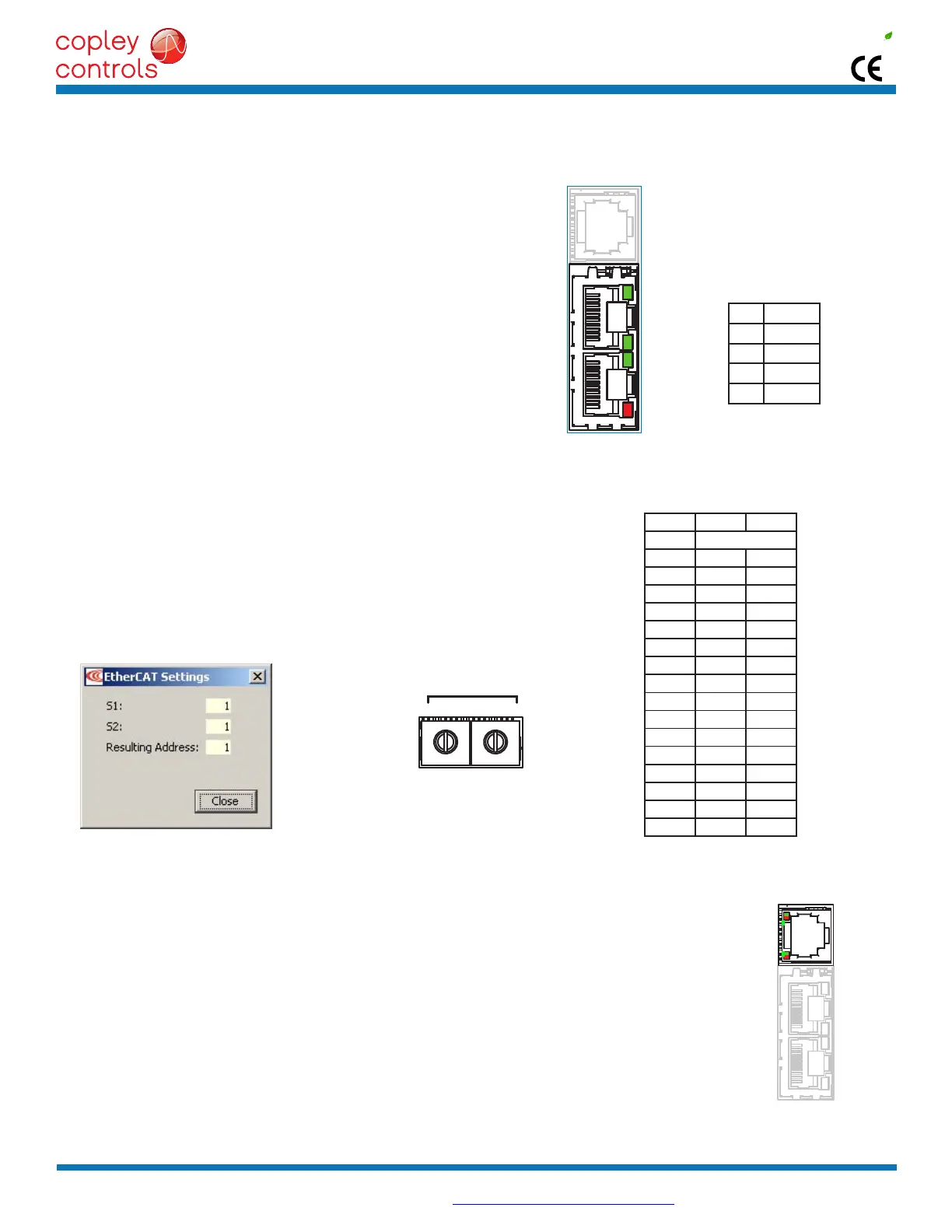
PIN SIGNAL
1 TX+
2 TX-
3 RX+
6 RX-
S2S1
Axis A
J7
Axis B
Copley Controls, 20 Dan Road, Canton, MA 02021, USA Tel: 781-828-8090 Fax: 781-828-6547
Tech Support: E-mail: sales@copleycontrols.com, Web: http://www.copleycontrols.com Page 5 of 32
RoHS
Xenus
PLUS
2-Axis
EtherCAT
800-1782
J8:EtherCATPORTS
RJ-45receptacles,
8 position, 4 contact
IN
OUT
J8
L/A
RUN
L/A
ERR
ETHERCATCONNECTIONS
DualRJ-45socketsacceptstandardEthernetcables.TheINportconnectstoamaster,ortotheOUTportofadevicethatis‘up-
stream’,betweenthe800-1782andthemaster.TheOUTportconnectsto‘downstream’nodes.If800-1782isthelastnodeona
network,onlytheINportisused.NoterminatorisrequiredontheOUTport.
ETHERCATLEDS(ONRJ-45CONNECTORS)
L/AAgreenLEDindicatesthestateoftheEtherCATnetwork:
LED Link Activity Condition
ON Yes No PortOpen
Flickering Yes Yes PortOpenwithactivity
Off No (N/A) PortClosed
RUN Green:ShowsthestateoftheESM(EtherCATStateMachine)
Off = Init
Blinking = Pre-operational
Single-ash = Safe-operational
On = Operational
ERR Red: Shows errors such as watchdog timeouts and unsolicited
state changes in the XE2 due to local errors.
Off = EtherCATcommunicationsareworkingcorrectly
Blinking = Invalidconguration,generalcongurationerror
SingleFlash = Localerror,slavehaschangedEtherCATstateautonomously
DoubleFlash= PDOorEtherCATwatchdogtimeout,
or an application watchdog timeout has occurred
EtherCAT ADDRESS(STATIONALIAS)
InanEtherCATnetwork,slavesareautomaticallyassignedaddressesbasedon
theirpositioninthebus.Butwhenthedevicemusthaveapositiveidenticationthatis
independentofcabling,aStationAliasisneeded.Inthe800-1782,thisisprovidedbytwo
16-position rotary switches with hexadecimal encoding. These can set the address of the
drivefrom0x01~0xFF(1~255decimal).Thechartshowsthedecimalvaluesofthehex
settings of each switch.
Example 1: Find the switch settings for decimal address 107:
1)FindthehighestnumberunderS1thatislessthan107andsetS1tothehexvaluein
thesamerow:96<107and112>107,soS1=96=Hex6
2)Subtr
act96fromthedesiredaddresstogetthedecimalvalueofswitchS2andsetS2
totheHexvalueinthesamerow:S2=(107-96)=11=HexB
EtherCAT
Address Switch
Decimal values
CME2->Amplier->NetworkConguration
AXISLEDS
Abi-colorLEDgivesthestateofeachaxis.Colorsdonotalternate,andcanbesolidONorblinking.Whenmul-
tiple conditions occur, only the top-most condition will be displayed.
When that condition is cleared the next one below will shown.
1)Red/Blinking = Latchingfault.OperationwillnotresumeuntildriveisReset.
2)Red/Solid = Transientfaultcondition.Drivewillresumeoperationwhen
the condition causing the fault is removed.
3)Green/Double-Blinking = STOcircuitactive,driveoutputsareSafe-Torque-Off
4)Green/Slow-Blinking = DriveOKbutNOT-enabled.Willrunwhenenabled.
5)Green/Fast-Blinking = PositiveorNegativelimitswitchactive.
Drive will only move in direction not inhibited by limit switch.
7)Green/Solid = DriveOKandenabled.Willruninresponseto
reference inputs or EtherCAT commands.
LatchingFaults
Default Optional(programmable)
• Shortcircuit(Internalorexternal) • Over-voltage
• Driveover-temperature • Under-voltage
• Motorover-temperature • MotorPhasingError
• FeedbackError • CommandInputFault
• FollowingError


 To Next Page
 Loading...