20 21
ENGLISH
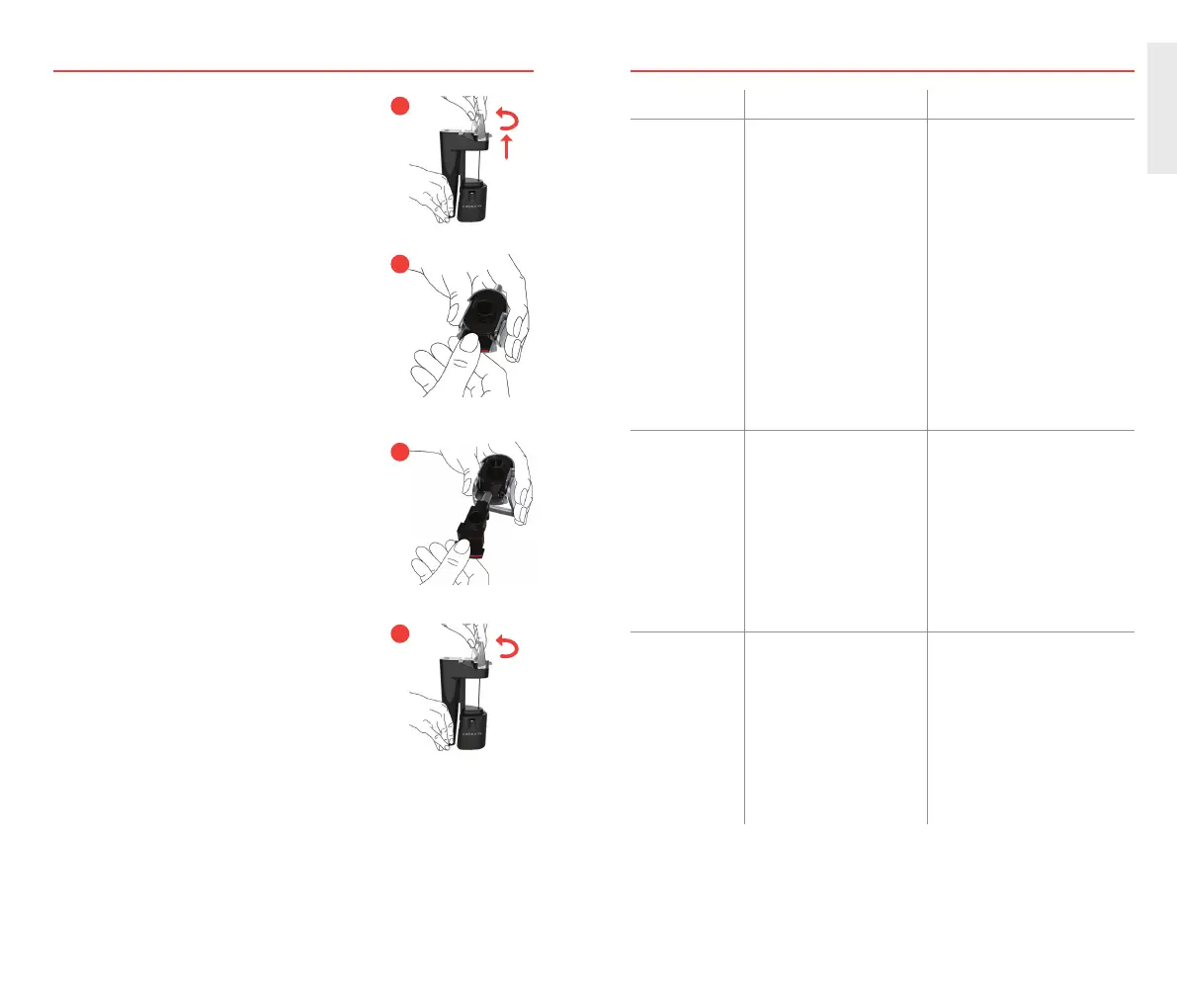
REPLACING THE SPOUT
1. Flip Handle up and twist quarter turn counter-
clockwise. Pull up to remove Handle and
Spout.
2. Slide Spout out of Handle, using red tab.
3. Slide new Spout back into Handle.
4. Place Handle over needle well, and twist
quarter turn clockwise into place.
1
4
2
3
TROUBLESHOOTING
PROBLEM PROBABLE CAUSE SOLUTION
Wine is not
pouring.
System is not completely
seated onto wine bottle
(Light Ring is still BLUE).
Bottle is not tilted enough.
Battery is empty.
Coravin Capsule is empty
or missing. Light Ring
is RED.
Needle is clogged
or damaged.
Filter in Needle is clogged.
Push System completely down
further onto bottle. Light Ring will
turn GREEN.
Raise bottom of bottle higher.
System will pour automatically
when bottle is tilted enough.
Charge System.
Install new Coravin Capsule
only when Light Ring is RED.
If clogged, refer to “Clearing the
Needle.” Replace if damaged.
Refer to “Cleaning the System.”
Wine is pouring
slowly.
Pour slows down before
System is nished pouring
glass of wine.
Sip Mode may be engaged.
Sip Icon is illuminated.
Needle is clogged
or damaged.
Filter in Needle is clogged.
This is normal. Wine pours more
slowly towards end of glass.
Push Button to turn Sip Mode off
and pour faster.
Replace if damaged. If clogged,
refer to “Clearing the Needle.”
Refer to “Cleaning the System.”
It is dif cult
to insert and
remove System
from wine
bottles.
Coating on Needle may
be worn.
Some corks are more
dif cult than others.
Wine is built up on
the Clamp.
Replace Needle if tip is
worn or damaged.
This is normal. Use Handle for
extra leverage to remove System
from bottle.
Rinse clamp thoroughly under
warm, clean water. Refer to
“Cleaning the System.”


 To Next Page