Technical Support Manual – 05/2018 Rel. 2.1.3 Page 10
Gau
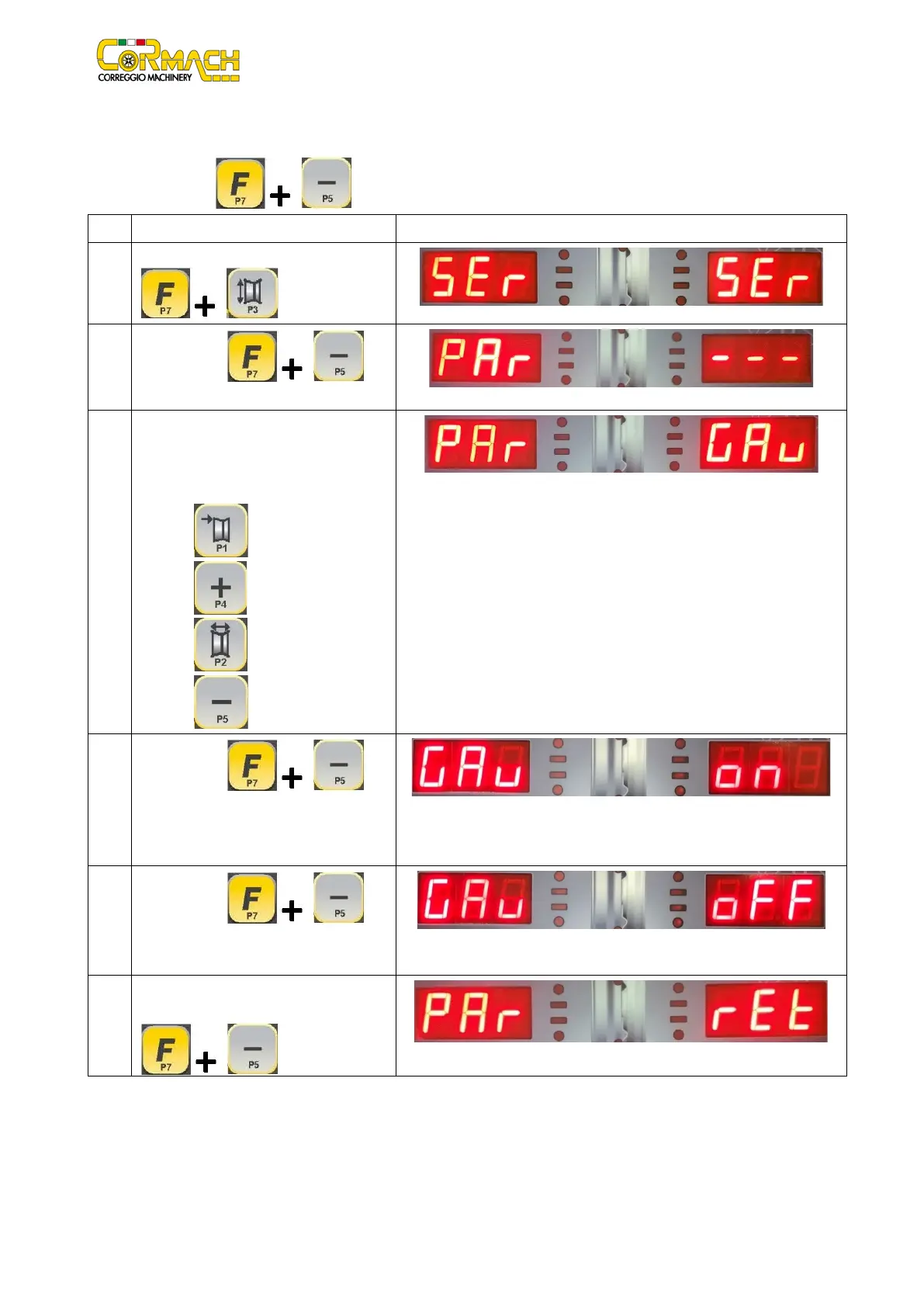
Activation or deactivation of the distance/diameter sensor
This menu option allows you to activate or deactivate the distance-diameter sensor. This is a double function: if the function is
disabled, press [F+P5] to enable it and vice-versa.
1
Enter the SERVICE mode by pressing [F+P3]
.
2
Press [F+P5] to
enter in PARAMETERS MENU.
3
A password is required to enter this menu.
Enter the password by pressing the keys in
the sequence indicated within 5 seconds, or
the machine will return to SERVICE mode:
1. [P1]
2. [P4]
3. [P2]
4
Press [F+P5] to
activate the
GAUGE. The DISTANCE/DIAMETER SENSOR
5
Press [F+P5] to
deactivate
DISTANCE/DIAMETER SENSOR
GAUGE.
6
To exit the Parameters Menu, select option
Ret and press [F+P5]



 To Next Page