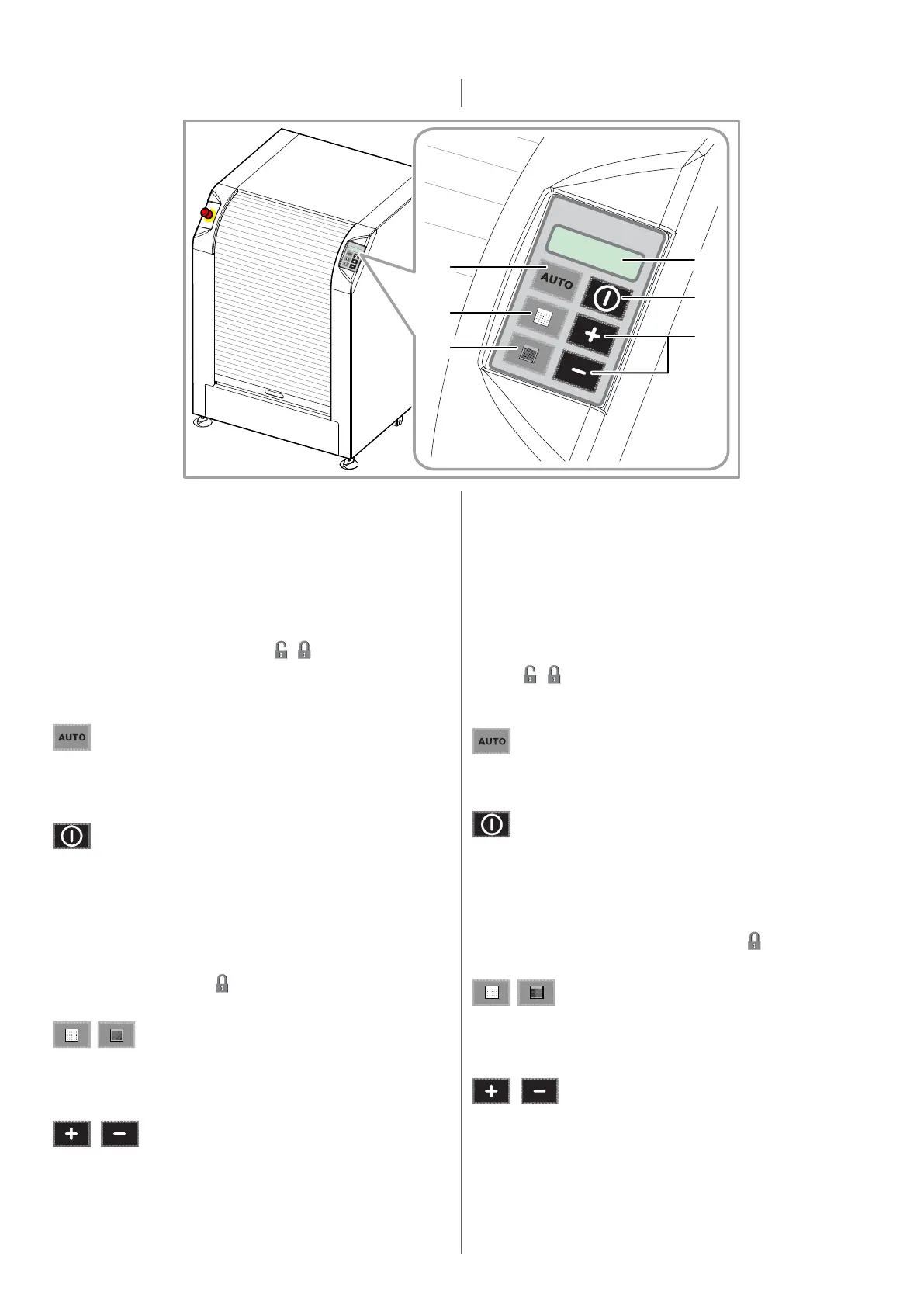
CLEVERmix 700
1
3
2
4
4
5
Il pannello di comando è congurabile, ciò signica che i tas funzione
potrebbero non trovarsi nella stessa posizione e il loro aspeo potrebbe
variare secondo la personalizzazione cliente.
Il display visualizza il nome del programma di agitazione selezionato
e i messaggi relavi alle azioni intraprese dalla macchina durante il
ciclo automaco di agitazione. Il display si illumina all’accensione della
macchina.
Se sul display, al simbolo del luccheo ( / ) che indica lo stato della
porta (capitolo 3.5), si alterna un punto esclamavo (!), signica che è
stata raggiunta la soglia di manutenzione programmata. In questo caso,
è necessario contaare l’assistenza tecnica autorizzata.
Tasto che consente di eseguire un programma di agitazione
completamente automaco. I parametri di agitazione sono calcola in
funzione della dimensione della laa.
Tasto che consente di avviare il processo di agitazione di una confezione.
Premendo il tasto durante il funzionamento, il ciclo di agitazione si
arresta.
Solo modello con porta automaca scorrevole vercale: il tasto
consente di comandare la chiusura totale della porta senza far avviare
il ciclo. Per fare ciò premere e mantenere premuto il tasto per almeno 3
secondi. Durante il processo, il display visualizza al centro del display il
simbolo di luccheo chiuso ( ). Per comandare l’apertura della porta,
premere nuovamente il tasto per almeno 3 secondi.
Tas che consentono di selezionare programmi di agitazione
pre-imposta. Possono essere personalizza con scrie o una
rappresentazione graca dei prodo del cliente.
Tas che permeono di variare il tempo di agitazione prima dell’inizio
del ciclo. Durante il ciclo non è possibile modicare il tempo di
agitazione.
Consentono anche di sbloccare la porta o di comandare l’apertura della
porta automaca (tasto –) in condizioni di WRN08.
The control panel keyboard can be fully congured, this means that
funcon keys may not be posioned in the same place and may change
based on customer’s personalizaon.
The display shows the name of the mixing program selected, as well
as the messages concerning the acons undertaken by the machine
during the automac mixing cycle. The display lights up at machine
start-up.
On the display, if the (!) symbol is shown alternavely with the lock
symbol ( / ) used to indicate door status (chapter 3.5), this means
that the planned maintenance threshold has been reached. In this
case, contact authorized technical service.
Key that allows you to select a fully automac cycle. The mixing
parameters are calculated based on can height.
This key allows to start the mixing cycle of a can. If pressed during
machine operaon, the cycle stops.
Only model with automac vercal sliding door: the key allows to
command total closure of the door, without starng the cycle. To do so,
press and hold down the key for at least 3 seconds. During the process,
the display will show the closed lock symbol ( ) at the center. To
command door opening, press again the key for at least 3 seconds.
Keys that allow you to select pre-set automac mixing programs.
They can be customized with text or a graphical representaon of the
customer’s products.
Keys that allow you to modify the mixing me before starng the cycle.
During the mixing cycle it is not possible to change the mixing me.
They also allow to unlock the door or command opening of the
automac door (key –) in WRN08 condions.


 To Next Page