EasyManua.ls Logo

Corometrics 145 - Page 29

Default Icon
33 pages
Print Icon
To Next Page IconTo Next Page
To Previous Page IconTo Previous Page
Loading...
SECTION
7
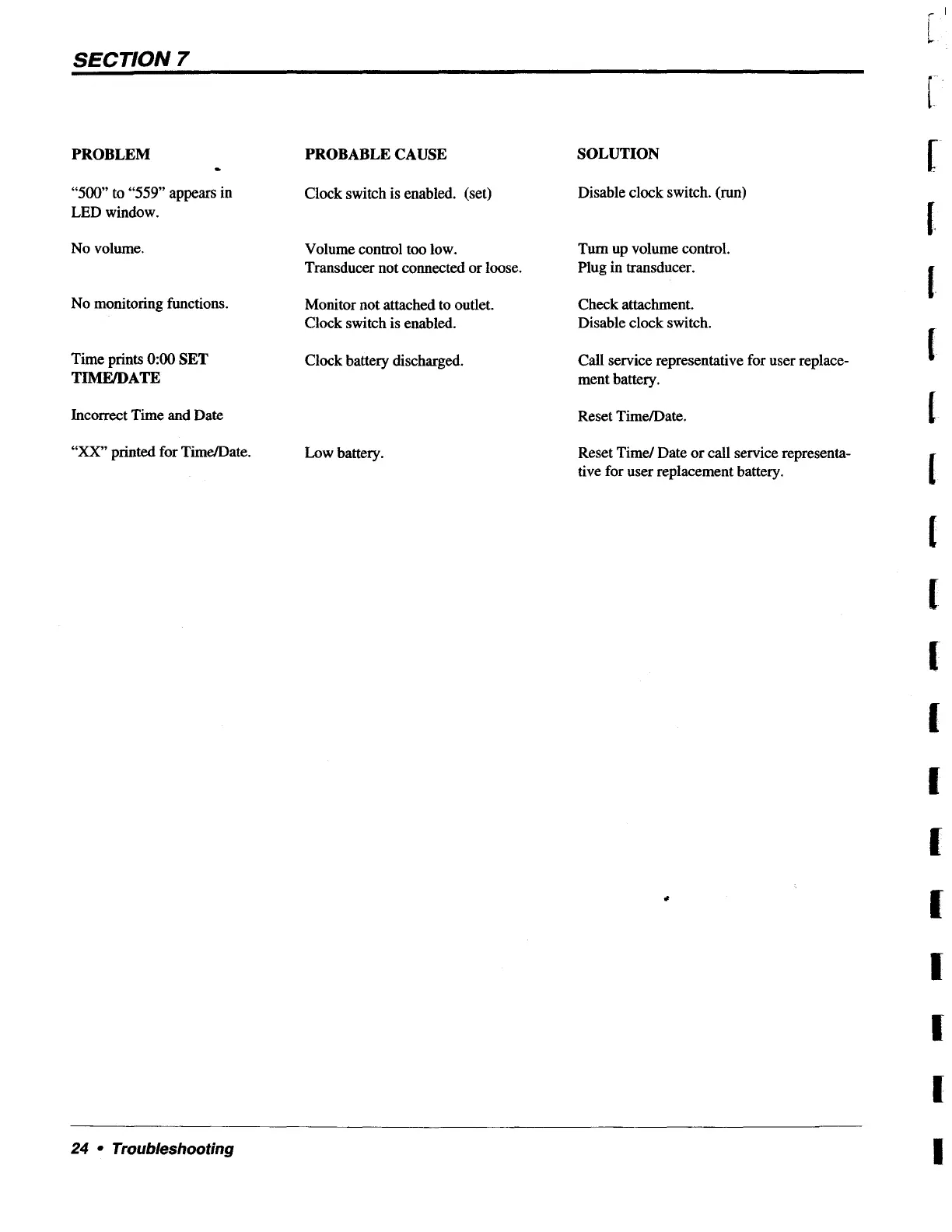
PROBLEM
-
“500”
to
“559”
appears
in
LED
window.
No
volume.
No
monitoring
functions.
Time
prints
0:00
SET
TIME/DATE
Incorrect
Time
and
Date
“XX”
printed
for
Time/Date.
PROBABLE
CAUSE
Clock
switch
is
enabled.
(set)
Volume
control
too
low.
Transducer
not
connected
or
loose.
Monitor
not
attached
to
outlet.
Clock
switch
is
enabled.
Clock
battery
discharged.
Low
battery.
SOLUTION
Disable
clock
switch.
(run)
Turn
up
volume
control.
Plug
in
transducer.
Check
attachment.
Disable
clock
switch.
Call
service
representative
for
user
replace-
ment
battery.
Reset
Time/Date.
Reset
Time/
Date
or
call
service
representa-
tive
for
user
replacement
battery.
24
«
Troubleshooting