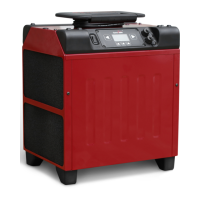
Alarm/Indicator lamp
The indicator lamp comes on in the following error cases:
Ambient temperature too high.
The fan continues to run. The machine
resumes operation automatically if the
temperature drops.
Ambient temperature too low.
The fan continues to run. The machine
resumes operation automatically if the
temperature rises.
The bottom tray is filled with
condensation water. Check that the
condensation hose is not blocked.
Check that the pump runs by holding
the outlets on the condensation water
hose and feel for a small pressure
Internal sensor fault ambient temperature
Internal fault. Disconnect the machine
from power for a few minutes and
restart again. If the alarm remains,
contact a service technician.
Internal fault. Disconnect the machine
from power for a few minutes and
restart again. If the alarm remains,
contact a service technician.
Stop defrosting takes longer than expected
Internal fault. Disconnect the machine
from power for a few minutes and
restart again. If the alarm remains,
contact a service technician.
Compressor operation interruption
Internal fault. Disconnect the machine
from power for a few minutes and
restart again. If the alarm remains,
contact a service technician.
Fault with temperature sensor in the evaporator
Internal fault. Disconnect the machine
from power for a few minutes and
restart again. If the alarm remains,
contact a service technician.
Insufficient Cooling capacity
Internal fault. Disconnect the machine
from power for a few minutes and
restart again. If the alarm remains,
contact a service technician.



 To Next Page