MOBILTEX® DATA LTD.
Calgary, Alberta
www.corTalk.com
TITLE: uDL2 Configuration and Operation Guide
DOCUMENT NO.:
UDL2-MAN-001
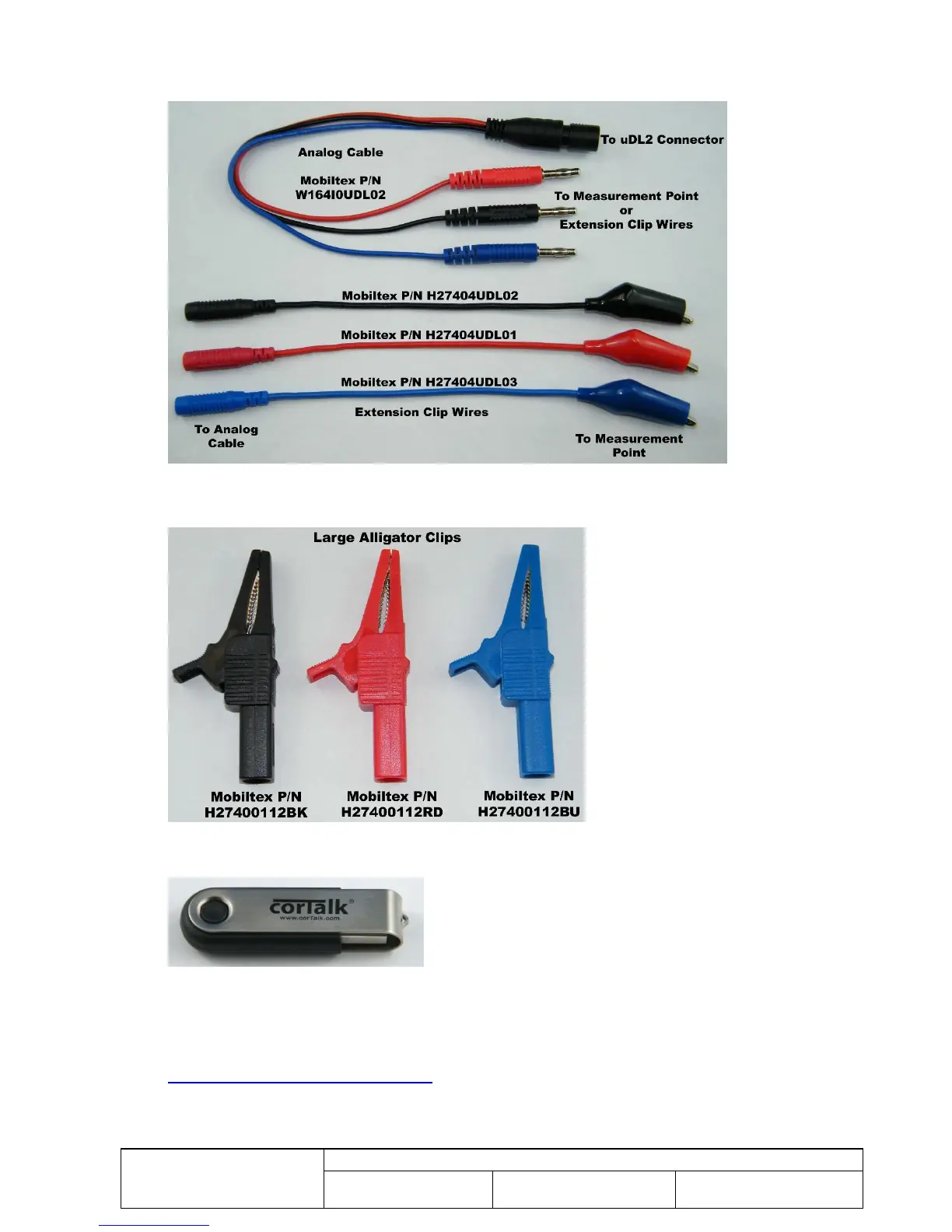
uDL2 Analog Cable (W164I0UDL02)
Extension Banana Plug To Clip Adapters (H27404UDL01/H27404UDL02/H27404UDL03)
Figure 6 uDL2 Analog Cable and Extension Clip Adapters
Large Alligator Clips (H27400112BK/H27400112RD/H27400112BU)
Figure 7 Large Alligator Clips
Programming Application and Driver Media (CD or USB flash drive)
Figure 8 Programming Application and Driver USB Flash Drive
To use a PC to communicate with the uDL2, you will require the media (CD or USB flash drive) that shipped
with the uDL2. The media contains drivers and the uDL2 configuration application. If you do not have the
media, the contents can be downloaded from the Mobiltex web site at the following URL.
http://www.mobiltex.com/cathodic/udl2



 To Next Page