11ASSEMBLY INSTRUCTIONS |
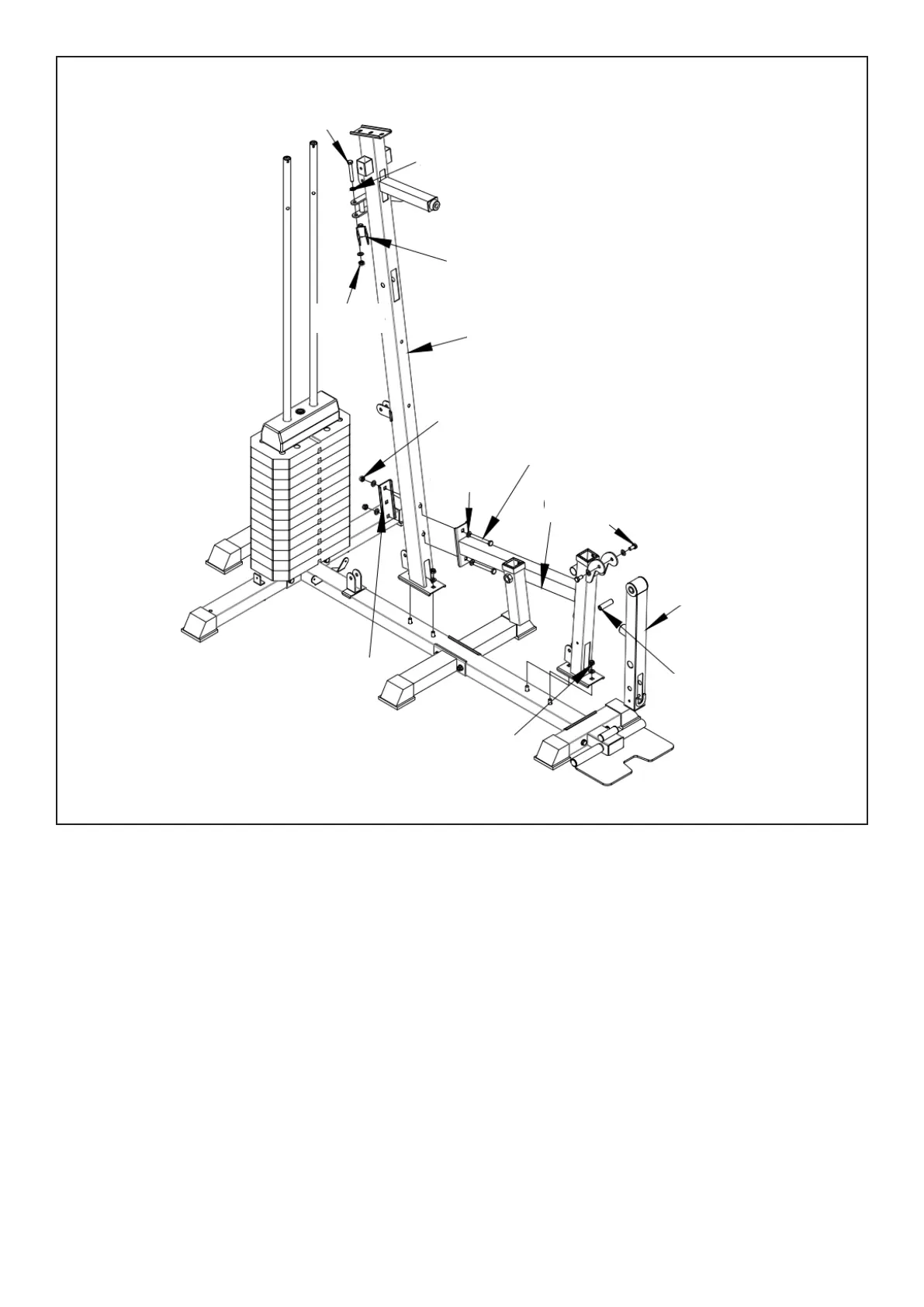
1. Lock the bottom end of (#10) and (#2) with 2 flat gasket (#56-12), 2 nuts (#56-14) as shown.
2. Connect (#11) onto (#2) bolt and lock with 2 flat gasket (#56-12) and 2 nuts (#56-14).
3. Connect (#11) onto (#10) with bolt (#56-1), flat gasket (#56-12) and nut (#56-14).
4. Install (#53-8) onto (#12) and install from each end on (#11) with bolts (#56-3) and flat gasket
(# 56-12).
5. Install (#53-1), bolts (#56-2), flat gasket (#56-12) and nuts (#56-14) onto the (#10) upright column.
STEP 3
56-2
56-12
53-1
53-1
56-14
10
56-14
56-12
56-1
11
56-3
12
53-8
56-14
53-3



 To Next Page