Need help?
Do you have a question about the Cosa XPDM and is the answer not in the manual?
Details fittings, recommended pipes, and sample conditioning for connecting the XPDM.
Step-by-step guide for performing dewpoint measurements with the XPDM instrument.
Explains the LCD display elements, pseudo-alphanumerics, symbols, and value formatting.
How to view dewpoint readings in °C, °F, PPM, LBS, or G/M³, with pressure correction options.
Instructions for viewing the sensor's internal temperature in °C or °F units.
Procedure for initiating and performing automatic calibration of the XPDM sensor.
Guide to accessing and displaying the instrument's serial number.
Details the RS-232C serial interface for data communication and querying dewpoint.
Explains the 4-20mA or 0-24mA current loop output for analog data transmission.
Requirements and specifications for operating the XPDM using an external AC or DC power source.
Instructions for battery replacement, safety warnings, and approved battery models.
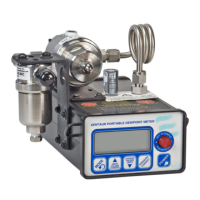
The XPDM is a portable, hand-held, microprocessor-controlled, battery-operated dew-point meter designed for quick and precise measurements in various applications. It features built-in dry-storage for the sensor, which is crucial for fast and accurate readings.
The XPDM measures dew-point, which is the temperature at which air or gas becomes saturated with water vapor, and condensation begins to form. It utilizes hygroscopic materials in its sensor that adsorb moisture. The design allows the sensor to move directly between a dry-storage position and a sample cell without exposure to ambient air, ensuring the sensor is drier than the gas being measured at the start of each measurement. This minimizes the time required for accurate readings. The instrument can display moisture content in various engineering units, including °C, °F, PPM (parts per million by volume), LBS (pounds of water per million standard cubic feet), and G/M³ (grams of water per standard cubic meters). It also offers pressure correction capabilities to account for different gas pressures at the sensor and in the sample.
 General
| Brand | Cosa |
|---|---|
| Model | XPDM |
| Category | Measuring Instruments |
| Language | English |

 To Next Page