10
5.0 The User Interface
The user interface consists of a custom LCD display, an audio indicator, 5 push buttons and a
sensor actuator.
5.1 Display Conventions
1. To display letters with the 7 segment numeric display, the following pseudo-alpha-numerics
are used:
Numbers:
0 1 2 3 4 5 6 7 8 9
0 1 2 3 4 5 6 7 8 9
Letters:
A B C D E F G H I J L N O P Q R S T U X Y Z
A B C D E F G H I J L N O P Q R S T U X Y
Z
Symbols:
? - .
? - .
2. The instrument will indicate whether a particular mode lets you change a parameter by showing
the word “SET” in the upper left corner of the display. Be careful not to change any parameter
inadvertently.
3. °C°F appear simultaneously, to indicate the sensors’ attenuation in decibels.
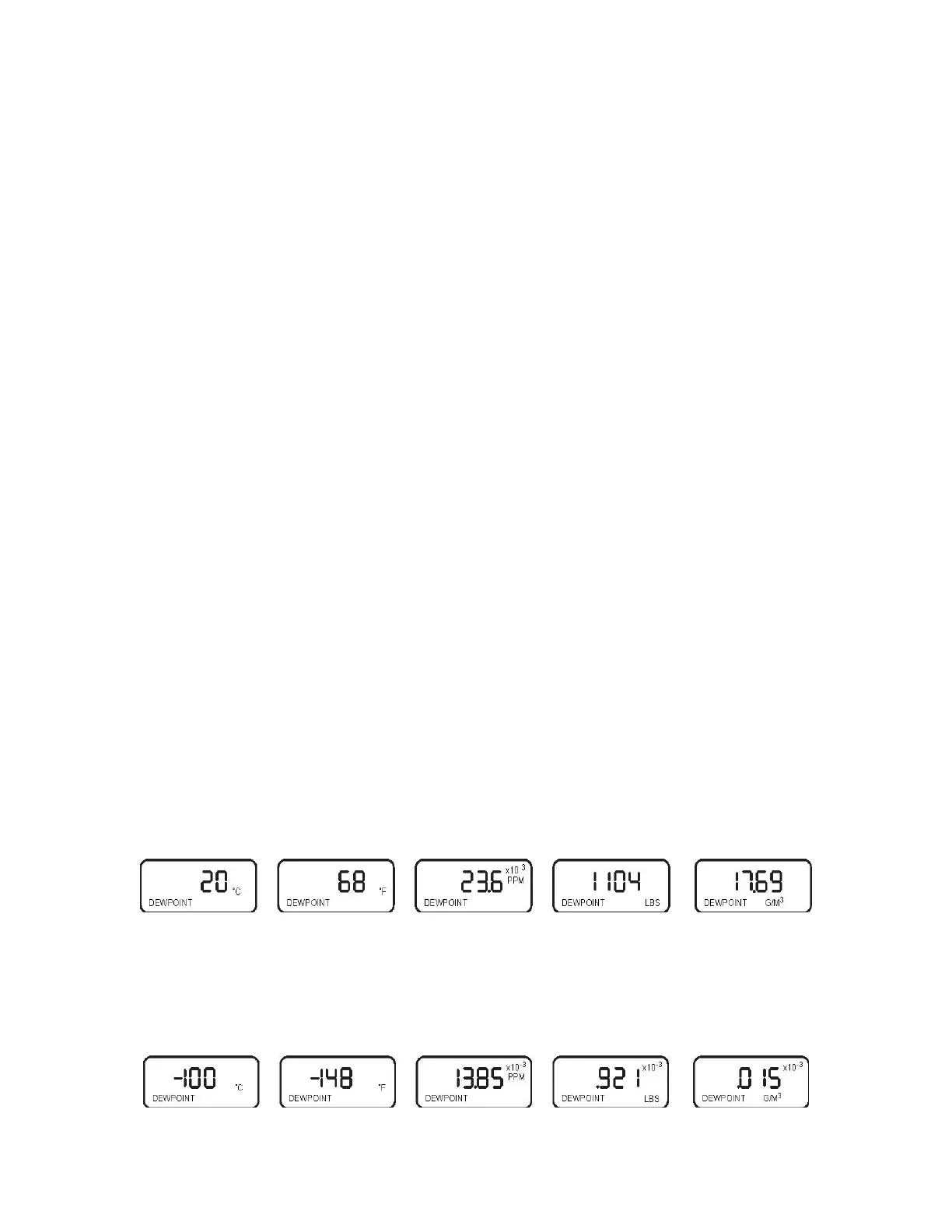
4. Values higher than ±1999 and lower than ±0.01 are displayed in powers of 10
±3
.
Either a “10
3
” or “10
-3
” will appear above and to the right of the displayed value, if this is
required, and the value will be rounded off to 3½ digits. Examples follow:
actual value:
+20°C +68°F 23612 1104.2 17.688
ppmV lbs H
2
0/mmSCF grams H
2
0/meters
3
actual
value
-100°C -148°F 0.013849 0.00092115
0.00001475
ppmV lbs H
2
0/mmSCF
grams
H
2
0/meters
3


 To Next Page