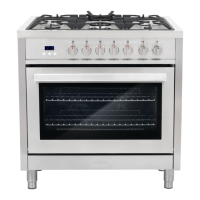
EasyManua.ls Logo

Cosmo COS-244AGC - User Manual

Cosmo COS-244AGC
23 pages
Print Icon
To Next Page IconTo Next Page
Loading...
Cosmo is constantly making efforts to improve the quality and
performance of our products, so we may make changes to our
appliances without updating this manual.
COS-244AGC
24-INCH FREESTANDING
GAS RANGE
COS-244AGC
User’s Manual
Manual del usuario
I N S P I R I N G T H E W O R L D ’ S K I T C H E N

Other manuals for Cosmo COS-244AGC

Questions and Answers

  • D
    Danielle CisnerosAug 16, 2025
    Why is my Cosmo COS-244AGC burner not working?
    • S
      Stephen RyanAug 16, 2025
      If the burner on your Cosmo Ranges isn't working, there might be air in the gas line. To fix this, turn on any one of the surface burner knobs to release the air. Also, make sure the control knob is correctly set by pushing it in before turning it to a setting. Check the burner ports to ensure they are clean; if clogged, use a toothbrush or paper clip to clean them.
  • W
    William DuncanAug 19, 2025
    Why are the flames on my Cosmo COS-244AGC burner uneven and yellow?
    • C
      Curtis GoodmanAug 19, 2025
      Uneven, yellow, or noisy flames on your Cosmo Ranges burner could be due to several reasons. First, check the burner ports to ensure they are clean; if they're clogged, use a toothbrush or paper clip to clear them. Make sure the burner caps are correctly positioned so that the alignment pins align with the slots. If you are using liquid propane, have a qualified technician convert the range to LP gas.
  • J
    Jennifer FerrellAug 22, 2025
    Why are the burner flames on my Cosmo COS-244AGC too high?
    • M
      mmckayAug 22, 2025
      If the burner flames on your Cosmo Ranges are too high or too low, check that the range is set up for the correct gas type, as it comes set up for natural gas. Contact a qualified technician if you want to set up LP. Also, verify that the pressure regulator is installed correctly and that the gas line pressure is correct.
  • G
    Gary PetersonAug 25, 2025
    What to do if Cosmo Ranges oven is not heating?
    • C
      Christopher CollinsAug 26, 2025
      If your Cosmo Ranges oven isn't heating, first check to see if the unit is plugged in. If it is, try replacing the fuse or resetting the circuit breaker.
  • G
    greenemichaelAug 28, 2025
    Why does my Cosmo Ranges burner make popping noises?
    • J
      john58Aug 28, 2025
      If your Cosmo Ranges burner is making popping noises, it might be wet, so dry the burner before use. Also, check that the burner cap and gas spreader are positioned correctly, ensuring the alignment pins are properly aligned to the slots.
  • J
    John CannonAug 30, 2025
    Why is there excessive heat around the cookware on my Cosmo COS-244AGC?
    • W
      William VangAug 31, 2025
      Excessive heat around the cookware on your Cosmo Ranges could be because the cookware isn't the right size for the burner. The cookware’s bottom surface should be about the same size as the cooking area and burner, and shouldn't extend more than 1” outside it. Adjust the flame so it doesn't come up around the cookware.
  • T
    Tracy MedinaSep 3, 2025
    How to prevent excessive moisture in Cosmo COS-244AGC?
    • J
      Jasmine PetersonSep 3, 2025
      When using bake mode on your Cosmo Ranges, pre-heat the oven. Convection Bake and Convection Roast modes will eliminate any moisture in the oven.
  • W
    wilkinscynthiaSep 6, 2025
    What to do if Cosmo Ranges oven display is off?
    • A
      Anne DrakeSep 6, 2025
      If the oven display on your Cosmo Ranges is off, there may have been a power interruption. Turn off the power at the main supply (fuse or breaker box), then turn the breaker back on. If the issue continues, call for service.
  • C
    Christine Irwin DVMSep 8, 2025
    Why does the cooling fan keep running on my Cosmo COS-244AGC after it's turned off?
    • J
      Jesse TaylorSep 9, 2025
      If the cooling fan in your Cosmo Ranges continues to run after the oven is turned off, it means the electronic components haven't cooled down enough yet. The fan will automatically turn off once they have cooled sufficiently.
  • R
    Rachel FowlerSep 12, 2025
    Why does Cosmo COS-244AGC Ranges oven light not turn on?
    • W
      Wendy RussellSep 12, 2025
      If the oven light in your Cosmo Ranges isn't turning on, the bulb might be loose or burned out. Remove the bulb to check if it's burned out, and replace it if necessary before re-inserting it.

Summary

Precautions

Tip Over Hazard

Explains the risk of the range tipping over and how to secure it with an anti-tip bracket.

Gas Leak

Details hazards associated with gas leaks and steps to take if detected.

Important Safety Instructions

Specifications

Parts and Features

Control Panel

Overview and illustration of the appliance's control panel with functions.

Before Use

Operation Instructions - Gas Burner

Sealed Surface Burners

Instructions and warnings related to the sealed surface burners.

Operation Instructions - Oven

How to Light Surface Burners

Step-by-step guide for igniting the surface burners.

In Case of Power Failure

Instructions for operating the gas burners during a power outage.

Clock & Timer

Set Time of Day and Timer

Procedures for setting the clock and using the digital countdown timer.

Timed Cooking

Guide to setting the oven for automatic timed cooking operations.

Cleaning Cooktop

Burner Removal and Refitting

Steps for removing, cleaning, and refitting burner caps and heads.

Cleaning Oven

Oven Surface Cleaning

Guidance on cleaning stainless steel, oven door, control panel, and cavity.

Oven Light Replacement

Procedure for replacing the oven light bulb safely.

Troubleshooting

Cooktop Issues

Common problems and solutions for the gas cooktop burners.

Oven Issues

Common problems and solutions for oven heating, display, and fan operation.

Warranty and Service

Cosmo COS-244AGC Specifications

General IconGeneral
BrandCosmo
ModelCOS-244AGC
CategoryRanges
LanguageEnglish

Related product manuals