Cotes dehumidifier: 650000
5 / OPERATION
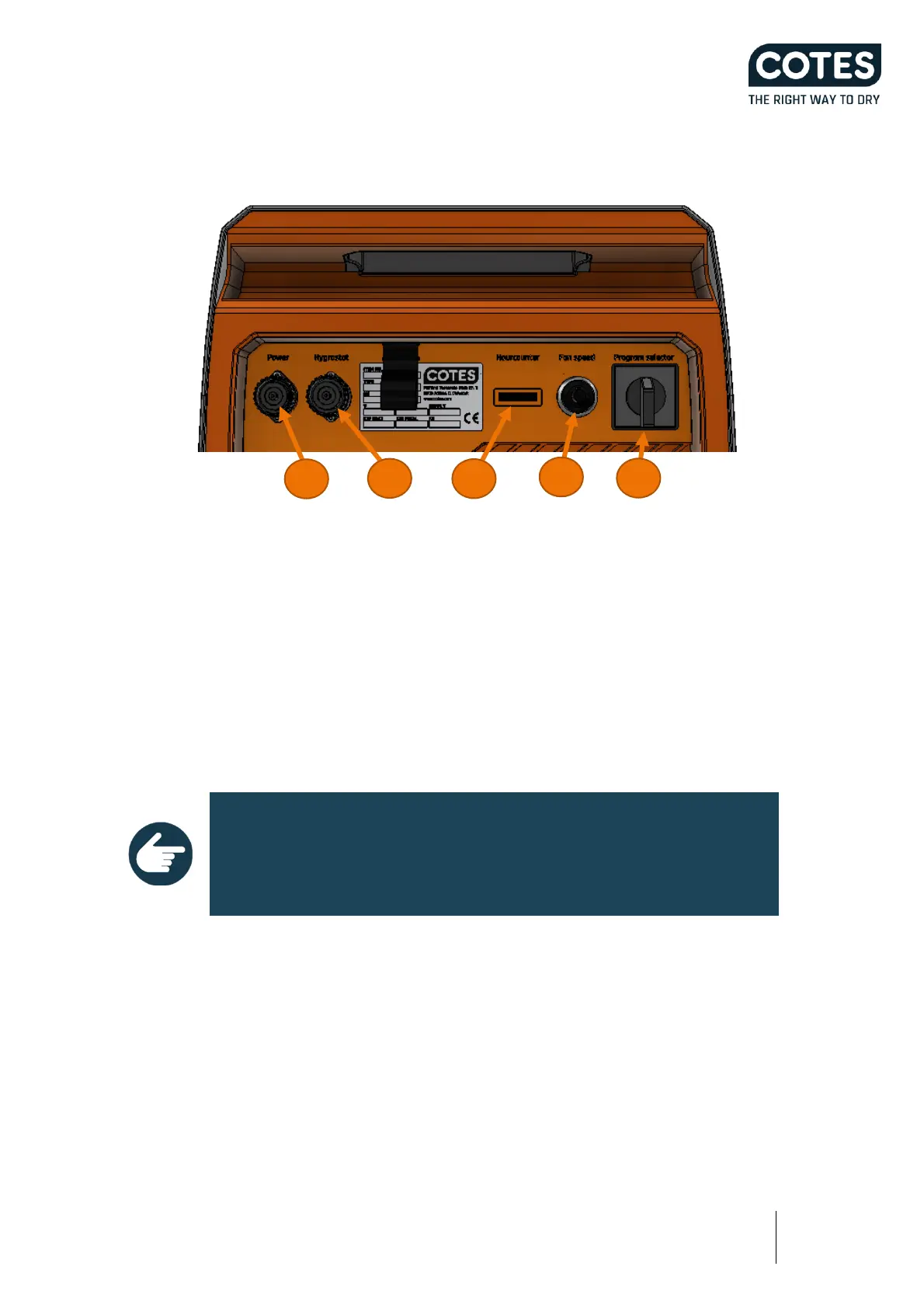
5.1 CONTROL PANEL AND ELECTRICAL INTERFACES
1. Power cable connector
2. Hygrostat connector
3. Hour counter
4. Potentiometer (Fan adjustment)
5. Program selector switch
5.2 HOW TO OPERATE THIS DEHUMIDIFIER
The CR240 is designed for maximum dehumidification and the standard setting is that it runs all the time.
This configuration is as simple as possible, therefore there is no dehumidification management installed.
Starting and stopping the dehumidifier
NOTE
Avoid frequent switching on / off the selector switch as this may damage
the contact element or the connected hygrostat.
The dehumidifier is started and stopped using the selector switch. The selector switch has four positions:
• Man = Manual, continuous operation
• 0 = Switched off
• Auto = Automatic, operation with connected hygrostat
• Auto + Fan = Automatic, operation with connected hygrostat and fan always on.
Turn the selector swich to the appropriate position to start the dehumidifier in the selected operating mode.
When the selector switch is set to 0, the machine is turned off and all components are without power.


 To Next Page