26
COWON A3
Setup Features
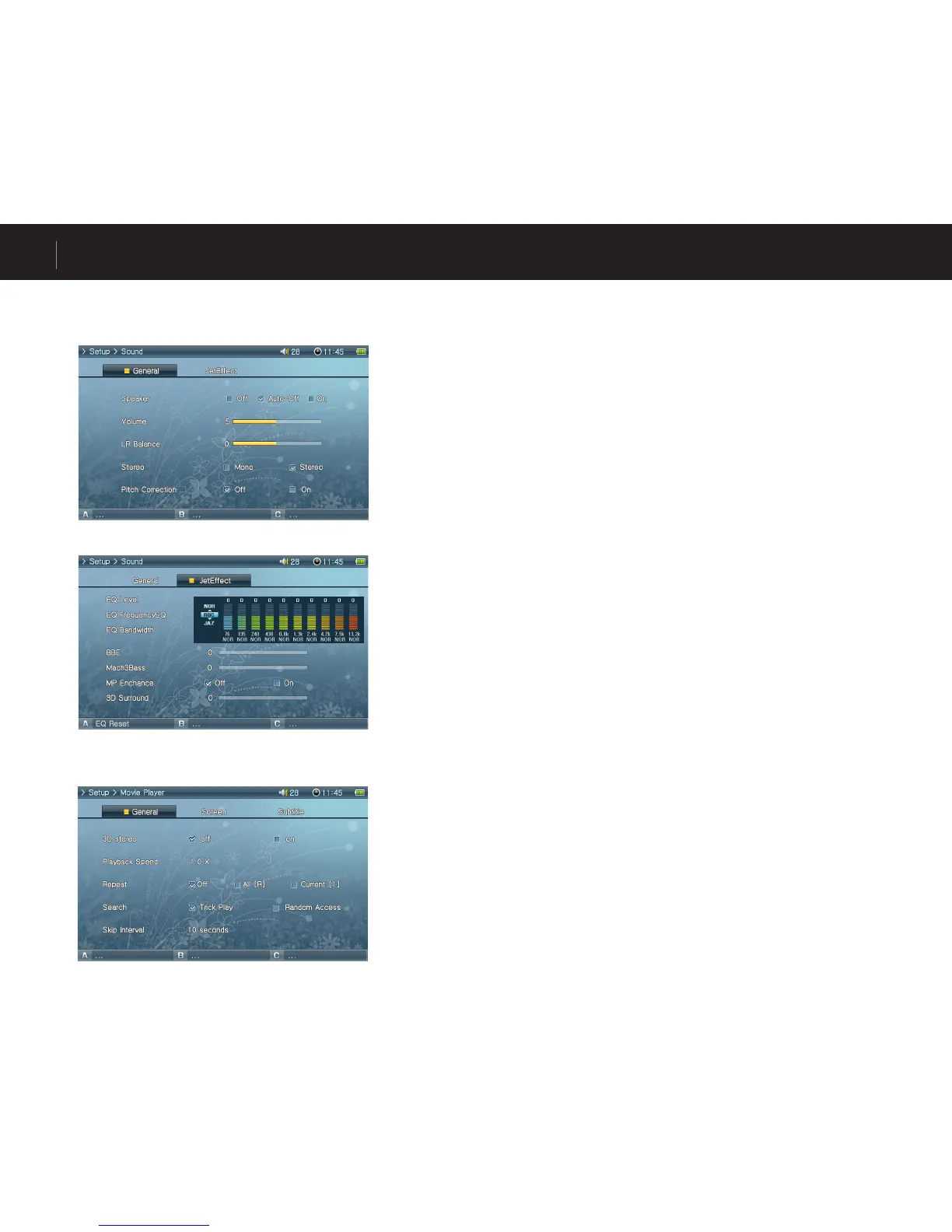
4. Movie Player
General
• 3D Stereo
3D Surround provides three-dimensional sound effects during movie playback.
• Playback Speed
Adjust playback speed.
• Repeat
If set to “All”, A3 continually plays all files in the folder.
If set to “Current”, A3 repeats the current file.
3. Sound
General
• Speaker
Adjust the built-in speaker settings.
If set to Off, the speaker is turned off. If set to Auto-Off, speaker is quiet only when
the earphones are connected. If set to On, the speaker is always turned on.
• Volume
Adjust the volume. Volume levels range from 0 to 40.
Adjust the volume by moving either +, - in the playback screen.
• LR Balance
Adjust the left and right balance of the speaker and the earphones.
• Stereo
Set to either Stereo or Mono.
• Pitch Correction
Controls voice pitch while adjusting playback speed for Movie/Music files.
JetEffect
• Equalizer
Either choose preset EQ or customizable 10 Band EQ.
Press “A”button to restore default EQ settings.
• BBE
BBE is the sound field effect that provides clear music.
• Mach3Bass
Mach3Bass is the base booster that enhances the super low-end bass.
• MP Enhance
MP Enhance is the sound field effect that compensate for missing sound segments.
• 3D Surround
3D Surround provides three-dimensional sound effects.



 To Next Page