STATUS
INDICATOR
BEHAVIOR
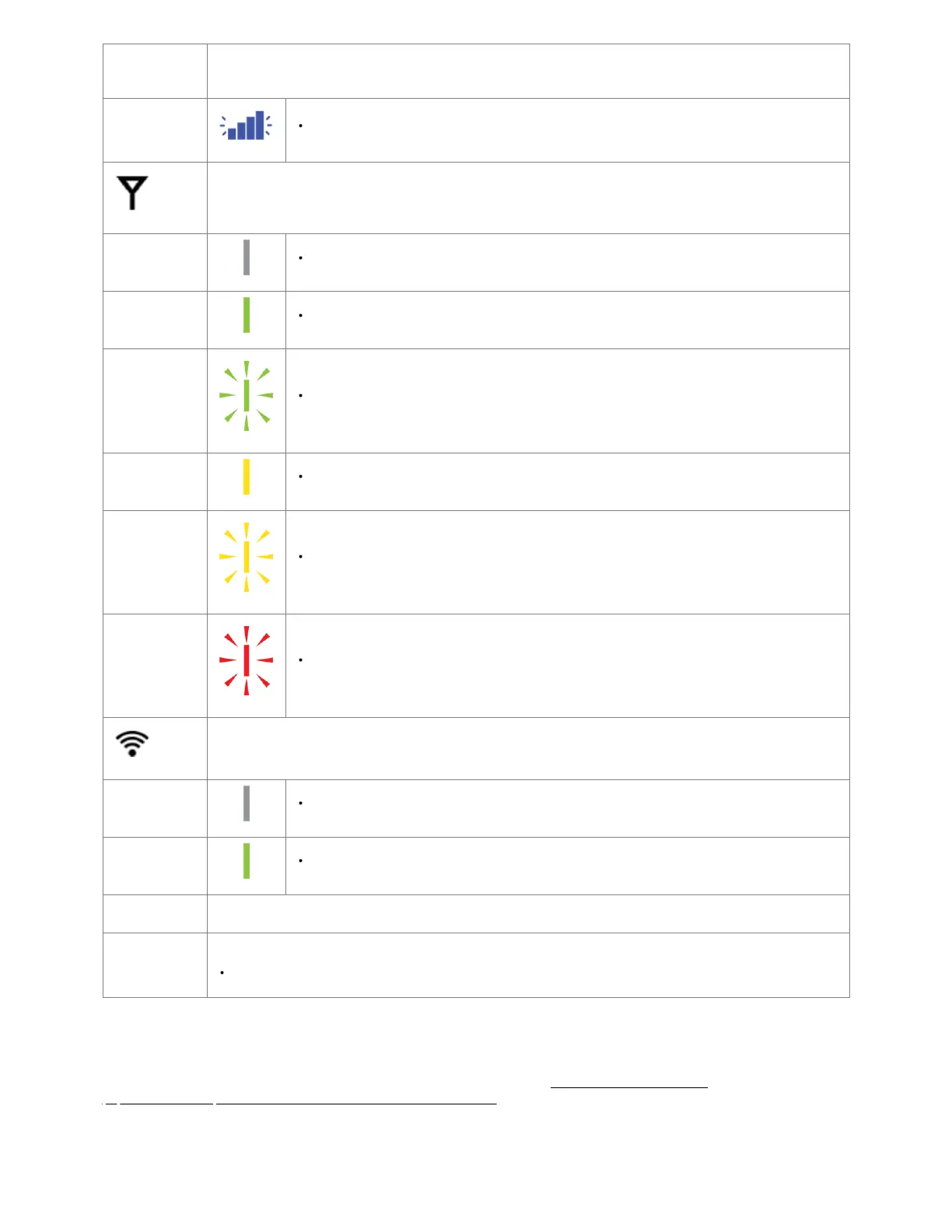
4 Blinking Bars = SIM door is not installed, modem is off.
EMBEDDED MODEM: Indicates connection status for the embedded (internal) modem.
No Light = Modem is not connected.
Solid Green = Modem has established an active connection.
Blinking Green = Modem is connecting.
Solid Yellow = Modem is not active.
Blinking Yellow = Data connection error. No modem connection possible.
Blinking Red = Modem is in the process of resetting.
WI-FI: Indicates the Wi-Fi status.
No Light = Wi-Fi is not operating.
Solid Green = Wi-Fi is on and operating normally
OTHER ADDITIONAL LED INDICATIONS
ETHERNET PORT LIGHTS: LEDs on either side of each Ethernet port on the backside of the endpoint indicating connection status.
Yellow = 10/100 Link/Activity
Troubleshooting
If the device takes longer than five minutes to connect to the Internet, log into the local UI of the device to make configuration changes or to start the
troubleshooting process. You must be physically co-located with the device to do this. Refer to No Internet or Connection Issues
(https://customer.cradlepoint.com/s/article/NCOS-No-Internet-or-Connection-Issues) for more information.
Once the device connects to the Internet, it should then connect to your NetCloud Manager account and start its configuration download.















 To Next Page