CradlePoint MBR1000 | USER MANUAL Firmware ver. 1.6.9
© 2010 CRADLEPOINT, INC. PLEASE VISIT HTTP://KNOWLEDGEBASE.CRADLEPOINT.COM/ FOR MORE HELP AND RESOURCES PAGE 8
3 QUICK START
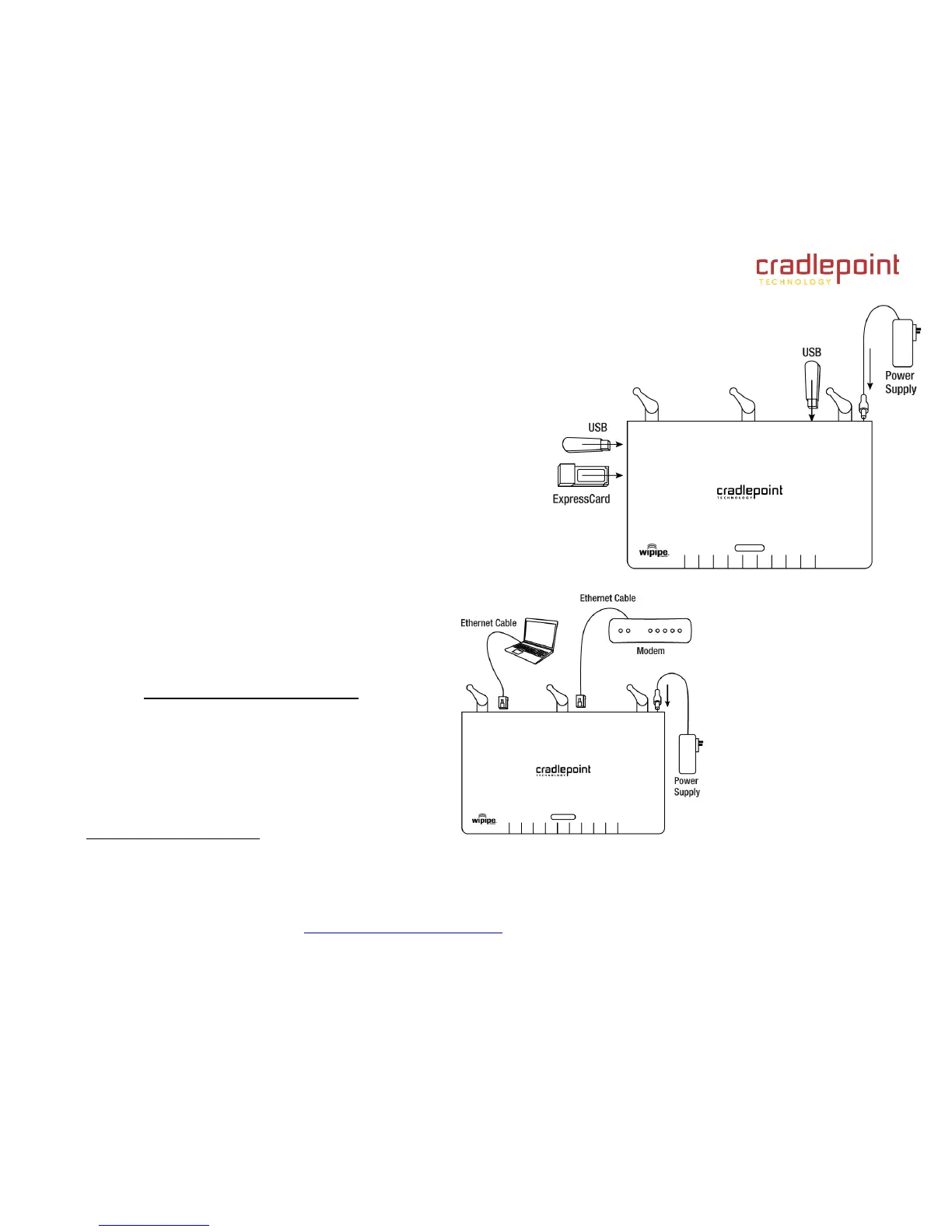
3.1 Wireless Setup Using a Mobile Broadband (cellular)
Data Modem/s
1
Connect the Power Supply
Insert your ExpressCard and/or USB modem/s.
Establish a wireless internet connection as shown below.
3.2 Wired Connection Using Cable/DSL Internet Service
Connect the Power Supply
Insert one end of your Ethernet cable to the WAN port.
Insert the other end of the Ethernet cable into your Cable or DSL modem.
It may take a minute or two for the MBR1000 to initialize.
Open your web browser.
You can now access the Internet.
For Failover/Failback Functionality, you must have an Active Data
Modem attached to the MBR1000.
CradlePoint recommends that Wi-Fi security be setup at this
point. See Setting Up Wireless Network Security
1
Data Modem Not Included. This Product Requires an Activated Data Modem or Phone with Data Plan for Full Functionality. See you Cellular/3G/4G Service Provider for Details
on Coverage and Data Plan Options













 To Next Page