CradlePoint MBR1000 | USER MANUAL Firmware ver. 1.6.9
© 2010 CRADLEPOINT, INC. PLEASE VISIT HTTP://KNOWLEDGEBASE.CRADLEPOINT.COM/ FOR MORE HELP AND RESOURCES PAGE 17
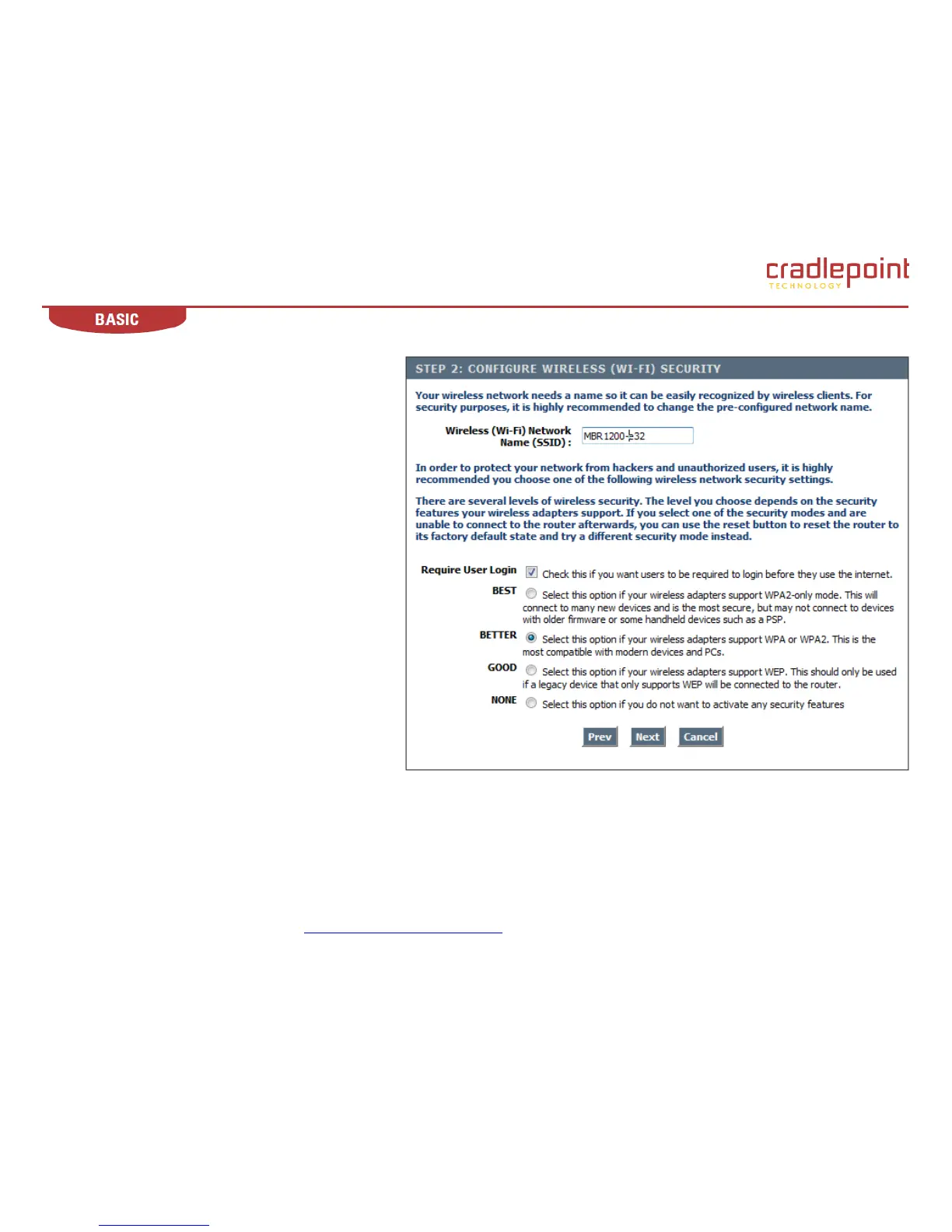
4.2.4 Configure Wireless Security
Wireless (Wi-Fi) Network Name (SSID). Enter a name
for the wireless network. For security purposes, it is
highly recommended that you change the pre-configured
network name. NOTE: Be sure to write down the new
SSID and keep it in a safe place.
Require User Login. With the box checked, users will
be required to login before they can access the internet.
With the box unchecked, users will NOT be required to
login before they can access the internet.
WPS, Best, Better, Good, None. Choose one of four
levels of security, or none.
NOTE: The wireless adapters installed on the wireless
clients accessing the MBR1000 must be able to support
the security level you choose.
(continued)













 To Next Page